Manual · HHP
Dolphin 7400/7450 Mobile Computer with Microsoft Pocket PC User's Guide
Manual133 pagesPDF 1.6 MB
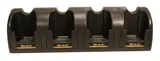
User's guide for the HHP Dolphin 7400 and 7450 Pocket PC mobile computers, their HomeBase cradles and the QuadCharger.
Names · 2 models
The models it names
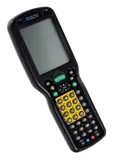 HHP 7400Portable batch data collection terminal from$895.00341 in stock
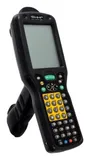 HHP 7450802.11b wireless portable data collection terminal from$995.0031 in stock
Filed with · 2 models
Also filed with these models on the old site
Summary
What is in it
The user's guide for the HHP Dolphin 7400 and the pistol-grip Dolphin 7400/7450 Pocket PC mobile computers with image engine or laser scanner. It covers safety labels and batteries, first-time setup, the front and back panel features, entering data and using the keyboard, the 802.11b RF models, customizing settings, the Pocket PC applications, ActiveSync and Pocket Internet Explorer, and the HomeBase and IntelliBase charging and communication cradles, the QuadCharger and the mobile cradles.
Its parts
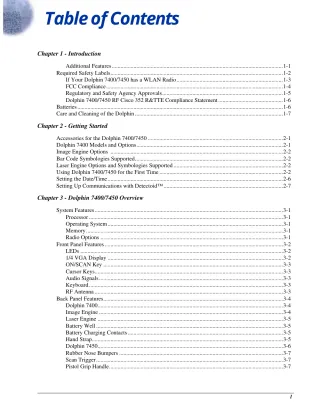
- Introduction
- Getting Started
- Dolphin 7400/7450 Overview
- Using the Dolphin 7400/7450 Mobile Computer
- Dolphin 7400/7450 RF Mobile Computer
- Customizing Your Dolphin 7400/7450
- Applications
- Communications
- Getting Connected
- Pocket Internet Explorer
- Companion Programs
- Dolphin Charging/Communication Cradles
- Dolphin QuadCharger
- Dolphin Mobile Charging/Communication Cradles
- Warranty, Support and Service
From the manual
Key facts from this manual
Each line names its page in the PDF.
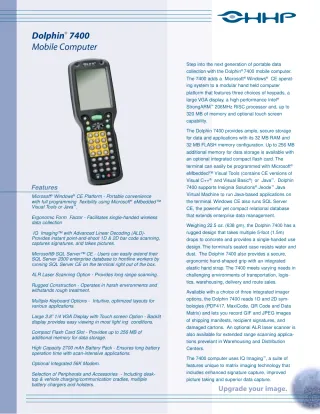
The HHP (Hand Held Products) user's guide for the Dolphin 7400 and Dolphin 7450 mobile computers running Microsoft Pocket PC, in Batch and RF versions. It covers first-time setup, hardware features, batteries, Pocket PC applications, the HomeBase, IntelliBase and USB HomeBase cradles, the QuadCharger and the mobile cradles.
- Device
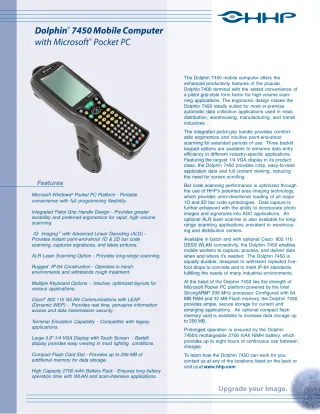
- Hand held computer with integrated 2D imager; the 7450 adds a pistol-grip handle p. 17
- Processor and OS
- StrongARM 206MHz RISC on a 100 MHz bus, Microsoft Pocket PC p. 29
- Display
- 240 x 320 pixel 1/4 VGA, electroluminescent backlight, touch screen p. 30
- Main battery
- 3.6V, 2700 mAh NiMH battery pack; internal backup battery keeps RAM and clock up to 30 minutes p. 36
- Ports
- Micro-DB9 RS-232 (115kbps, also carries power), IrDA (115kbps), 5 VDC power port p. 35
- Keyboard
- Backlit, epoxy-coated keys; 43-key alpha/numeric, 35-key numeric/alpha or 56-key alpha/numeric p. 31
- Memory
- 32 MB Flash; RAM stated as 64 MB in the overview and 32 MB in Getting Started; one Type I compact flash socket (service center only) p. 17, 29
- Image engines
- LX 2.0 to 15.0 in.; LR 1.9 to 9.4 in.; HD 1.6 to 3.9 in.; red or green aimer p. 18
- Laser option
- Advanced Long Range laser: 30mil codes at 2.75 to 8 ft, 100mil reflective to 30 ft p. 18
- Radio
- Type II PCMCIA slot; Cisco 352 802.11b card in RF models p. 29
- Image capture
- Up to 640 x 480 pixels, 256 gray levels; bmp, jpg, png p. 32
- Standard kit
- Terminal, 2700 mAh NiMH battery, HomeBase, RS-232 cable, AC-DC adapter, SDK and guide CD p. 18
- Cradles
- HomeBase, IntelliBase, IntelliBase+ (charges a spare battery), USB HomeBase, Mobile IntelliBase p. 17, 93
- QuadCharger
- Charges four NiMH packs in 2.5 hours; 90-265 volt universal supply; conditions in eight hours p. 107, 108
What this manual walks you through
- Unpacking, charging and starting the Dolphin for the first time p. 18, 19, 20
- Removing and installing the battery pack p. 19
- Calibrating the touch screen p. 20, 21
- Managing battery power and the backup battery p. 36
- Communicating through the IntelliBase and USB HomeBase cradles p. 93
- Charging and conditioning batteries in the QuadCharger p. 108, 109
- Troubleshooting the QuadCharger p. 110
Good to know
- A new terminal ships with a plastic insulator between battery and terminal contacts that must be removed before charging. p. 19
- Charge about 8 hours the first time so the backup battery fills; the main battery takes 3.5 hours. p. 19
- If both main and backup batteries fully discharge, the terminal cold boots and RAM data is lost. p. 20
- Do not press any keys while the terminal boots. p. 20
- The guide recommends conditioning battery packs once a month. p. 109
Questions this manual answers
What battery does the HHP Dolphin 7400 use?
A 3.6V, 2700 mAh NiMH battery pack, backed by an internal NiMH backup battery. p. 36
What does a red light on the Dolphin QuadCharger mean?
An error during the charge cycle; move the battery to another pocket to tell a bad battery from a bad pocket. p. 109, 110
How far can the Dolphin 7400 scan?
Depending on the image engine, up to 15.0 in. (LX); the optional ALR laser reads 30mil codes to 8 ft and reflective codes to 30 ft. p. 18
What is the difference between the Dolphin 7400 and 7450?
The 7450 has the same features in a pistol-grip form for high volume scanning. p. 17
How do I wake a Dolphin 7400 from sleep?
Press the ON/SCAN key; if the battery is low, replace it with a charged one first. p. 20
Contents
Chapters and sections
Each line opens the PDF at its page.
The whole text · 17 parts
Read the manual here as text
Its text as extracted from the PDF, unedited, in parts; each page opens the PDF at that page.
- Pages 1 to 81-8
- Introduction9-16
- Getting Started17-28
- Dolphin 7400/7450 Overview29-38
- Using the Dolphin 7400/7450 Mobile Computer, pages 39 to 4739-47
- Using the Dolphin 7400/7450 Mobile Computer, pages 48 to 5648-56
- Dolphin 7400/7450 RF Mobile Computer57-60
- Pages 61 to 6961-69
- Pages 70 to 7870-78
- Pages 79 to 8279-82
- Pocket Internet Explorer83-86
- Companion Programs87-92
- Dolphin Charging/Communication Cradles93-106
- Dolphin QuadCharger107-110
- Dolphin Mobile Charging/Communication Cradles111-120
- Warranty, Support and Service121-124
- Appendix A125-133
The file