Manual · HHP
Dolphin 7200 Handheld Computer and HomeBase User's Guide
Manual170 pagesPDF 3.1 MB
User's guide for the HHP Dolphin 7200 handheld computer (batch, RF, RS-232, iButton and 2D models) and its HomeBase cradles.
Names · 1 model
The models it names
Filed with · 1 model
Also filed with these models on the old site
Summary
What is in it
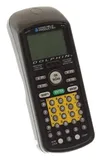
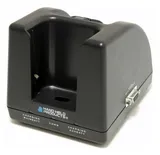
Hand Held Products' user's guide for the Dolphin 7200 handheld computer and the Dolphin 7200 HomeBase and Compact HomeBase. It covers getting started, the keypads, display and batteries, then each model in turn: the 802.11b and WLIF RF terminals, the iButton reader, the RS-232 terminal and the 2D imager terminal. Later chapters set up the HomeBase for charging and communications, introduce the Dolphin OS and development software, and give troubleshooting, specifications, scan maps and GS-DOS commands.
Its parts
- Before You Begin
- Getting Started
- Dolphin Basics
- Dolphin 7200 RF Handheld Computer
- Dolphin 7200 with iButton Reader Handheld Computer
- Dolphin 7200 RS-232 Handheld Computer
- Dolphin 7200 2D Terminal
- Using the Dolphin 7200 HomeBase
- Using the Dolphin 7200 Compact HomeBase
- Learning About the Dolphin OS and Development System Software
- Troubleshooting and Warranty Information
From the manual
Key facts from this manual
Each line names its page in the PDF.
Hand Held Products' Dolphin 7200 Handheld Computer and HomeBase User's Guide (7200UG Rev D, December 2001). It covers the Dolphin 7200 Batch, iButton Reader, RF, RS-232 and 2D terminals and the HomeBase charging and communications cradle: batteries, cradle setup and wiring, troubleshooting and full terminal specifications.
- Device
- Handheld computer and imager/bar code scanner with a 386 33 MHz processor running GSDOS, PC-compatible p. 16
- Versions
- Batch, iButton Reader, RF (802.11b or WLIF radio), RS-232 (micro-DB9 port) and 2D (IMAGETEAM 4250 image engine) p. 17
- Memory
- 2 MB RAM and 8 MB flash; the Batch column lists flash expandable to 16 MB p. 17, 144
- Battery
- 3.6V, 1500 mAh NiMH pack; up to 20 hours (Batch, 2D) or 10 hours (RF) per charge p. 36
- Display
- 8 lines of 20 characters, 119 x 73 pixels, electroluminescent backlight p. 142
- Keypad
- 36-key alphanumeric or 20-key numeric; RF adds IBM 3270, IBM 5250 and DEC VT220 overlays p. 142
- Communication
- IrDA optical, up to 115kbs; micro-DB9 RS-232 port on the RS-232 model p. 17, 142
- Scan engine
- Standard HP engine scans 2 to 36 in. (5 to 91 cm); long-range and high-density engines optional p. 149
- Radio (RF)
- 2.4 to 2.4835 GHz; Cisco 802.11b at 1, 2, 5.5 and 11 Mbps, 30mW, or WLIF/OpenAIR at 1.6 Mbps, 100mW p. 146, 147
- Accessories
- HomeBase, 10 Slot Battery Charger (90-264V), VehicleBase Vehicle Kit, holster, wrist strap, RS-232 charging cable with PS9U-11 adapter, 6' RS-232 cable p. 16, 17
- HomeBase
- Charging and IrDA communications cradle with a spare battery well, RS-232 DCE port and 12V DC supply; can be daisy-chained p. 79, 82, 86
- Dimensions
- 6.85 in. long, 2.63 in. wide, 1.62 in. deep at the handle p. 141
- Temperature
- Operating -10 to 50°C (14 to 122°F); storage -20 to 70°C (-4 to 158°F) p. 145
- Drop
- Survives multiple 5 ft (1.5 m) drops to concrete p. 146
What this manual walks you through
- Deep-cycling and charging battery packs p. 36, 37
- Storing batteries p. 37
- Reading the HomeBase charging and COMM LEDs p. 80, 81
- Connecting the HomeBase to a host and wiring RS-232 cables p. 85, 86
- Building a network of HomeBases p. 82
- Setting the HomeBase configuration switches p. 86
- Troubleshooting the terminal and HomeBase p. 129, 130, 131
- Fixing unreadable images on the 7200-2D p. 132
Good to know
- The terminal ships with a plastic insulator between terminal and battery that must be removed before charging. p. 36
- A charged battery pack should stay in the terminal to save the internal backup battery. p. 36
- The Multi-HomeBase port does not talk to standard serial devices. p. 82
- Each AC wall transformer powers only one HomeBase. p. 86
- HomeBase switch changes take effect only after a power cycle. p. 81
Questions this manual answers
What does CMOS MEM size wrong mean on a Dolphin 7200?
The internal backup battery is run down, so settings and the date reset to defaults; recharge it (at least 5 hours) and set the date and time again. p. 129
What battery does the HHP Dolphin 7200 use?
A 3.6V, 1500 mAh nickel-metal-hydride (NiMH) battery pack. p. 36
How long does a Dolphin 7200 battery last?
Up to 20 hours on the Batch and 2D terminals and up to 10 hours on the RF terminal per full charge. p. 36
What baud rate does the Dolphin 7200 HomeBase use?
The troubleshooting table says to set 57600, N, 8, 1 with Configuration Switch 2 set to Fixed BPS. p. 130
What cable connects a Dolphin HomeBase to a PC?
The HomeBase port is DCE, so a standard straight-through RS-232 cable goes to a computer; a DCE device needs a null modem. p. 86
The whole text · 17 parts
Read the manual here as text
Its text as extracted from the PDF, unedited, in parts; each page opens the PDF at that page.
- Pages 1 to 101-10
- Pages 11 to 2011-20
- Pages 21 to 3021-30
- Pages 31 to 4031-40
- Pages 41 to 5041-50
- Pages 51 to 6051-60
- Pages 61 to 7061-70
- Pages 71 to 8071-80
- Pages 81 to 9081-90
- Pages 91 to 10091-100
- Pages 101 to 110101-110
- Pages 111 to 120111-120
- Pages 121 to 130121-130
- Pages 131 to 140131-140
- Pages 141 to 150141-150
- Pages 151 to 160151-160
- Pages 161 to 170161-170
The file