Manual · Epson
TM-T88II/T88III Technical Reference Guide
Manual88 pagesPDF 1.4 MB
Technical reference guide for the Epson TM-T88II and TM-T88III thermal receipt printers: setup, DIP switches, interfaces and specifications.
Covers · 2 models
The models it covers
Summary
What is in it
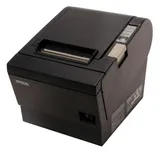
Epson technical reference guide for the TM-T88II and TM-T88III thermal receipt printers, written for designers and developers of POS systems. It gives a product overview and comparison table, setup with DIP switches and serial, parallel, USB and Ethernet connections, the power supply and cash drawer, application development with the Advanced Printer Driver, OPOS ADK and ESC/POS commands, LEDs, error codes and sensors, product specifications, interface pinouts, and options such as the PS-170 and PS-180 power supplies.
Its parts
- Product Overview
- Setup
- Application Development Information
- ESC/POS Command-related Information
- Product Specifications
From the manual
Key facts from this manual
Some pages are scans or cannot be read; this says only what the readable text supports. Each line names its page in the PDF.
Epson's technical reference guide (Rev. A) for the TM-T88III thermal printer and the legacy TM-T88II, written for POS system designers. It covers setup and DIP switches, error codes, specifications, the serial and parallel interfaces, roll paper, and the PS-170 and PS-180 power supplies.
- Device
- Thermal line printer; the TM-T88III is the current model, the TM-T88II the legacy one p. 13
- Interfaces
- RS-232C serial (DSUB 25-pin female) or IEEE 1284 bidirectional parallel; USB and Ethernet as dealer options p. 55, 63, 65
- Power
- 24 VDC ± 7%, from the optional PS-180 adapter or the earlier PS-170 p. 55
- Current draw
- High-speed mode average: TM-T88II approx. 1.7 A, TM-T88III approx. 1.8 A; standby approx. 0.2 A p. 55
- Print speed
- Maximum in high-speed mode: TM-T88II approx. 120 mm/s, TM-T88III approx. 150 mm/s p. 14
- Paper
- Thermal roll paper 79.5 mm ± 0.5 mm wide (57.5 mm with factory spacer), outer diameter 83 mm or less p. 69
- Serial baud rates
- TM-T88II: 2400, 4800, 9600, 19200; TM-T88III: 4800, 9600, 19200, 38400; 9600 bps default p. 14, 63
- Memory
- Receive buffer 4KB or 45 bytes; macro buffer 2KB; NV graphics 256KB; NV user memory 1KB p. 55
- Columns
- 80 mm paper: Font A (12 × 24) 42 columns, Font B (9 × 17) 56 columns p. 56
- Size and weight
- Width 145 mm, depth 195 mm; approx. 1.8 kg without roll paper p. 60
- Operating range
- 5 to 45°C (41 to 113°F), 10 to 90% RH p. 55, 61
- Power supplies
- PS-180 for either model; legacy PS-170 (90 to 264 VAC in, 2.0 A out); power cable AC-170 p. 13, 14, 69
- Cash drawer
- Drawer kick-out connector on the rear panel; 2 drives p. 17, 55
- Wall mounting
- Optional WH-10 Wall Hanging Bracket Set p. 22
What this manual walks you through
- Reading the POWER, ERROR and PAPER OUT LEDs p. 16
- Loading and replacing roll paper p. 18, 19
- Fitting the power switch cover and resetting through it p. 19
- Precautions for wall installation p. 22
- Setting the DIP switches for serial, density and busy conditions p. 22, 23, 24
- Connecting the power supply unit p. 35
- Error types, ERROR LED codes and recovery p. 44, 45
- Serial interface pin assignments and XON/XOFF p. 63, 64, 65
- Differences between the TM-T88II and TM-T88III p. 14, 85
Good to know
- The 58 mm or 80 mm paper width is set at the factory by fitting a spacer. p. 17
- Do not open the printer cover during printing, and keep hands off the sharp manual cutter. p. 17
- Do not use roll paper whose trailing end is glued to the core. p. 18
- Use only the PS-180, PS-170 or an equivalent supply; a nonstandard one can cause electric shock or fire. p. 35
- On a TM-T88III, the TM-T88II driver cannot set 38400 bps, and choosing 2400 bps garbles characters. p. 14
Questions this manual answers
Does the PS-180 power supply work with the TM-T88II?
Yes. The PS-180 works with either the TM-T88II or the TM-T88III; the original PS-170 is obsolete. p. 13
What baud rates does the TM-T88II support?
2400, 4800, 9600 and 19200 bps, set with DIP switches 1-7 and 1-8; 9600 bps is the default. p. 14, 63
How do I set the TM-T88II serial handshake to XON/XOFF?
Turn DIP switch 1-3 ON; OFF, the factory setting, gives DTR/DSR. p. 23, 63
How is the TM-T88III different from the TM-T88II?
It prints faster (approx. 150 mm/s against 120 mm/s), adds 38400 bps in place of 2400 bps, and has 11 pages of extended characters instead of 8. p. 14
What size paper roll does the TM-T88II take?
Specified thermal roll paper 79.5 mm ± 0.5 mm wide, outer diameter 83 mm or less. p. 69
Contents
Chapters and sections
Each line opens the PDF at its page.
The whole text · 12 parts
Read the manual here as text
Its text as extracted from the PDF, unedited, in parts; each page opens the PDF at that page.
The file