Manual · Epson
TM-T88III User's Manual
Manual64 pagesPDF 776 KB
User's manual for the Epson TM-T88III thermal receipt printer: DIP switches, setup, paper loading, troubleshooting and specifications.
Covers · 1 model
The models it covers
Summary
What is in it
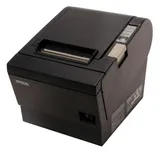
The multilingual user's manual for the Epson TM-T88III thermal line receipt printer, in English, German, Dutch, French, Portuguese, Spanish and Italian. It shows the printer parts and DIP switch tables for serial and parallel models, safety notes, unpacking, horizontal or wall mounting, the control panel, the power switch and connector covers, loading the paper roll, clearing paper jams, cleaning the print head and the full specifications.
Its parts
- Printer Parts
- DIP Switch Tables
- EMC and Safety Standards Applied
- Safety Precautions
- Caution Labels
- Restriction of Use
- Unpacking
- Downloading Drivers, Utilities, and Manuals
- Installing the Printer Horizontally or Vertically
- Control Panel
- Using the Power Switch Cover
- Attaching and Removing the Connector Cover
- Installing the Paper Roll
- Troubleshooting
- TM-T88III Specifications
From the manual
Key facts from this manual
Each line names its page in the PDF.
The multilingual Epson user's manual (2001) for the TM-T88III thermal receipt printer (TM-T88III/TM-T88IIIP, model name M129C), in 80 mm and 58 mm paper width models. It covers DIP switch tables, unpacking, mounting, the control panel, loading paper, troubleshooting, clearing jams, head cleaning and specifications; the English part was read.
- Device
- Thermal line receipt printer, 180 dpi × 180 dpi, with autocutter p. 5, 9
- Interfaces
- RS-232C or bi-directional parallel; dealer options RS-485, USB, 10 Base T; drawer kick-out with 2 drives p. 10
- Power
- + 24 VDC ± 7%; high-speed mode mean approx. 1.8A, low-power mode mean approx. 1.2A p. 10
- Print speed
- High-speed approx. 150 mm/s max.; low-power 70 mm/s; ladder bar code approx. 42 mm/s p. 10
- Printing width
- 80 mm paper model: 72 mm, 512 dot positions; 58 mm paper model: 50.8 mm, 360 dot positions p. 9
- Characters per line
- 80 mm model: Font A 42, Font B 56; 58 mm model: Font A 30, Font B 40 p. 9
- Paper
- Single-ply thermal roll, 79.5 mm wide (80 mm model) or 57.5 mm wide (58 mm model), 83 mm max. diameter; specified NTP080-80, NTP058-80 p. 10
- Receive buffer
- 4KB or 45 bytes p. 2, 10
- Serial speeds
- 4800, 9600, 19200 or 38400 bps, set by DIP switches 1-7 and 1-8 p. 2
- Size and weight
- 148 × 145 × 195 mm (H × W × D); approximately 1.8 kg {3.96 lb} p. 10
- Environment
- Operating 5 to 45°C {41 to 113°F}, 10 to 90% RH p. 10
- Reliability
- MTBF 360,000 hours; MCBF 52,000,000 lines p. 10
- Mounting
- Horizontal, or vertical on a wall with the optional WH-10 hanging bracket set p. 6
- In the box
- Printer, paper roll, power switch cover; connector cover and AC adapter may not be included p. 5
What this manual walks you through
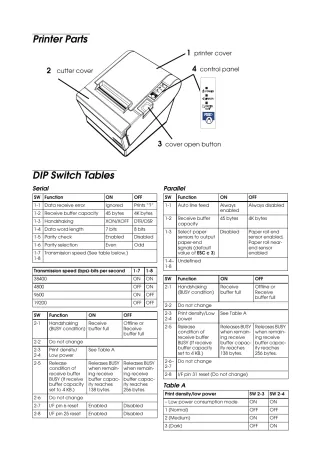
- Setting DIP switches for serial or parallel interface p. 2
- Installing the printer horizontally or on a wall p. 6
- Fitting the power switch cover p. 6
- Attaching and removing the connector cover p. 7
- Loading the paper roll p. 7, 8
- Troubleshooting LED and printing problems p. 8
- Clearing paper jams and resetting the cutter blade p. 8, 9
- Cleaning the print head p. 9
Good to know
- Never connect a telephone line to the drawer kick-out connector. p. 5
- A non-shielded interface cable invalidates the printer's EMC standards. p. 3
- Clean the thermal head periodically, generally every 3 months. p. 9
- Use only the specified power source; an improper one may cause fire. p. 4
- Once a connector cover tab is removed, it cannot be replaced. p. 7
Questions this manual answers
What interfaces does the Epson TM-T88III have?
RS-232C serial or bi-directional parallel, with RS-485, USB and 10 Base T available as dealer options. p. 10
What paper width does the TM-T88III use?
The 80 mm model takes 79.5 mm ± 0.5 mm rolls and the 58 mm model 57.5 mm ± 0.5 mm rolls, up to 83 mm in diameter. p. 10
Why is the ERROR LED flashing on my TM-T88III?
If there is no paper jam, the head may have overheated; printing resumes when it cools. Otherwise turn the printer off and back on after 10 seconds. p. 8
What voltage does the TM-T88III need?
+ 24 VDC ± 7%. p. 10
Can the TM-T88III be mounted on a wall?
Yes, vertically with the paper exit at the front, using the optional WH-10 hanging bracket set. p. 6
Contents
Chapters and sections
Each line opens the PDF at its page.
- User’s Manual / Bedienungsanleitung Gebruikershandleiding / Manuel d’utilisation Manual do utilizador / Manual del usuario Manuale dell’utente1
- Printer Parts2
- DIP Switch Tables2
- EMC and Safety Standards Applied3
- Safety Precautions4
- Caution Labels5
- Restriction of Use5
- Unpacking5
- Downloading Drivers, Utilities, and Manuals5
- Installing the Printer Horizontally or Vertically6
- Control Panel6
- Using the Power Switch Cover6
- Attaching and Removing the Connector Cover7
- Installing the Paper Roll7
- Troubleshooting8
- Removing Jammed Paper8
- Cleaning the Print Head9
- TM-T88III Specifications9
- Bedienungsanleitung11
- Warnschilder13
- Verwendungshinweise13
- Auspacken14
- Herunterladen von Treibern, Dienstprogrammen und Handbüchern14
- Horizonte oder vertikale Druckerinstallation14
- Bedienfeld14
- Verwenden der Netzschalterabdeckung15
- Anbringen und Abnehmen der Anschlussabdeckung15
- Einlegen der Papierrolle16
- Fehlersuche16
- Entfernen eines Papierstaus17
- Reinigen des Druckkopfes17
- Technische Daten des TM-T88III17
- Gebruikershandleiding19
63 more lines, from page 23 on
- Aanbrengen en verwijderen van de connectorkap23
- Manuel d’utilisation27
- Consignes de sécurité29
- Restrictions d’emploi29
- Déballage30
- Téléchargement des pilotes, utilitaires et manuels30
- Installation horizontale ou verticale de l’imprimante30
- Panneau de commande30
- Utilisation du cache d’interrupteur31
- Pose et retrait du cache de connecteur31
- Installation du rouleau de papier32
- Dépannage32
- Dégagement d’un bourrage de papier32
- Nettoyage de la tête d’impression33
- Fiche technique de la TM-T88III33
- Manual do utilizador35
- Etiquetas de aviso37
- Restrições quanto à utilização37
- Desembalagem38
- Download de Drivers, Utilitários e Manuais38
- Instalação da impressora horizontal ou verticalmente38
- Painel de controlo39
- Utilização da tampa do interruptor de ligação39
- Instalação e remoção da tampa do conector39
- Instalação do rolo de papel40
- Resolução de problemas40
- Remoção de papel encravado40
- Limpeza da cabeça de impressão41
- Características técnicas da TM-T88III41
- Manual del usuario43
- Etiquetas de Precaución45
- Restricción en el uso45
- Desembalaje46
- Cómo descargar drivers, utilidades y manuales46
- Instalación de la impresora en forma horizontal o vertical46
- Panel de control47
- Uso de la tapa del interruptor de alimentación47
- Montaje y extracción de la tapa del conector47
- Instalación del rollo de papel48
- Localización de problemas48
- Solucionar un atasco de papel48
- Limpieza del cabezal impresor49
- Especificaciones de la TM-T88III49
- Manuale dell’utente51
- Etichette di avvertimento53
- Limitazioni d’impiego53
- Disimballaggio54
- Download dei driver, dei programmi di utility e dei manuali54
- Installazione orizzontale o verticale54
- Pannello di controllo54
- Uso della copertura dell’interruttore dell’alimentazione55
- Installazione e rimozione della copertura dei connettori55
- Installazione del rotolo della carta56
- Risoluzione dei problemi56
- Rimozione della carta inceppata56
- Pulizia della testina di stampa57
- Specifiche TM-T88III57
- WEEE (Waste Electrical and Electronic Equipment) Directive60
The whole text · 7 parts
Read the manual here as text
Its text as extracted from the PDF, unedited, in parts; each page opens the PDF at that page.
The file