Manual · CipherLab
CPT-720 Portable Terminal User Manual
Manual22 pagesPDF 333 KB
User manual for the CPT-720 rugged portable data terminal with laser or long range CCD scanner: specs, connections and operation.
Covers · 1 model
The models it covers
Summary
What is in it
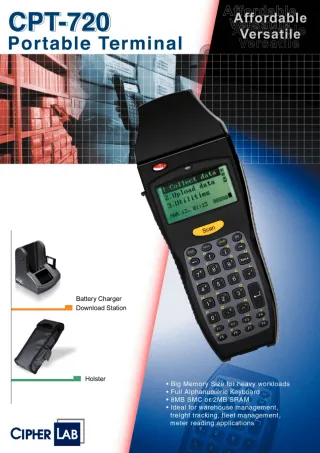
A short user manual for the CPT-720 Portable Terminal, a rugged batch data collection terminal with an integrated laser or long range CCD bar code scanner. It lists the electrical, environmental and physical specifications, CPU, memory, scanner, display, keypad and communication options, shows the RS-232, IrDA, RF and RS-485 connections, explains the kernel, system and application software modules and how to build your own application, and walks through keypad, application, system and kernel mode operation and troubleshooting.
Its parts
- Introduction
- General Features and Characteristics
- Hardware Configuration
- Software Organization
- Operations
- Troubleshooting
From the manual · read page by page
Key facts from this manual
Some pages are scans or cannot be read; this says only what the readable text supports. Each line names its page in the PDF.
User manual for the CipherLab CPT-720 portable terminal, published by Syntech Information. It lists the specifications and explains the keypad, the preloaded data collection program, the system and kernel menus, program download and troubleshooting. Two connection diagram pages are scans with little text.
- Device
- Rugged handheld data terminal with an integrated laser or long range CCD barcode scanner and expandable data memory p. 3
- Battery
- Two AAA size batteries or a NiMH rechargeable battery pack p. 4
- Backup battery
- 3.0V, 7.0mAh rechargeable lithium battery for SRAM and calendar p. 4
- Working time
- 100 hours and more than 50,000 readings (CPU in low speed mode, 1 reading every 5 seconds) p. 4
- Memory
- 1 M Bytes flash for programs; 256 K Bytes SRAM base data memory; 8 M Bytes Smart-Media card extended memory p. 5
- Scanner options
- CPT-720L (laser) or CPT-720C (long range CCD) p. 5
- Laser scanner
- CPT-720L: visible laser diode, depth of field 5 to 95 cm depending on barcode resolution p. 5
- CCD scanner
- CPT-720C: 100 scans/sec, depth of field 20cm, resolution 0.15mm to 1.00mm p. 5
- Display
- 128x64 graphic dots STN LCD with LED backlight; icons for battery low, alpha input, shift mode and Smart-Media card p. 6
- Keypad
- 32 rubber keys: alphanumeric, arrow, function and scan trigger keys p. 6
- Communication
- RS-232 and infrared (IrDA 1.0 and high speed IR) up to 115200bps; RS-485 through the cradle, up to 32 units; RF up to 9600bps, up to 100 m p. 6
- Operating temperature
- -20 to 60 °C p. 4
- Size and weight
- 203.6mm x 79mm x 39.6mm; 330g with batteries p. 4
- Accessories
- RS-232 cable, high speed IR transceiver, cradle for charging and communication, RF base station, Smart-Media card and reader p. 7
What this manual walks you through
- Connecting terminals to an RF base, up to 32 units p. 10
- Using the preloaded data collection program p. 13, 14
- Using the keypad, shift and alpha modes p. 15
- Entering system mode and setting clock, backlight, CPU speed and auto off p. 16, 17
- Testing the scanner, battery, buzzer, display and keys p. 17, 18, 19
- Downloading user programs by RS-232, cradle, IR or IrDA p. 19
- Updating the kernel from kernel mode p. 20
- Troubleshooting power, download, keypad and scanning problems p. 21, 22
Good to know
- Clear Data erases all transaction data for good. p. 13
- Initializing or testing the data memory wipes its contents. p. 16
- After a kernel update, do not power off until the system restarts itself. p. 20
- When the battery-low icon shows, less than 25% of fresh battery power remains. p. 18
- Test & Calibrate in kernel mode is for manufacturing use only. p. 20
Questions this manual answers
What batteries does the CipherLab CPT-720 use?
Two AAA size batteries or a NiMH rechargeable battery pack, plus a 3.0V rechargeable lithium backup battery for the SRAM and calendar. p. 4
How do I enter system mode on the CPT-720?
Press the 7, 9 and POWER keys at the same time. p. 16
How much memory does the CPT-720 have?
1 M Bytes of flash for programs and 256 K Bytes of SRAM for data, extendable with an 8 M Bytes Smart-Media card. p. 5
How fast does the CPT-720 transfer data?
RS-232 and infrared run up to 115200bps; RF runs up to 9600bps over up to 100 m. p. 6
What if the CPT-720 scanner does not scan?
Check that the symbologies used are enabled and that the battery-low indicator is not shown; change the batteries if it is. p. 22
The whole text · 3 parts
Read the manual here as text
Its text as extracted from the PDF, unedited, in parts; each page opens the PDF at that page.
The file