Manual · Allen-Bradley
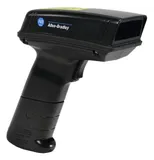
Hand-Held Decoded Bar Code Scanners (Cat. No. 2755-HDG-4) User Manual
Manual115 pagesPDF 622 KB
User manual for the Allen-Bradley 2755-HDG-4 hand-held decoded laser bar code scanner: connecting, configuring and troubleshooting.
Covers · 1 model
The models it covers
Summary
What is in it
Allen-Bradley's user manual for the 2755-HDG-4 hand-held decoded bar code scanner. It describes the scanner's features, LEDs, scanning ranges and accessories, then shows how to connect it through Synapse and AdaptaScan cables to RS-232 and keyboard wedge hosts, Enhanced Decoders, a Flexible Interface (RB) module, PLC and SLC controllers. It explains configuring symbologies and data formats with bar codes, setting cable options, troubleshooting and cleaning, and gives specifications and pinouts in appendices.
Its parts
- Preface: Using this Manual
- Scanner Features
- Connecting and Operating Scanner
- Configuring the Scanner
- Communication Setup (Cable Configuration)
- Troubleshooting and Maintenance
From the manual
Key facts from this manual
Each line names its page in the PDF.
Allen-Bradley's user manual (Publication 2755-6.2) for the 2755-HDG-4 hand-held decoded laser bar code scanner. It shows how to connect the scanner through Synapse or AdaptaScan cables to PCs, terminals, Enhanced Decoders, PLC-5 and SLC processors, how to configure it, read its beeps and LEDs, troubleshoot it, and lists accessories and specifications.
- Device
- Hand-held, trigger-operated decoded bar code scanner with a visible red laser diode p. 10
- Power
- 4.8 to 14.0V DC; 150 mA at 5V DC (typical) p. 90
- Interface cables
- Scanner Emulator Synapse, RS-232 Synapse, Keyboard Wedge Synapse or AdaptaScan Pass Through cable, set up by scanning bar codes p. 21
- Scanner cables
- 8 ft. / 2.44 meter 2755-HDC-GS1-08; 20 ft. / 6.1 meter 2755-HDC-GS1-20 p. 16
- RS-232 cables
- 25-pin DB male, Txd on pin 3: 2755-HFC-SR2-01; 9-pin DB female, Txd on pin 2: 2755-HFC-SR3-01 p. 16
- Keyboard wedge cables
- IBM XT/AT 5-pin DIN 2755-HFC-SP1-01; PS/2 6-pin Mini-DIN 2755-HFC-SP2-01; DEC VT220, 320, 420 2755-HFC-SV1-01; DEC VT520 2755-HFC-SV2-01 p. 17
- Other cables
- Scanner Emulation Synapse 2755-HFC-SA1-01; AdaptaScan Pass Through 2755-HDC-GA2-08 p. 18
- Power supply
- 2755-HFP-D1, 100 - 240 VAC, 50 - 60 Hz; power cables 77121-801-01 (US 110V), 77121-801-02 (US 240V), 77121-801-03 (European 240V) p. 17
- Stands and boot
- Adjustable stands 2755-HFN-K1 (5 to 18 inch) and 2755-HFN-K2 (9 to 16 inch); multi-mount stand 2755-HFN-K3; protective boot 2755-HFN-H1 p. 18, 19
- Symbologies
- UPC-A, UPC-E, EAN 8, EAN 13, EAN 128, Codabar, Code 39, Code 39 Full ASCII, Code 128, Code 93, Interleaved 2 of 5, Discrete 2 of 5, MSI Plessey p. 12
- Read range
- 7.5 mil: 0.0 to 7.0 in; 20.0 mil: 0.0 to 25.0 in; 55.0 mil: 3.0 to 55.0 in p. 14
- Size and weight
- 5.0 (L) x 2.8 (W) x 6.3 (H) in [127 x 71 x 160 mm]; 8.5 oz (240 g) p. 90
- Environment
- Operating -22 to 122 F (-30 to 50 C); storage -40 to 140 F; humidity 5% to 95%; 6ft (1.8 meter) drop to concrete p. 91
- LEDs
- Green = decode (stays on until the next scan); red = laser on p. 11
What this manual walks you through
- Attaching and removing the scanner cable with its locking collar p. 22
- Connecting to an Allen-Bradley Enhanced Decoder scanner port or Aux port p. 31, 32
- Connecting to a Flexible Interface Module, a PLC-5 or an SLC-5/03 or 5/04 channel 0 port p. 33, 34, 35
- Checking connections, testing the beam and scanning a first label p. 36
- What the beeps mean in normal use, configuration and Code 39 buffering p. 37, 38
- Choosing the cable type and the scanner's default settings p. 41, 42
- Troubleshooting no beam, unread symbols, wrong keyboard wedge data and data not sent p. 87, 88
- Cleaning the scan window p. 89
- Hands-free scanning in an adjustable stand p. 92
- Scanner connector pinout for Synapse and AdaptaScan cables p. 93
Good to know
- Enhanced Decoder hookups need the Series B Gun Adapter 2755-NC16; the Series A adapter will not work. p. 31
- Connect the power supply last. p. 31
- Never clean the window with abrasive materials, tissues, alcohol or acetone. p. 89
- The scanner has no serviceable parts; do not open the housing. p. 89
- The scanner cannot tell Code 39 from Code 39 Full ASCII. p. 12
Questions this manual answers
What voltage does the Allen-Bradley 2755-HDG-4 scanner need?
4.8 to 14.0V DC, about 150 mA at 5V DC. The 2755-HFP-D1 supply is needed only when the host cannot power it. p. 17, 90
Which cable connects the 2755-HDG-4 to an SLC 5/04?
The 9-pin RS-232 Synapse cable 2755-HFC-SR3-01, to the channel 0 port set for RS-232. p. 35
What do four long low beeps mean on the 2755-HDG-4?
A format or transmission error, usually because the scanner is not set up correctly; the data is ignored. p. 37
Can the 2755-HDG-4 scan hands-free?
Yes, in the 2755-HFN-K1 or -K2 adjustable stand it turns on and scans without the trigger. p. 92
How do I clean the 2755-HDG-4 scan window?
Blow off loose dirt with clean air, then wipe in one direction with an optical cloth moistened with cleaning fluid for plastic lenses. p. 89
Contents
Chapters and sections
Each line opens the PDF at its page.
- Front Cover1
- Important User Information2
- Preface - Using this Manual6
- 1 - Scanner Features9
- 2 - Connecting and Operating Scanner20
- Overview21
- Scanner to Synapse Cable or AdaptaScan Pass Through Cable22
- Scanner Cable to Synapse Cable Connection23
- Scanner Emulation Synapse Cable Connections24
- RS-232 Synapse Cable Connections25
- Keyboard Wedge Synapse Cable Connections27
- AdaptaScan Pass Through Cable Connection29
- Scanner to Enhanced Decoder Scanner Port Application31
- Scanner to Enhanced Decoder Aux Port Application32
- Scanner to Flexible Interface (RB) Module Application33
- Scanner to PLC Application34
- Scanner to SLC Application35
- Operating the Scanner36
- Automatic Shutoff37
- Audible Response37
- Configuring the Scanner and Cables39
- 3 - Configuring the Scanner40
40 more lines, from page 44 on
- UPC / EAN Options44
- 4 - Communication Setup (Cable Configuration)57
- Cable Defaults57
- Setting RS-232 Synapse Cable Options58
- Setting IBM PC Keyboard Wedge Synapse Cable Options65
- Setting DEC VT520 Keyboard Wedge Synapse Cable Options69
- Setting DEC VT220/VT320/VT420 Keyboard Wedge Synapse Cable Options72
- Setting Scanner Emulation Synapse Cable Options75
- AdaptaScan Pass Through Cable Options80
- 5 - Troubleshooting and Maintenance86
- A - Specifications90
- B - Hands-Free Stand Operation92
- C - Scanner Pinout Connections93
- D - ASCII Chart94
- E - European Union Directive Compliance CE99
- Glossary101
- Index108
- Test Symbols114
- Back Cover115
The whole text · 15 parts
Read the manual here as text
Its text as extracted from the PDF, unedited, in parts; each page opens the PDF at that page.
- Pages 1 to 51-5
- Preface - Using this Manual6-8
- 1 - Scanner Features9-19
- 2 - Connecting and Operating Scanner, pages 20 to 2920-29
- 2 - Connecting and Operating Scanner, pages 30 to 3930-39
- 3 - Configuring the Scanner, pages 40 to 4840-48
- 3 - Configuring the Scanner, pages 49 to 5649-56
- 4 - Communication Setup (Cable Configuration), pages 57 to 6657-66
- 4 - Communication Setup (Cable Configuration), pages 67 to 7667-76
- 4 - Communication Setup (Cable Configuration), pages 77 to 8577-85
- 5 - Troubleshooting and Maintenance86-89
- Pages 90 to 9290-92
- Pages 93 to 9893-98
- Pages 99 to 10799-107
- Pages 108 to 115108-115
The file