Manual · Allen-Bradley
Multipurpose Bar Code Workstation (Catalog No. 2755-DH1) Product Data
Manual8 pagesPDF 57 KB
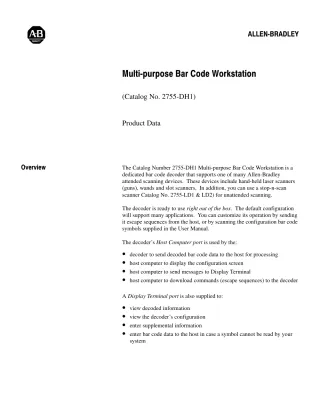
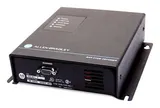
Product data for the Allen-Bradley 2755-DH1 Multi-purpose Bar Code Workstation, a bar code decoder for attended and unattended scanners.
What this file really is
The old site listed this file as a manual for the Allen-Bradley 2755-DH1 and 2755-DS. Filed as a 2755-DS document, this is the product data sheet for the 2755-DH1 Multi-purpose Bar Code Workstation; it does not mention the 2755-DS.
Names · 1 model
The models it names
Filed with · 1 model
Also filed with these models on the old site

Summary
What is in it
A product data sheet for the Allen-Bradley Catalog No. 2755-DH1 Multi-purpose Bar Code Workstation, a dedicated bar code decoder for hand-held laser scanners, wands, slot scanners and the 2755-LD1 and LD2 stop-n-scan scanners. It lists features, a typical setup with host computer and display terminal ports, attended and unattended applications, how to change the configuration with escape sequences or configuration bar codes, and electrical, mechanical, environmental, decoding and communication specifications.
Its parts
- Overview
- Features
- Typical Setup
- Applications
- Changing the Default Configuration
- Specifications
From the manual · read page by page
Key facts from this manual
Each line names its page in the PDF.
Allen-Bradley product data sheet, dated October 1990, for the 2755-DH1 Multi-purpose Bar Code Workstation, a decoder that powers one scanner and passes decoded data to a host computer. It describes the features, a typical setup, applications, how to change the configuration, and the specifications.
- Device
- Bar code decoder that supports one Allen-Bradley scanning device p. 1
- Scanners
- Hand-held laser scanners, wands, slot scanners; 2755-LD1 and LD2 stop-n-scan scanners for unattended scanning p. 1
- Host port
- Full duplex RS-232-C or RS-422 p. 2
- Terminal port
- Separate RS-232-C port for a display terminal p. 2
- Power
- Built-in supply also powers the scanner; detachable IEC 320 power cable p. 2
- Bar codes
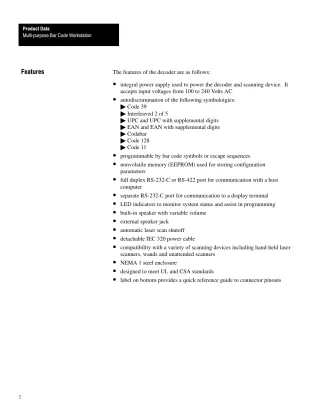
- Code 39, Interleaved 2 of 5, UPC and EAN with supplements, Codabar, Code 128, Code 11; autodiscriminated p. 2
- Programming
- By bar code symbols or escape sequences; settings kept in nonvolatile EEPROM p. 2
- Escape sequences
- Format Esc - y <n> <alpha>; Esc - y 1Z resets, Esc - y 5Z stores the configuration in EEPROM p. 4
- Cables
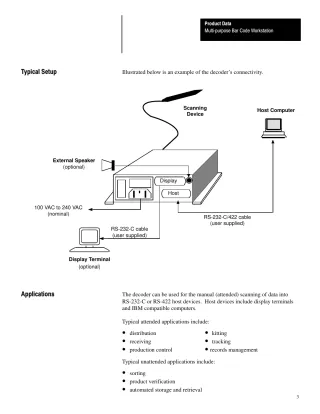
- Host RS-232-C/422 cable and display terminal RS-232-C cable are user supplied p. 3
- Enclosure
- NEMA 1 steel enclosure; built-in speaker with variable volume, external speaker jack p. 2
- Hosts
- RS-232-C or RS-422 host devices, including display terminals and IBM compatible computers p. 3
- Applications
- Distribution, receiving, production control, kitting, tracking, records management; unattended sorting, product verification, automated storage and retrieval p. 3
What this manual walks you through
- A typical setup with scanner, host computer and display terminal p. 3
- Changing the configuration with escape sequences from the host p. 4
- Sending several escape sequences as one string p. 4
- The three ways to configure by scanning bar code symbols p. 5
- Resetting the decoder by scanning configuration symbols p. 5
Good to know
- This sheet does not print the configuration bar codes; they are in the User Manual. p. 5
- The host and display terminal cables are not included; the user supplies them. p. 3
Questions this manual answers
Which scanners work with the Allen-Bradley 2755-DH1?
Allen-Bradley hand-held laser scanners, wands and slot scanners, plus the 2755-LD1 and LD2 stop-n-scan scanners for unattended scanning. p. 1
How do I reset the 2755-DH1 from the host?
Send the escape sequence Esc - y 1Z. p. 4
Can the 2755-DH1 talk to an RS-422 host?
Yes. The host port is full duplex RS-232-C or RS-422. p. 2
Does the 2755-DH1 come with communication cables?
No. The sheet shows the host and display terminal cables as user supplied. p. 3
Contents
Chapters and sections
Each line opens the PDF at its page.
The whole text · 1 part
Read the manual here as text
Its text as extracted from the PDF, unedited, in parts; each page opens the PDF at that page.
The file