Manual · Unitech
MS146 Bar Code Slot Reader
Manual41 pagesPDF 816 KB
User manual for the Unitech MS146 bar code slot reader: interface versions, Scanner Configuration Manager settings and troubleshooting.
Covers · 1 model
The models it covers
Summary
What is in it
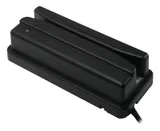
User manual for the Unitech MS146 family of bar code slot readers, made for reading ID, membership and other cards that carry bar codes. It explains the PS/2, RS232, USB and TTL wand versions and the visible and infrared models, then shows how to configure the reader with the Scanner Configuration Manager software: device, beeps and delays, keyboard wedge, RS232, symbologies and data editing. Specifications, troubleshooting, warranty and a test chart close the manual.
Its parts
- Introduction
- Scanner Configuration Manager
- Specifications
- Troubleshooting
- Warranty
- Bar Code Test Chart
From the manual
Key facts from this manual
Each line names its page in the PDF.
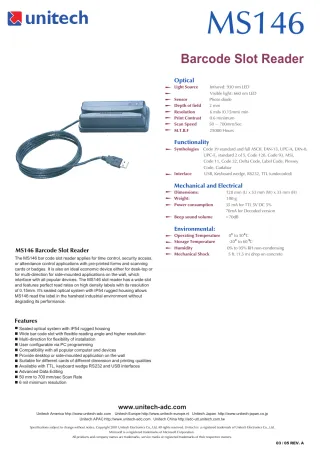
This is the Unitech manual (Rev. A) for the MS146 family of bar code slot readers, made in PS/2, RS232, USB and TTL wand versions with visible or infrared light. It explains each interface version and how to set up the reader with the Scanner Configuration Manager software. It also gives the specifications and pinouts and a troubleshooting guide.
- Device
- Bar code slot reader for ID, membership and other cards that carry bar codes p. 5
- Interface versions
- MS146A and MS146IA: undecoded TTL (wand); MS146-2 and MS146I-2: RS232; MS146-3 and MS146I-3: AT keyboard wedge; MS146-3PS2 and MS146I-3PS2: PS/2 keyboard wedge; MS146-4 and MS146I-4: USB p. 5, 6
- Light source
- Visible light (660nm) for normal bar codes; infrared light (930nm) for bar codes behind an opaque security film p. 5
- Power
- 5 Volts DC; decoded 70mA, TTL (undecoded) 35mA p. 34
- RS232 power supply
- The RS232 version very likely needs an optional power supply (5V, 300mA) p. 5, 37
- RS232 settings
- 9600 bits per second, 8 data bits, no parity, 1 stop bit, no flow control p. 5
- USB
- MS146-4: standard Windows USB driver since Windows 98 SE; output in HID keyboard format p. 6
- Keyboard wedge cable
- "Y" cable with male and female AT plugs (MS146-3) or PS/2 plugs (MS146-3PS2) p. 6
- Symbologies
- Codabar, Code 11, Code 32, Code 39 (Standard and Full ASCII), Code 93, Code 128, Delta Code, EAN-8, EAN-13, Label Code IV and V, MSI Code, Plessey Code, Standard 2 of 5, UPC-A, UPC-E p. 34
- Scan rate
- 2" (50mm) to 30" (750mm) per second p. 34
- Size and weight
- 3.75" L x 1.375" W x 1.1875" H (95mm L x 35mm W x 30mm H); 6.7 oz. (190 grams) with cable; cord 6' 0" (1.83m) p. 34
- Temperature
- Operating 32° to 122° F (0° to 50° C); storage -4° to 140° F (-20° to 60° C) p. 34
- Scanning area
- 0.43" (11mm) from the bottom of the card p. 34
- Configuration software
- Scanner Configuration Manager (SCMSetup.exe); saves settings in .cfg files p. 7
What this manual walks you through
- Choosing and connecting the right interface version p. 5, 6
- Uploading, editing and downloading settings with Scanner Configuration Manager p. 7, 8, 9
- Printing configuration bar codes when a download is not possible p. 8
- Device, beep tone and delay settings p. 10
- Keyboard wedge settings: function codes, Caps Lock, language and wand emulation p. 11, 12
- RS232 settings: baud rate, parity, handshaking and terminators p. 13, 14
- Connector pinouts for the keyboard, RS232, TTL and USB versions p. 35
- Resetting the scanner to factory default p. 36
- Troubleshooting a scanner that does not light up, beep or send data p. 37, 38
Good to know
- The undecoded MS146A needs an external decoder and cannot be configured with Scanner Configuration Manager. p. 5
- With a laptop or a USB keyboard, a keyboard wedge reader must be set up as a Keyboardless Wedge. p. 6
- Resetting to factory default erases any special configuration. p. 36
- Scanner Configuration Manager uploads and downloads only under Windows, not Windows NT. p. 38
- Glossy surfaces or glossy inks can make bar codes unreadable. p. 37
Questions this manual answers
Why does my Unitech MS146 RS232 reader not light up?
The RS232 version very likely needs a separate power supply (5V, 300mA), since a computer's com port rarely supplies power. p. 5, 37
What serial port settings does the MS146-2 use?
9600 bits per second, 8 data bits, no parity, 1 stop bit and no flow control. p. 5
How do I reset the MS146 to factory defaults?
In Scanner Configuration Manager, click the New Document icon and then download the settings to the scanner. p. 7, 36
Can the MS146 read bar codes under a security film?
The infrared light (930nm) version reads bar codes hidden behind an opaque security film. p. 5
What is the difference between the MS146-3 and the MS146-3PS2?
Both are keyboard wedges with a Y cable; the MS146-3 has AT plugs and the MS146-3PS2 has PS/2 plugs. p. 6
The whole text · 5 parts
Read the manual here as text
Its text as extracted from the PDF, unedited, in parts; each page opens the PDF at that page.
The file