Manual · Unitech
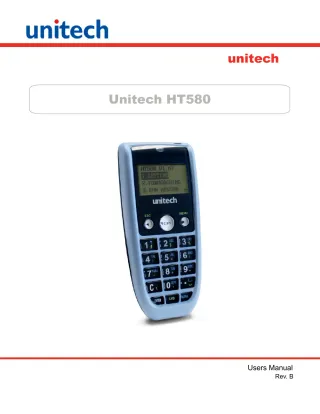
Unitech HT580 Users Manual
Manual37 pagesPDF 1.3 MB
User's manual for the Unitech HT580 portable data collection terminal with CCD scanner: setup, settings, communication and firmware.
Covers · 1 model
The models it covers
Summary
What is in it
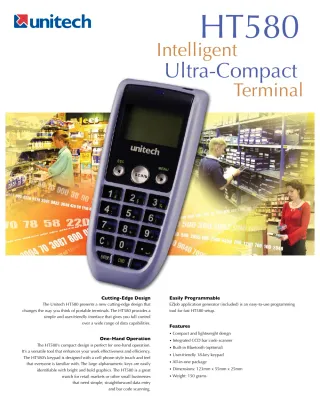
The user's manual for the Unitech HT580, a lightweight handheld data collection terminal with a CCD bar code scanner, aimed at small retailers. It covers getting started (features, package contents, battery charging, powering on and off, the communication cradle), using the keypad and scanner, device settings and Supervisor Mode, USB, Bluetooth and modem communication, the communication program and updating the firmware.
Its parts
- Getting Started
- Using the Hardware
- Communication
From the manual · read page by page
Key facts from this manual
Each line names its page in the PDF.
User manual (Rev. B) for the Unitech HT580 portable data collection terminal and its RS232 and modem cradles. It explains charging and the cradle, the keypad and device settings, the built-in FormCaching data entry generator, bar code symbology options, diagnostics, USB, Bluetooth and modem communication, and firmware updates.
- What it is
- Portable data collection terminal for small retailers, with a proprietary operating system developed in C p. 6
- CPU and memory
- CPU ST-UPSD3354DV; 2MB Flash ROM p. 8
- Display
- Back-lit, 128 x 64 pixels, 16 x 4 or 12 x 4 characters p. 8
- Keypad
- 18 rubber keys plus a power key; numeric, command (CMD) and alphabetic (ALPHA) modes p. 13
- Communication
- Bluetooth V1.1, USB1.1, RS232, modem; baud rates 9600 to 57600 bps, default 38400bps p. 8, 19
- Battery
- One 3.7V 730mAh Li-Ion battery; up to 8 hours battery life; 8 hours to charge from empty with the 5 volt AC adaptor p. 8, 10
- Cradles
- Charging/communication cradle 5000-601558 (RS232-USB) or 5000-601557 (Modem) p. 11
- Package contents
- Terminal, communication cradle, adaptor, USB & RS232 Y cable, holster and strap p. 6
- Scanner
- CCD scanner; China Postal Code, Codabar, Code 32, Code 39, Code 93, Code 128, IATA, Industrial and Interleaved 2 of 5, Telepen, MSI, UPC/EAN p. 8
- Size and weight
- 123mm x 55mm x 25mm; 150g (5.3 oz) p. 8
- Environment
- Operating 0°~50°C (32°~122° F); storage -20°~70°C; 20%~85% RH; sealing IP42 p. 8
- Drop and ESD
- 4 foot free drop to concrete; 8 KV air, 4 KV contact discharge p. 8
- Interface port
- RS232 port on the bottom of the unit; pin 3 DC-IN, pin 10 TXD, pin 11 RXD, pins 2 and 8 GND p. 12
- Firmware files
- Firmware zip HT580Vx.xx.zip holding bank0.bin through bank7.bin, loaded with MultiEJ p. 37
What this manual walks you through
- Installing and charging the battery and powering the terminal on and off p. 3, 10
- Seating the terminal in the cradle and reading the cradle LEDs p. 11, 12
- Setting the date and time and the backlight, scanner, autorun, buzzer and key options p. 15, 16, 17, 18
- Configuring the communication port, baud rate, protocol and terminal address p. 19, 20
- Building a data entry application with FormCaching and exporting its settings p. 21, 22, 23, 24
- Turning individual bar code symbologies and check digits on or off p. 25, 26, 27
- Running the built-in hardware diagnostics and warm or cold starting the terminal p. 28, 29
- Connecting to a PC by USB or Bluetooth p. 30, 31, 32
- Moving files with the MultiEj program and communicating through the modem cradle p. 33, 34, 35, 36, 37
- Updating the firmware p. 37
Good to know
- Charge the Li-Ion battery only between -5°C and 50°C; charging outside that range can damage it. p. 3
- The diagnostic tests destroy data, so back up the terminal first. p. 28
- A cold start erases all data and returns every setting to default. p. 29
- Keep the unit charging during a firmware update; a decoder update requires sending the unit to Unitech. p. 29, 37
- FormCaching fields cannot be redefined until the FORM.DAT data file is deleted. p. 24
Questions this manual answers
How do I update the firmware on a Unitech HT580?
Load the eight files bank0.bin through bank7.bin from the firmware zip with MultiEJ, then run 3.UPDATE F/W from the Supervisor SYS menu while the unit charges. p. 37
What battery does the HT580 use and how long does it last?
One 3.7V 730mAh Li-Ion battery, rated up to 8 hours of battery life; a full charge from empty takes 8 hours. p. 8, 10
What is the part number of the HT580 cradle?
5000-601558 for the RS232-USB cradle and 5000-601557 for the modem cradle. p. 11
How do I connect the HT580 to a PC by USB?
Install the Unitech USB driver from the HT580 CD, which creates a virtual COM port, and set the terminal's port to RS232/USB in the Supervisor COMM menu. p. 30
How do I cold start the HT580 with the keys?
With the unit off, hold the CMD/ALPHA keys and press POWER; a cold start erases all data. p. 29
The whole text · 4 parts
Read the manual here as text
Its text as extracted from the PDF, unedited, in parts; each page opens the PDF at that page.
The file