Manual · Telxon
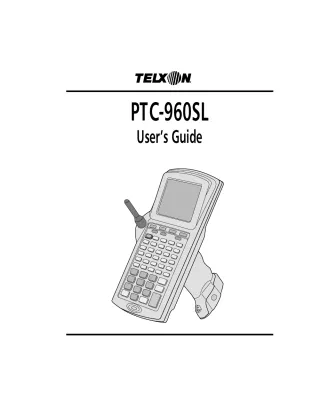
PTC-960SL User's Guide
Manual66 pagesPDF 496 KB
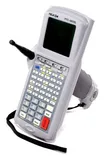
User's guide for the Telxon PTC-960SL handheld computer with built-in laser scanner and optional spread spectrum radio.
Covers · 1 model
The models it covers
Summary
What is in it
Telxon's user's guide for the PTC-960SL, a battery-powered handheld computer with a built-in laser scanner that collects, stores and transmits data. It covers regulations and safety, an overview of entering, storing and communicating data, getting started with the antenna and battery pack, parts, features, scanning bar codes, communicating by radio, cable or optical cradle, replacing the battery, maintenance and troubleshooting. Appendices give specifications, bar code types and scanning distances, accessory part numbers and communication connections.
Its parts
- Regulations
- Safety information
- Scope of the manual
- Overview of the PTC-960SL
- Getting started
- Parts
- Features
- Scanning bar-code labels
- Communicating data
- Replacing the battery pack
- Maintaining the PTC-960SL
- Troubleshooting
From the manual
Key facts from this manual
Some pages are scans or cannot be read; this says only what the readable text supports. Each line names its page in the PDF.
Telxon user's guide (part number 20361-701-03, released 12/2/97, with a 2000 Symbol Technologies cover note) for the PTC-960SL handheld computer with a built-in laser scanner. It covers charging, the keyboard, display and radio options, sending data by cable, cradle or radio, use in freezers, and troubleshooting, with specifications, bar codes, accessory part numbers and cable pinouts.
- What it is
- Battery-powered handheld computer with a built-in laser scanner and an optional spread spectrum radio; built to survive a 4-foot drop to concrete p. 15
- Interfaces
- RS-232 via micro DB-15 connector, 300 to 38,400 baud; optical contacts for the SC-960SL cradle p. 40
- Radio options
- 900-MHz or 2.4-GHz direct-sequence, or 2.4-GHz frequency-hopping spread spectrum p. 21
- Battery
- 1300-mAhr lithium-ion or 500-mAhr nickel-cadmium pack in the handle; backup battery is a Supercap p. 18, 41
- Charging
- 12-VDC, 200-mA power module: 8 hours lithium-ion, 5 to 6 hours nickel-cadmium; Universal Battery Charger: four packs in 3 hours or less p. 19, 20
- Display
- FSTN monochrome LCD, 8 or 16 lines of 16 or 21 characters, 128 x 128 pixel graphics, EL backlight p. 40
- Keyboard
- 45-key alphanumeric standard or 28-key numeric optional; keypad options DOS, 3278/5251 or ANSI/VT220 p. 41
- Scan engines
- PSC-DI-1400, Symbol SE-1200 or Symbol SE-1200LR p. 42
- Memory
- 512 KB application flash EPROM, 256 KB O.S. flash EPROM, 1 to 4 MB RAM p. 42
- Processor and software
- V20H/80C88 at 10 MHz plus a Z182 for RF; MS-DOS 5.0 or TCAL; 3278, 5251 or ANSI/VT220 RF terminal emulation p. 42
- Operating temperature
- -4 to 122 degrees F (-20 to 50 C); extended temperature version -22 to 70 degrees F (-30 to 21 C), 70% humidity maximum p. 35
- Size and weight
- 8.5 x 3.5 x 7 in; 22 oz with nickel-cadmium pack, 26 oz with radio and nickel-cadmium pack p. 42
- Adapter cables
- 20955-002 pigtail micro DB-15-to-DB-25 with charging jack; 21019-001 without; 21146-000 micro DB-15-to-DB-9; 21018-001 clone cable p. 48, 49, 50, 51
- Host and modem cables
- 10124-0X1 half duplex modem; 10124-0X2 full duplex modem; 10124-0X3 host (DTE); 13656-3X3 9-pin host download; 10582-XX0 25-pin host download p. 52, 53, 54, 55, 56
What this manual walks you through
- Unpacking the PTC-960SL and checking the box contents p. 18
- Attaching the antenna on a radio unit p. 19
- Charging by power module, communication cradle or Universal Battery Charger p. 19, 20
- Turning on the PTC and checking that it works p. 20
- Reprogramming the flash EPROMs from a host computer p. 21
- The keys, LEDs, contrast buttons, battery release and scanner trigger p. 22, 23, 24
- Automatic off, backup battery, beeper and clock p. 25, 26
- Using an extended temperature unit in walk-in freezers p. 35
- Troubleshooting power, scanning and radio problems p. 38, 39
- Micro DB-15 pinouts and cable wiring diagrams p. 47, 48, 49, 50, 51, 52, 53, 54
Good to know
- On a radio unit, do not turn the PTC on or transmit unless the antenna is attached, or the radio may be damaged. p. 19
- Storing it over two months without charging drains both batteries and loses data and programs in memory. p. 26
- In a freezer, do not leave the PTC unattended for more than 2 hours or a battery pack for more than 1 hour. p. 35
- Let a frozen battery pack warm to at least 65 degrees F before recharging it. p. 35
- Only six bar-code types are supported at once; an extra type such as Code 93 must replace a default one. p. 43
Questions this manual answers
What battery does the Telxon PTC-960SL take?
A 1300-mAhr lithium-ion or a 500-mAhr nickel-cadmium battery pack, which fits in the handle. p. 18
How long does a PTC-960SL battery take to charge?
With the power module, 8 hours for lithium-ion or 5 to 6 hours for nickel-cadmium. The Universal Battery Charger charges up to four packs in 3 hours or less. p. 20
What bar codes does the PTC-960SL read?
Codabar, Code 2 of 5, Code 39, Code 128, Plessey and UPC/EAN. Other types are a special order and replace one of these. p. 43
Can the PTC-960SL be used in a freezer?
The extended temperature version runs from -22 to 70 degrees F, but should not be left unattended in a freezer for more than 2 hours. p. 35
What cable connects the PTC-960SL to a DB-9 serial device?
The micro DB-15-to-DB-9 adapter cable, P/N 21146-000. p. 50
The whole text · 7 parts
Read the manual here as text
Its text as extracted from the PDF, unedited, in parts; each page opens the PDF at that page.
The file