Manual · Telxon
SC-960RL/SC-960L User's Guide
Manual59 pagesPDF 501 KB
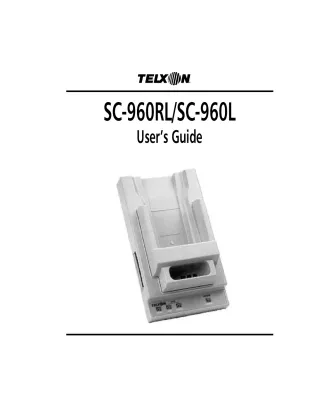
User's guide for the Telxon SC-960RL and SC-960L single-bay communication cradles for the PTC-960RL and PTC-960L terminals.
What this file really is
The old site listed this file as “PTC 960RL Manual” for the Telxon PTC-960SL. Linked as a PTC 960RL manual, but it is the user's guide for the SC-960RL/SC-960L communication cradles that hold and charge the PTC-960RL and PTC-960L, not for the terminals themselves.
Filed with · 1 model
Also filed with these models on the old site
Summary
What is in it
The user's guide for the Telxon SC-960RL and SC-960L single-bay communication cradles, accessories for the PTC-960RL and PTC-960L hand-held terminals. It covers unpacking, parts and features, mounting on a table or wall, connecting to a host computer, external or internal modem, linking cradles together, inserting the PTC and a spare battery, charging, communicating data, flashing through the cradle, maintenance, troubleshooting, specifications, cable pinouts and LED meanings.
Its parts
- Regulations
- Safety information
- Scope of the manual
- Overview of the SC-960RL/SC-960L
- Getting started
- Installing a single cradle
- Connecting cradles together
- Inserting and removing a PTC
- Inserting and removing a spare battery pack
- Charging battery packs
- Communicating data
- Flashing through the cradle
- Maintaining the SC-960RL/SC-960L
- Troubleshooting
From the manual
Key facts from this manual
Some pages are scans or cannot be read; this says only what the readable text supports. Each line names its page in the PDF.
Telxon user's guide (part number 21570-701-04, released 3/17/97) for the SC-960RL and SC-960L Single-bay Communication Cradles, which serve the PTC-960RL and PTC-960L hand-held computers; it does not name the PTC-960SL. It explains mounting the cradle, connecting it to a host, a modem or other cradles, charging battery packs, flashing a PTC through the cradle and troubleshooting, with specifications, cable part numbers and pinouts.
- What it is
- Single-bay cradle that links a PTC to a host computer and charges its battery pack plus a spare; SC-960RL for the PTC-960RL, SC-960L for the PTC-960L p. 16
- Host interface
- RS-232 through a female 25-pin host connector, full duplex, 300 to 38.4 K bps p. 19, 21, 40
- Link to the PTC
- Optical couplers in the PTC and the cradle p. 33
- Power pack
- 12 VDC, 800 mA; each cradle needs its own p. 18
- Charging
- Nickel-cadmium packs, one or two in about 12 hours plus communication time p. 32
- Internal modems
- MM-202 (Bell 202 and V.23 half duplex, 1200 bps), MM-224 (V.22bis, V.22, Bell 212A, Bell 103), MM-224MV (up to V.22bis at 2400 bps, MNP-5, V.42bis); RJ-11 jack p. 20, 40
- Daisychaining
- Up to 32 cradles through the male 25-pin daisychain connector; no single attached cable over 50 ft p. 19, 40
- Host cables
- Cradle-to-9-pin host P-80910-100; cradle-to-25-pin host 11345-1X0 (X is the length in feet) p. 42, 44
- Older host software
- For PC-TCOS, TCOM-101 and TCOM-201: cradle-to-9-pin host 13656-322, cradle-to-25-pin host 10582-001 p. 44
- Other cables
- Cradle-to-modem 11346-000; cradle-to-cradle extension 10930-120 p. 44
- Temperature
- Operating 50 to 110 degrees F (10 to 43 C); storage -20 to 140 degrees F (-29 to 60 C) p. 41
- Size and weight
- 7.7 x 4.3 x 4.5 in; 13 oz wall-mount, 21 oz table-top p. 41
- Mounting
- Ordered as table-top (with cradle base) or wall-mount (on a standard telephone wall mounting plate) p. 20, 22
- LEDs
- Red Power, red PTC bay Busy, green PTC bay Charging, green spare battery bay Charging p. 51
What this manual walks you through
- Mounting the cradle on a table or a wall p. 23, 24
- Connecting the cradle to a host computer or external modem p. 24, 25
- Connecting the internal modem to a telephone line p. 25
- Inserting and removing a PTC p. 30
- Inserting and removing a spare battery pack p. 31
- Charging battery packs and charging precautions p. 32
- Reprogramming a PTC's flash EPROM through the cradle p. 34
- Troubleshooting communication, charging and LED problems p. 37, 38, 39
- Host connector pinouts and cable choices p. 43, 44
- Reading the status LEDs p. 51, 52
Good to know
- Each cradle works only with its own PTC model: the SC-960RL with the PTC-960RL, the SC-960L with the PTC-960L. p. 30
- Wait at least 2 seconds after removing a battery pack before inserting another. p. 32
- The first flash load must go through a null-modem cable from a PC; flashing through the cradle needs more than twice as much RAM as application ROM. p. 34
- Custom host software must not keep RI asserted when idle, or the PTC never suspends and its battery is not recharged. p. 44
- Do not use the cradle below 50 or above 110 degrees F. p. 35
Questions this manual answers
Which PTC fits the Telxon SC-960L cradle?
Only the PTC-960L. The SC-960RL is the cradle for the PTC-960RL. p. 30
How long does the SC-960RL take to charge a battery?
About 12 hours for one or two battery packs, plus the time the PTC spends communicating with the host. p. 32
What power supply does the SC-960RL/SC-960L cradle use?
A 12 VDC, 800 mA power pack; every cradle in a daisychain needs its own. p. 18
How many SC-960RL cradles can be connected together?
Up to 32 cradles, sharing one connection to a host computer or modem. p. 19
What cable connects the cradle to a 9-pin host port?
The standard cradle-to-9-pin host cable is P-80910-100; 13656-322 is the alternate for older PC-TCOS, TCOM-101 and TCOM-201 packages. p. 44
The whole text · 6 parts
Read the manual here as text
Its text as extracted from the PDF, unedited, in parts; each page opens the PDF at that page.
The file