Manual · Symbol
NetVision Data Phone User Guide
Manual12 pagesPDF 411 KB
Short user guide for the Symbol NetVision Data Phone, a Spectrum24 wireless LAN phone with a built-in laser bar code scanner.
Filed with · 2 models
Also filed with these models on the old site
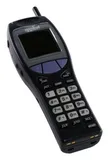
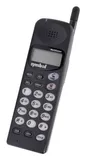
Summary
What is in it
Symbol's user guide for the NetVision Data Phone, a Spectrum24 wireless LAN handset that combines phone calls with a built-in laser bar code scanner for data collection. It shows the keys and features, battery charging and swapping, technical data, logging on to the network, answering and placing calls, name and speed dialing, intercom groups, message paging, scanning and manual data entry, ring styles, key locking, display contrast, and regulatory information.
From the manual · read page by page
Key facts from this manual
Each line names its page in the PDF.
A 12-page Symbol user guide for the NetVision Data Phone, a Spectrum24 wireless LAN phone with a built-in laser bar code scanner. It prints no model number of its own. It shows the keys, battery charging and swapping, logging on, calling features, scanning and data entry, plus technical data and regulatory statements.
- Device
- Spectrum24 wireless LAN phone with a built-in laser bar code scanner p. 1, 9
- Battery
- 7.2 volts rechargeable, lithium ion p. 4
- Battery life
- 150 minutes (2.5 hours) talk time, 24 hours standby per charge p. 4
- Radio
- 2.4 - 2.485 GHz, 100 mW output power p. 4
- Scanner
- Visible laser diode at 650 nm; best distance about six to ten inches (15 to 25 cm) p. 4, 9
- Charger
- NetVision Data Phone Battery Charger: rear slot for a battery, front slot for battery and phone together p. 4
- Connectors
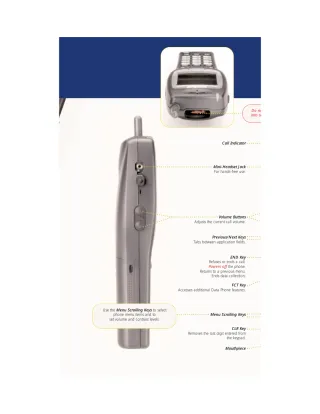
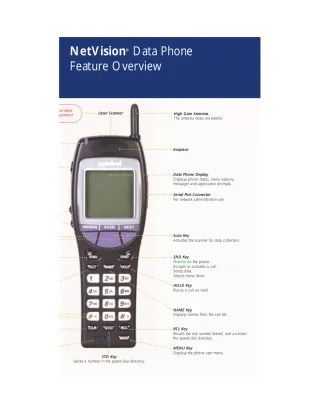
- Mini-headset jack for hands-free use; serial port connector for network administration p. 2, 3
- Temperature
- -30°C to 60°C (-22°F to 140°F) p. 4
- Drop
- 3.3 ft. (1 meter) to tile p. 4
- Display
- Shows phone status, menu options, messages and application prompts; adjustable contrast p. 3, 11
- Antenna
- High gain antenna that does not extend p. 3
- Directory
- Name list of up to 25 users; speed-dial numbers 00-99; last eight calls stored p. 7
- Intercom
- Member of up to 10 intercom groups, one group at a time p. 8
- Ring styles
- Six tones, LED-only or vibrator p. 11
What this manual walks you through
- Charging batteries and reading the charger's green, red and amber indicators p. 4
- Swapping, attaching and detaching the battery p. 4
- Connecting to the network and logging on with a user name and PIN p. 5
- Choosing an answering mode, setting call volume, muting and blocking calls p. 6
- Dialing extensions and outside numbers, name dialing, redial and speed-dial p. 7
- Intercom calls and reading paged messages p. 8
- Scanning a bar code p. 9
- Typing data on the keypad and moving through data collection applications p. 10
- Setting ring style, vibration, ring volume, keypad lock and display contrast p. 11
Good to know
- When swapping the battery, a fresh one must go in within three minutes to keep the user configuration. p. 4
- Turn the phone off before charging its attached battery, and charge only in a Symbol NetVision Data Phone Charger. p. 4
- Without a network connection the phone shows No Network and cannot make or receive calls, get pages or collect data. p. 5
- The redial list does not store the numbers of external calls. p. 7
- Do not stare into the laser aperture; the guide gives the laser class as CDRH Class II, IEC 825 Class 2. p. 4, 9
Questions this manual answers
What battery does the Symbol NetVision Data Phone use?
A 7.2 volt rechargeable lithium ion battery, good for 150 minutes of talk time or 24 hours of standby per charge. p. 4
What radio frequency does the NetVision Data Phone use?
It works in the 2.4 - 2.485 GHz range with 100 mW output power. p. 4
How do I scan a bar code with the NetVision Data Phone?
Aim the top of the phone at the bar code, about six to ten inches away, and press SCAN; the call indicator turns green and the phone beeps on a good read. p. 9
Can I change the battery without losing my settings?
Yes, when the phone is idle; remove the battery without powering off and put in a charged one within three minutes. p. 4
Why does my NetVision Data Phone say No Network?
It means the phone cannot connect to the network; until it does, it cannot make or receive calls, get pages or collect data. p. 5
The whole text · 2 parts
Read the manual here as text
Its text as extracted from the PDF, unedited, in parts; each page opens the PDF at that page.
The file