Manual · Symbol
MC909X User Guide
Manual246 pagesPDF 13 MB
User guide for the Symbol MC909X family of mobile computers (MC9090-G, -K, -S, MC9094 and MC9097), from setup to troubleshooting.
Covers · 1 model
The models it covers
Summary
What is in it
Motorola user guide for the MC909X family of mobile computers, covering the MC9090-G, MC9090-K and MC9090-S plus the MC9094 and MC9097 phone models, running Windows CE 5.0 or Windows Mobile 5.0. It explains unpacking, batteries and charging, keypads, status icons, scanning and imaging, resets, Bluetooth setup, using the MC9094 and MC9097 phones, accessories, maintenance and troubleshooting, with specifications in an appendix.
Its parts
- About This Guide
- Getting Started
- Operating the MC909X
- Using Bluetooth
- Using MC9094 Phone
- Using the MC9097 Phone
- Accessories
- Maintenance & Troubleshooting
From the manual
Key facts from this manual
Some pages are scans or cannot be read; this says only what the readable text supports. Each line names its page in the PDF.
The Symbol MC909X Mobile Computer User Guide, a 246-page manual for the MC9090 family of rugged handheld computers. It covers the MC9090-G, MC9090-K and MC9090-S, and the phone models MC9094-K, MC9094-S, MC9097-K and MC9097-S. It explains charging, resets, scanning, Bluetooth, the phones, the accessories, troubleshooting, the technical specifications and connector pin-outs.
- Device
- Rugged handheld mobile computer family: MC9090-G, MC9090-K, MC9090-S, and phone models MC9094 and MC9097 p. 15, 16, 17
- Scan engine
- 1D Standard Range laser or omni-directional 1D and 2D imager; MC909X-G also 1D Long Range p. 210
- Battery
- MC909X-G: 7.2 V Li-Ion 2200 mAh, 15.8 Wh; MC909X-K: 7.4 V 2200 mAh, 15.8 Wh; MC909X-S: 7.2 V 1550 mAh, 11.1 Wh p. 209
- Display
- 3.8 in. 1/4 VGA color; MC909X-G also monochrome with Windows CE p. 209
- Processor
- XScale Bulverde PXA270 at 624MHz p. 210
- Operating system
- MC909X-G: Windows CE 5.0 or Windows Mobile 5.0 Premium Edition; MC909X-K and -S: Windows Mobile 5.0 Premium or Phone Edition p. 210
- Flash and expansion
- 64MB flash with Windows CE, 128MB with Windows Mobile; SD/MMC card slot p. 210
- Keypads
- MC909X-G: 28, 43 or 53-key; MC909X-K: 28, 33, 43 or 53-key; MC909X-S: 28-key, 38-key alpha-prime or numeric-prime p. 209
- WLAN and Bluetooth
- Symbol 802.11a/b/g with internal antenna, 100mW; Bluetooth Version 1.2 with BTExplorer p. 211
- Phone radios
- MC9094: EDGE/GPRS, quad-band GSM 850/900/1800/1900 MHz; MC9097: iDEN 800 - 900 MHz with assisted GPS p. 17, 212
- Temperature
- Operating -20 to 50 C (-4 to 122 F); battery charging 0 to 40 C (32 to 104 F) p. 210
- Sealing and drops
- IP64 (electronic enclosure); multiple 6 ft. (1.8m) drops to concrete; 2,000 one-meter tumbles p. 210
- Connector
- 17-pin: USB, RS232C, POWER_IN 12V 2.5A max, EXT_PWR_OUT 3.3V at 500mA p. 216
- Modem module
- Line speed up to 33,600 bps, RJ11 jack, 9V 2 amp regulated AC/DC adapter p. 214, 215
What this manual walks you through
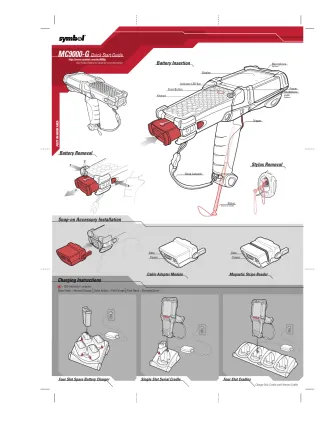
- Charging the main battery, memory backup battery and spare batteries p. 29, 30
- Reading the charge LED p. 30
- Removing the main battery p. 30
- Warm and cold boots on Windows CE 5.0 and Windows Mobile 5.0 devices p. 93, 94
- Scanning tips and the scan LED p. 93
- Accessories: cradles, the Cable Adapter Module, the MSR and their cables p. 26, 27, 173
- Finding the AKU and OEM software versions p. 17, 18
- Troubleshooting power, display, scanning, ActiveSync, Bluetooth and cradle problems p. 197, 198, 199, 200
- Connector pin-outs of the computer, CAM and MSR p. 216, 217
Good to know
- Do not remove the main battery in the first 15 hours of use, or data may be lost while the backup battery charges. p. 29
- On the MC9097, wait 10 seconds after pressing Power before releasing the battery, or a warm boot may be needed. p. 30
- On Windows CE 5.0 devices a cold boot erases records in RAM and restores default settings; try a warm boot first. p. 93, 94
- Use only the specified AC adapter with the modem module; a wrong supply causes electrical damage. p. 215
- Disconnect from the WLAN or WWAN network before connecting to a host computer with ActiveSync. p. 199
Questions this manual answers
How do I cold boot an MC9090?
Partially eject the battery with the primary battery release, press and release the handle trigger and Power button together, then push the battery fully back in. p. 94
How long does the MC9090 battery take to charge?
The main battery fully charges in less than four hours; a fully drained memory backup battery needs about 15 hours. p. 29
What operating system does the MC9090 run?
The MC909X-G runs Windows CE 5.0 or Windows Mobile 5.0 Premium Edition; the -K and -S run Windows Mobile 5.0 Premium or Phone Edition. p. 210
What battery does the MC9090-G use?
The MC909X-G column lists a removable, rechargeable 7.2 V Lithium Ion 2200 mAh battery pack, 15.8 watt hours. p. 209
What is the Bluetooth range of the MC9090?
The troubleshooting table says to move within 10 meters of the other Bluetooth device. p. 199
Contents
Chapters and sections
Each line opens the PDF at its page.
- Patents4
- Revision History5
- About This Guide15
- Getting Started23
- Introduction23
- Unpacking the Mobile Computer26
- Accessories26
- Getting Started28
- Installing and Removing the Main Battery28
- Charging the Battery29
- Starting the Mobile Computer32
- Calibrating the Screen32
- Checking Battery Status32
- SIM Card33
- Stylus35
- MC9090-G Strap36
- MC909X-K Strap37
- MC909X-S Strap38
- Battery Management39
- Changing the Power Settings39
- Changing the Display Backlight Settings39
- Changing the Keypad Backlight Settings40
- Turning Off the Radios40
- Operating the MC909X45
65 more lines, from page 90 on
- Using a Bluetooth Headset90
- Using Bluetooth97
- Using MC9094 Phone127
- Using the MC9097 Phone147
- Accessories173
- Introduction173
- Keypads174
- Multi Media Card (MMC) / Secure Device (SD) Card175
- Single Slot Serial/USB Cradle177
- Four Slot Ethernet Cradle179
- Four Slot Charge Only Cradle181
- Four Slot Spare Battery Charger182
- Magnetic Stripe Reader183
- Cable Adapter Module187
- Universal Battery Charger (UBC) Adapter190
- Modem Module192
- Maintenance & Troubleshooting195
- Specifications209
- Keypad Special Keys219
- Regulatory223
The whole text · 31 parts
Read the manual here as text
Its text as extracted from the PDF, unedited, in parts; each page opens the PDF at that page.
- Pages 1 to 31-3
- Pages 4 to 64-6
- Table of Contents, pages 7 to 117-11
- Table of Contents, pages 12 to 1412-14
- About This Guide15-22
- Getting Started, pages 23 to 3023-30
- Getting Started, pages 31 to 3831-38
- Getting Started, pages 39 to 4439-44
- Operating the MC909X, pages 45 to 5345-53
- Operating the MC909X, pages 54 to 6254-62
- Operating the MC909X, pages 63 to 7163-71
- Operating the MC909X, pages 72 to 8072-80
- Operating the MC909X, pages 81 to 8981-89
- Operating the MC909X, pages 90 to 9690-96
- Using Bluetooth, pages 97 to 10697-106
- Using Bluetooth, pages 107 to 116107-116
- Using Bluetooth, pages 117 to 126117-126
- Using MC9094 Phone, pages 127 to 136127-136
- Using MC9094 Phone, pages 137 to 146137-146
- Using the MC9097 Phone, pages 147 to 155147-155
- Using the MC9097 Phone, pages 156 to 164156-164
- Using the MC9097 Phone, pages 165 to 172165-172
- Accessories, pages 173 to 180173-180
- Accessories, pages 181 to 188181-188
- Accessories, pages 189 to 194189-194
- Maintenance & Troubleshooting195-208
- Specifications209-218
- Keypad Special Keys219-222
- Regulatory, pages 223 to 230223-230
- Regulatory, pages 231 to 238231-238
- Regulatory, pages 239 to 246239-246
The file