Manual · Symbol
LS 4800 Quick Reference
Manual25 pagesPDF 477 KB
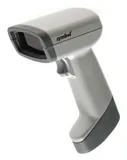
Quick reference guide for the Symbol LS 4800 and battery-powered LS 4900 1-D and 2-D (PDF417) hand-held laser scanners.
Filed with · 2 models
Also filed with these models on the old site
Summary
What is in it
A quick reference for the Symbol LS 4800 and LS 4900 hand-held laser scanners, which read 1-D bar codes and 2-D PDF417 symbols. It explains the scanner varieties, setup with an RS-232C cable or a Synapse Smart Cable, portable operation of the battery-powered LS 4900 with a portable terminal, the aiming dot, slab raster and open raster scan patterns, how to scan 1-D and 2-D codes, specular reflection and the dead zone, maintenance, battery use, troubleshooting and test symbols.
Its parts
- Scanner Varieties
- Setup
- Portable Operation: LS 4900
- Scanning with the LS 4800 / LS 4900
- Scanning 1-D or 2-D Bar Codes
- Specular Reflection
- The Dead Zone
- Maintenance
- Battery Use (LS 4900 Models Only)
- What If...
- Regulatory Information
- Test Symbols
From the manual · read page by page
Key facts from this manual
Each line names its page in the PDF.
A Symbol quick reference for the LS 4800 (corded) and LS 4900 (battery) laser scanners, which read 1-D bar codes and PDF417 2-D symbols; it never names the LS 4804 or LS 4904 by number. It covers hooking the scanner up over RS-232C or a Synapse cable, setting up the LS 4900 with a portable terminal, scanning technique, cleaning, batteries and what to try when it fails.
- Scanner type
- Laser scanner for 1-D bar codes and PDF417 2-D symbols p. 10, 11
- Power
- LS 4800: power supply or host power; LS 4900: battery powered p. 3
- Interfaces
- RS-232C or Synapse Smart Cable p. 3
- Laser
- 675 nm, 1.0 mW maximum, Class II p. 19
- Scan patterns
- Aiming dot, slab raster or open (full) raster, as programmed p. 10
- LS 4900 battery
- LS 4900: NiCad rechargeable batteries, charged in the Universal Four Slot Charger or trickle-charged in about 12 hours on AC p. 16
- Indicator lights
- Green LED on a good decode; red LED blinks when misaligned; LS 4900: yellow LED for low battery p. 12, 16
- Good-read signal
- Green LED plus a short, high tone beep p. 12
- LS 4900 host
- LS 4900: used with a portable terminal such as the PDT 3300 p. 8
- Scan angle limits
- Specular dead zone about 2 degrees for 1-D and 9 degrees for PDF417; not effective past 30 degrees from normal p. 14
- Tall PDF417 tilt
- Up to a 4 degree tilt from the symbol rows still works p. 13
- Radio interference class
- The manual states FCC Part 15 Class A and ICES-003 Class A p. 20
- Test symbols
- Code 128, 13 mil UPC, PDF417 p. 23
- Document number
- 70-15663-03, Revision C, August 1999 p. 25
What this manual walks you through
- Installing the LS 4800 with an RS-232C cable and power supply p. 5, 6
- Installing the LS 4800 with a Synapse cable p. 7
- Setting up the LS 4900 with a portable terminal, belt and holsters p. 8, 9
- Aiming and scanning 1-D and 2-D bar codes p. 11, 12
- Reading tall PDF417 symbols with an up and down motion p. 13
- Avoiding specular reflection p. 14
- Cleaning the exit window p. 15
- Charging LS 4900 batteries p. 16
- Troubleshooting no read, garbled data and a laser that will not start p. 17, 18
Good to know
- If the laser does not start and a long high beep follows, the scanner may be too hot and should be cooled. p. 18
- Do not spray water or cleaning liquid into the window, and keep abrasives off it. p. 15
- The scan pattern should reach at least three quarters of an inch past the bar code edges. p. 12
- As a Class A device it is likely to cause interference in a residential area. p. 20
- Avoid staring directly into the laser beam. p. 19
Questions this manual answers
What battery does the Symbol LS 4900 use?
NiCad rechargeable batteries; a yellow LED on the back means low battery. p. 16
What interfaces does the LS 4800 scanner support?
RS-232C or a Synapse Smart Cable to the host device. p. 3
Why does my LS 4800 give a long high beep and no laser?
It may be too hot; move it out of the heat or let the laser cool, and call Symbol support if it continues. p. 18
Can the LS 4800 read PDF417?
Yes; the raster pattern opens up for PDF417, and tall symbols can be read with a slow up and down motion. p. 10, 13
What does a blinking red LED mean on the LS 4800?
The scanner is not aligned well enough to read the bar code. p. 12
Contents
Chapters and sections
Each line opens the PDF at its page.
The whole text · 3 parts
Read the manual here as text
Its text as extracted from the PDF, unedited, in parts; each page opens the PDF at that page.
The file