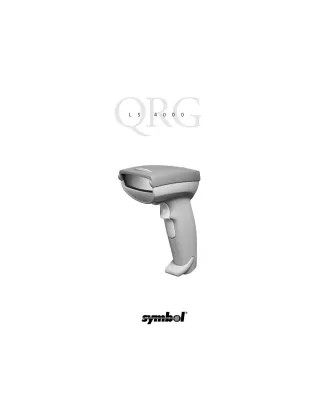
Manual · Symbol
LS 4000 Quick Reference
Manual40 pagesPDF 1.1 MB
Quick reference for the Symbol LS 4000 series handheld laser scanners: cable installation, testing, aiming and beeps.
Names · 1 model
The models it names
Filed with · 6 models
Also filed with these models on the old site
 Symbol LS-4004Hand-held laser barcode scanner from$195.00270 in stock Symbol LS-4005Hand-held laser barcode scanner from$225.0029 in stock Symbol LS-4006Hand-held laser barcode scanner from$295.0022 in stock Symbol LS-4007iHand-held laser barcode scanner from$295.007 in stock
 Symbol VS-1020Hand-held imaging barcode scanner from$395.001 in stock Symbol VS-4004Hand-held imaging barcode scanner from$395.00201 in stock
Summary
What is in it
Symbol's short quick reference for the LS 4000 series (LS 400X) handheld laser scanners, in English, French, German, Italian and Spanish. It shows how to install and switch the host cable, how to test and scan, how to hold the scanner at an angle to avoid specular reflection, what the beep means and what to check if nothing happens. It closes with Symbol's warranty terms, support phone numbers and ergonomic recommendations.
Its parts
- Scanning Made Easy
- Ready, Test, Scan
- Aiming
- What If...
- La lecture des codes à barres simplifieé
- Scannen einfach gemacht
- Lettura facile
- Lectura más fácil
- Ergonomic Recommendations
From the manual · read page by page
Key facts from this manual
Each line names its page in the PDF.
Symbol's Quick Reference (part 70-16423-01, Revision E, June 2001) for the LS 4000 series handheld laser scanners, printed as LS 4000 and LS 400X. It shows how to fit and change the host cable, test and aim the scanner, read the beep and the indicator light, and what to check when nothing happens, in English, French, German, Italian and Spanish, followed by regulatory and laser label details. It does not name the individual LS-4004, LS-4005, LS-4006, LS-4007i, VS-4004 or VS-1020 models.
- Device
- Handheld, trigger-operated laser bar code scanner, LS 4000 series (LS 400X) p. 3, 5
- Host cable
- Modular connector into the bottom of the handle, held by a boot; a different cable for each host type p. 3, 4
- Laser
- 630nm-680 nm, 1.0 milliwatt maximum output; the label shown states Class 2, with a Class 1 label version also shown p. 37
- Indicators
- Yellow light at the rear while the beam is on; turns green and the laser shuts off on a good read p. 5
- Good-read beep
- One short high tone; any other beep pattern needs the person in charge of scanning p. 7
- Scan angle
- Tilt up to 65 degrees forward or back; avoid holding straight over the code p. 6
- Maintenance
- No user maintenance needed p. 7
- Programming
- Not covered here; setup and programming are in the Product Reference Guide p. 3
- Emissions
- The manual states FCC Part 15 Class B, Industry Canada ICES-003 Class B and CE marking p. 34, 35
- Laser standards
- The manual states compliance with US 21CFR1040.10, IEC825-1:1993 and EN60825-1:1994+A11:1996 p. 36
- Languages
- English, French, German, Italian and Spanish p. 3, 9, 15, 21, 27
What this manual walks you through
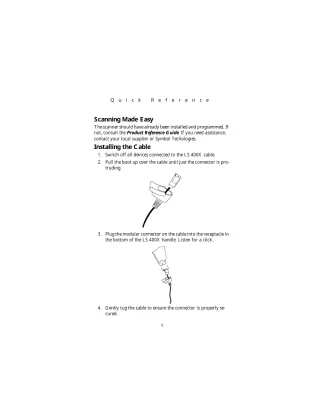
- Installing the cable in the scanner handle p. 3, 4
- Changing the cable for a different host p. 4
- Testing the scanner and reading a bar code p. 5
- Aiming at an angle and covering the whole symbol p. 6, 7
- What the beep means p. 7
- What to check when nothing happens p. 8
- Ergonomic recommendations p. 34
- Regulatory and laser label information p. 34, 35, 36, 37
Good to know
- Switch off all devices on the scanner cable before installing it. p. 3
- Do not stare into the beam of a Class 2 laser scanner. p. 36
- Using controls, adjustments or procedures other than those specified may cause hazardous laser light exposure. p. 36
- Holding the scanner straight over the code reflects light back into it and makes decoding difficult. p. 6
- The host system must be programmed to read the bar code type being scanned. p. 8
Questions this manual answers
How do I change the cable on a Symbol LS 4000 scanner?
Slide the boot down the cable, press the connector clip through the access hole and unplug the cable, then plug in the new one and reseat the boot. p. 4
What laser does the LS 4000 use?
A 630 nm to 680 nm laser with 1.0 milliwatt maximum output; the label shown marks it Class 2. p. 37
Why won't my LS 4000 read a bar code?
Check system power and the cable connections, make sure the system is programmed for that bar code type, and check that the symbol is not defaced. p. 8
What does the light on the back of the LS 4000 mean?
It glows yellow while the scan beam is on and turns green when a bar code has been read. p. 5
Does the LS 4000 need maintenance?
No. The guide says LS 4000 series scanners need no user maintenance. p. 7
Contents
Chapters and sections
Each line opens the PDF at its page.
- Symbol Technologies, Inc. One Symbol Plaza Holtsville, N.Y. 11742-1300 http://www.symbol.com2
- Scanning Made Easy3
- Ready, Test, Scan5
- Aiming6
- Aiming7
- What If...8
- La lecture des codes à barres simplifieé9
- Préparation, test, lecture11
- Visée12
- Visée13
- Que faire si...14
- Scannen einfach gemacht15
- Vorbereiten, Prüfen, Scannen17
- Zielen18
- Zielen19
The whole text · 4 parts
Read the manual here as text
Its text as extracted from the PDF, unedited, in parts; each page opens the PDF at that page.
The file