Manual · Symbol
LS 4000 and LS 400Xi Series Advanced Programmer's Guide
Manual130 pagesPDF 1.3 MB
Advanced programmer's guide for Symbol LS 4000 and LS 400Xi scanners: Advanced Data Formatting rules set by scanning bar codes.
Names · 1 model
The models it names
Filed with · 7 models
Also filed with these models on the old site
 Symbol LS-4004Hand-held laser barcode scanner from$195.00270 in stock Symbol LS-4005Hand-held laser barcode scanner from$225.0029 in stock Symbol LS-4006Hand-held laser barcode scanner from$295.0022 in stock Symbol LS-4007iHand-held laser barcode scanner from$295.007 in stock
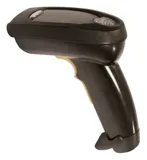 Symbol LS-4008iHand-held laser barcode scanner from$295.0066 in stock
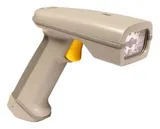 Symbol VS-1020Hand-held imaging barcode scanner from$395.001 in stock Symbol VS-4004Hand-held imaging barcode scanner from$395.00201 in stock
Summary
What is in it
Advanced programmer's guide for the Symbol LS 4000 series and LS 400Xi series (LS 4004i and LS 4005i) bar code scanners. It explains Advanced Data Formatting (ADF), which edits scan data before it is sent to the host through rules that link criteria (code type, length, data strings) to actions (send, skip, pad, modify, beep, send keystrokes). It then gives the ADF programming bar codes, an alphanumeric keyboard, ASCII tables and keyboard maps.
Its parts
- About This Manual
- Advanced Data Formatting
- ADF Bar Codes
From the manual
Key facts from this manual
Some pages are scans or cannot be read; this says only what the readable text supports. Each line names its page in the PDF.
The Symbol LS 4000 and LS 400Xi Series Advanced Programmer's Guide (70-35834-01, Revision B, February 2001), for the LS 4000 series and the LS 4004i and LS 4005i scanners. It explains Advanced Data Formatting (ADF), which edits scanned data before it goes to the host, and holds the ADF programming bar codes and keyboard tables. It does not name the VS-1020, VS-4004, LS-4006, LS-4007i or LS-4008i.
- What it is
- Programming guide with ADF bar codes for LS 4000 and LS 400Xi series scanners p. 9
- Data formatting
- ADF rules edit scan data before it is sent to the host p. 13
- Rule criteria
- Code type, code length, and a specific string of up to 8 characters at the start or any position p. 15
- Rule actions
- Send data, move cursor, send preset values, remove spaces or leading zeros, pad, beep, send keystrokes, switch rule sets p. 16, 17, 18
- Rule sets
- Rules can be grouped into four alternate sets turned on and off p. 20
- Send next N
- N can be any number from 1 to 254 p. 16
- Related manuals
- LS 400Xi PRG 70-37898-xx, LS 400Xi QRG 70-33849-xx, LS 4000 PRG 70-16171-xx, LS 4000 QRG 70-16423-xx p. 9
- Default rule
- Every unit has a default rule to send all scan data p. 22
What this manual walks you through
- Programming an ADF rule step by step with bar codes p. 14
- Worked example: formatting Code 128 and UPC data for an auto parts center p. 18, 19
- Switching between alternate rule sets, for example during a sale p. 20, 21
- Ordering rules so the most general rule comes last p. 21
- Erasing criteria, actions or saved rules p. 14
- Reading the beep sequences during rule entry p. 23
Good to know
- Rules are checked from the most recent down, so a general rule programmed after a specific one hides it. p. 21, 22
- After programming a rule in an alternate set, the guide recommends scanning DISABLE ALL RULE SETS. p. 21
- If a Move Cursor To character is not found, the rule fails and the next rule is tried. p. 16
Questions this manual answers
What does a Low-High-Low-High beep mean on an LS 4000 while programming ADF?
The scanner is out of rule memory; erase some rules and save the current rule again. p. 23
Why does one of my ADF rules seem not to work?
A more general rule programmed after it is matched first; program the most general rule last. p. 21, 22
Which scanners does the LS 4000 Advanced Programmer's Guide cover?
The LS 4000 series and the LS 400Xi, meaning the LS 4004i and LS 4005i. p. 9
Contents
Chapters and sections
Each line opens the PDF at its page.
The whole text · 16 parts
Read the manual here as text
Its text as extracted from the PDF, unedited, in parts; each page opens the PDF at that page.
- LS 4000 and LS 400Xi Series APG1-4
- Contents5-8
- About This Manual9-12
- Chapter 1 Advanced Data Formatting13-24
- Chapter 2 ADF Bar Codes, pages 25 to 3425-34
- Chapter 2 ADF Bar Codes, pages 35 to 4435-44
- Chapter 2 ADF Bar Codes, pages 45 to 5445-54
- Chapter 2 ADF Bar Codes, pages 55 to 6455-64
- Chapter 2 ADF Bar Codes, pages 65 to 7465-74
- Chapter 2 ADF Bar Codes, pages 75 to 8475-84
- Chapter 2 ADF Bar Codes, pages 85 to 9485-94
- Chapter 2 ADF Bar Codes, pages 95 to 10095-100
- Appendix A ASCII Tables and Keyboard Layouts, pages 101 to 109101-109
- Appendix A ASCII Tables and Keyboard Layouts, pages 110 to 118110-118
- Appendix A ASCII Tables and Keyboard Layouts, pages 119 to 126119-126
- Index127-130
The file