Manual · Symbol
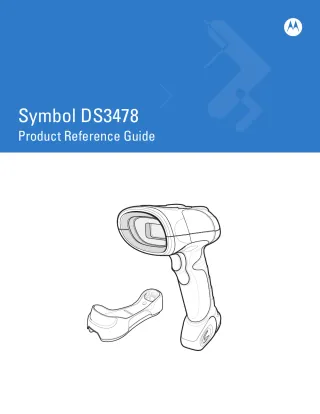
Symbol DS-3478 Quick Start
Manual2 pagesPDF 9.7 MB
Both pages are below, each with its text.
Covers · 1 model
The models it covers
From the manual · read page by page
Key facts from this manual
Some pages are scans or cannot be read; this says only what the readable text supports. Each line names its page in the PDF.
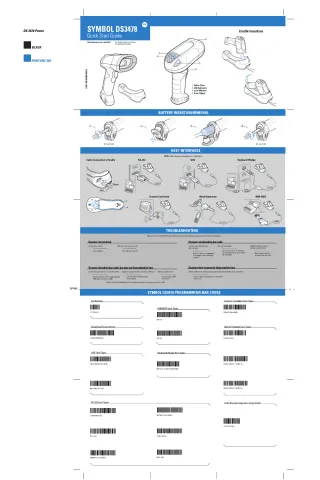
Two-page quick start poster (72-72130-01 Rev C, April 2010) for the Symbol DS3478 Bluetooth scanner. It gives programming bar codes for setting defaults, choosing the host type and unpairing from the cradle, then the beeper and LED meanings, scanning posture advice and regulatory information.
- Device
- Hand-held bar code scanner with a Bluetooth radio that pairs with a cradle p. 2
- Radio module
- Symbol Bluetooth radio Type 21-64381; BT ID BT01784 p. 2
- Power supply
- Motorola Type no. 50-14000 or PWRS-14000 direct plug-in, rated 5 Vdc, 850 m A p. 2
- Host types
- Programming bar codes for IBM 46XX, Wand Emulation, USB, Keyboard Wedge and RS-232 host types p. 1
- Charging
- Slow mode when the cradle is powered by the host cable; rapid mode when it is powered from an external power supply p. 2
- Parts
- Tether plate, LED indicators, scan window, scan trigger p. 2
- Radio approvals
- United States, Canada, Australia, Japan and Europe p. 2
- Document number
- 72-72130-01 Rev C, April 2010 p. 2
What this manual walks you through
- Choosing the host type with programming bar codes p. 1
- Unpairing or disconnecting the scanner from the cradle p. 1
- Reading the beeper indications p. 2
- Reading the LED indications in standard and charging use p. 2
- Scanning positions and posture to avoid strain p. 2
Good to know
- Only the listed Motorola power supply should be used; another supply invalidates the device's approvals. p. 2
- For FCC RF exposure rules, the scanner must be operated in the hand. p. 2
- In the EEA, Bluetooth transmit power is limited to 10mW EIRP, and Italy requires a user license for outside use. p. 2
Questions this manual answers
What power supply does the DS3478 cradle use?
The poster names Motorola Type no. 50-14000 or PWRS-14000, a direct plug-in supply rated 5 Vdc, 850 m A. p. 2
Why does the DS3478 charge slowly?
It charges in slow mode when the cradle is powered by the host cable; rapid mode is used when the cradle runs from an external power supply. p. 2
How do I unpair a DS3478 from its cradle?
Scan the UNPAIR/DISCONNECT programming bar code printed on the poster. p. 1
What does a red and green flashing LED mean on the DS3478?
In charging use, red and green flashing signals a temperature fault. p. 2
The file
Size and text
Every page · 2
Read it here
Each page as it is printed, and its words beside it, so a phone can search and copy them.
Page1of 2
Open in the PDF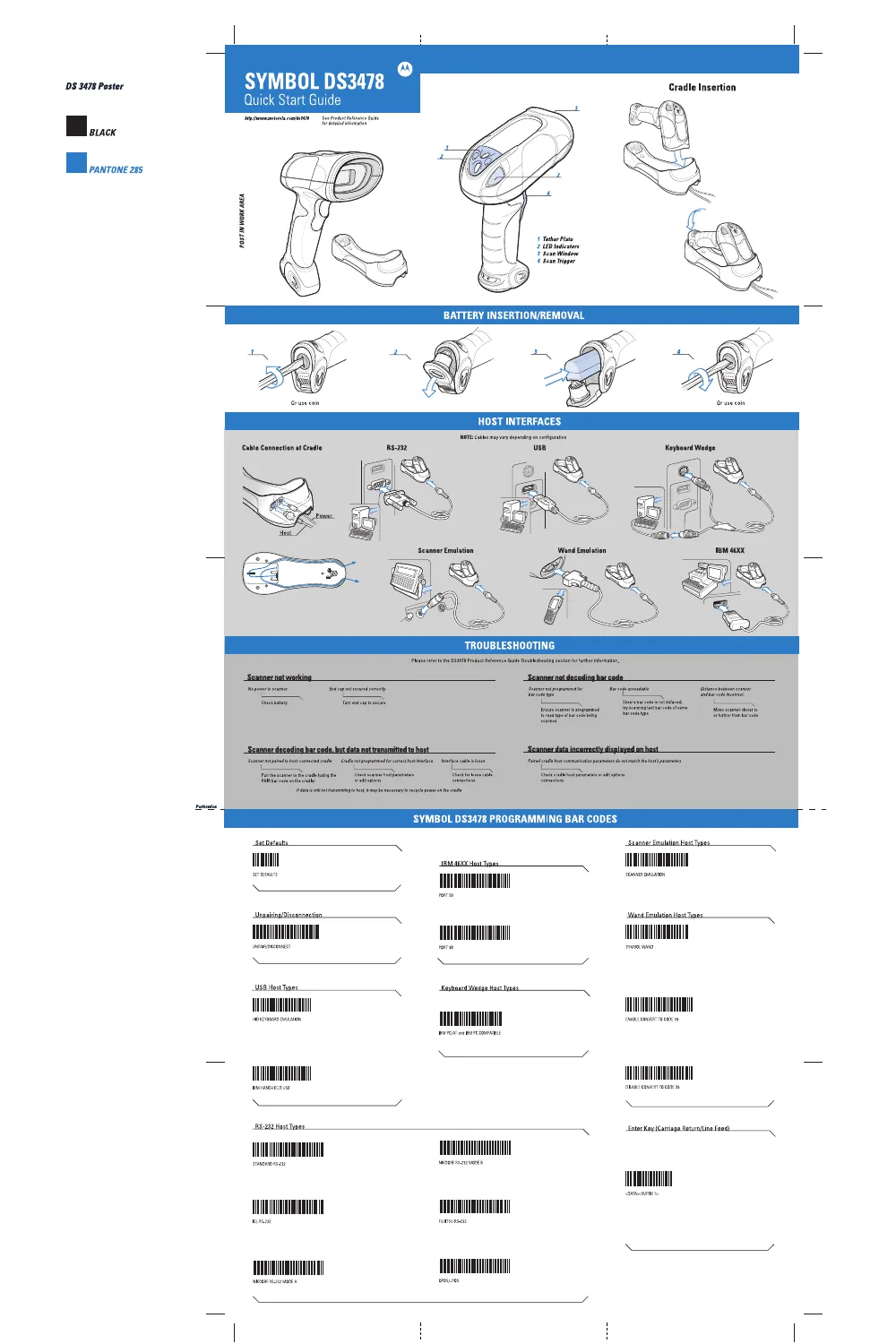
The text of page 1, read from a scan by OCR; it may hold reading errors
SYMBOL DS3478 ©DS 3478 PosterQuick Start Guide
http://www.motorola.com/ds3478 mt ee Froduct Referen c e Guide a BLACK ZO a PANTONE 285 : ( “y /
1 Tether Plate 2 LED Indicators 3 Scan Window 4 Scan Trigger
POST IN WORK AREAOr use coinHOST INTERFACES
NOTE: Cables may vary depending on configuration Keyboard Wedge
TROUBLESHOOTING
SYMBOL DS3478 PROGRAMMING BAR CODES
Set Defaults I \ il {ll IBM 46XX Host Types il | | | | MAI, | | | Mi | | | oe \ PORT 5B Unpairing/Disconnection Wand Emulation Host Types UNPAIR/DISCONNECT PORT 9B SYMBOL WAND \ \ USB Host Types Keyboard Wedge Host Types HID KEYBOARD EMULATION | | | | | | ENABLE CONVERT TO CODE 39 IBM PC/AT and IBM PC COMPATIBLE \ IBM HAND-HELD USB DISABLE CONVERT TO CODE 39 \ \ RS-232 Host Types Enter Key (Carriage Return/line Feed) STANDARD RS-232 NIXDORF RS-232 MODE B <DATA><SUFFIX 1> ICL RS-232 FUJITSU RS-232
NIXDORF RS-232 MODE A\OPOS/JPOS
Page2of 2
Open in the PDF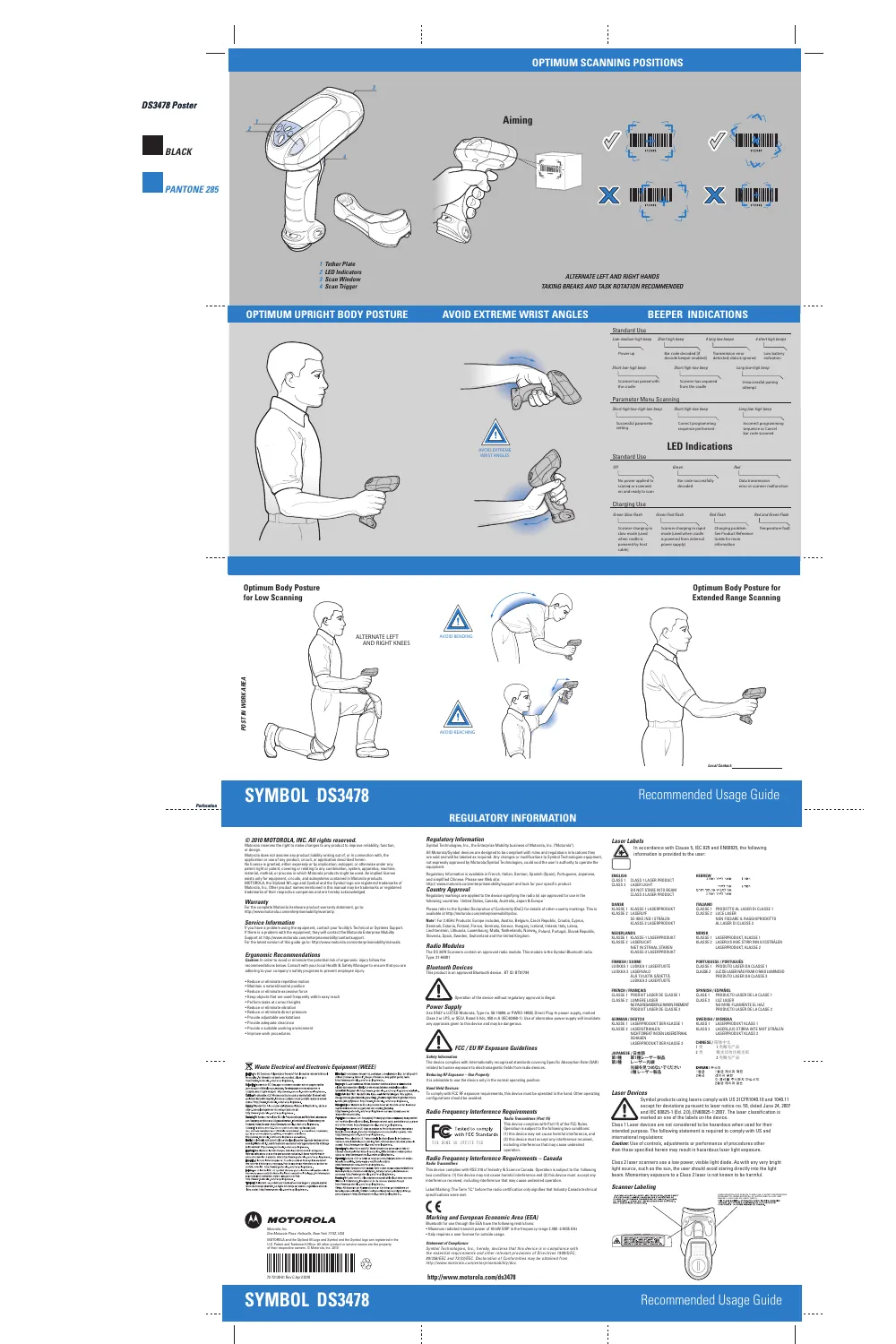
The text of page 2, read from a scan by OCR; it may hold reading errors
OPTIMUM SCANNING POSITIONS 3
DS3478 Poster 2Aiming1BLACK4PANTONE 285
1 Tether Plate 2 LED Indicators 3 Scan Window 4 Scan Trigger
OPTIMUM UPRIGHT BODY POSTURE
ALTERNATE LEFT AND RIGHT HANDS TAKING BREAKS AND TASK ROTATION RECOMMENDED
BEEPER INDICATIONS
AVOID EXTREME WRIST ANGLES Standard Use
Low-medium-high beepShort high beepPower up4 long low beeps
Bar code decoded [if decode beeper enabled]
Short low-high beep
Transmission error detected; data is ignored
Short high-low beep
Scanner has paired with the cradle
4 short high beeps Low battery indication
Long low-high beep
Scanner has unpaired from the cradle
Unsuccessful pairing attempt
Parameter Menu Scanning Short high-low-high-low beep
Short high-low beep
Successful parameter setting
AVOID EXTREME WRIST ANGLES
Long low-high beep
Correct programming sequence performed
Incorrect programming sequence or Cancel bar code scanned
LED Indications Standard Use Off
Green No power applied to scanner, or scannersi on and ready to scan
Red
Bar code successfully decoded
Data transmission error or scanner malfunction
Charging Use Green Slow Flash Scanner charging in slow mode (used when cradle is powered by host cable)
Green Fast Flash
Red Flash
Scanner charging in rapid mode (used when cradle is powered from external power supply)
Optimum Body Posture for Low Scanning
Charging problem See Product Reference Guide for more information
Red and Green Flash Temperature fault
Optimum Body Posture for Extended Range Scanning
POST IN WORK AREA
ALTERNATE LEFT AND RIGHT KNEES
AVOID BENDINGAVOID REACHING
- Local Contact
- Perforation
SYMBOL DS3478
Recommended Usage Guide REGULATORY INFORMATION
© 2010 MOTOROLA, INC. All rights reserved.
Motorola reserves the right to make changes to any product to improve reliability, function, or design. Motorola does not assume any product liability arising out of, or in connection with, the application or use of any product, circuit, or application described herein. No license is granted, either expressly or by implication, estoppel, or otherwise under any patent right or patent, covering or relating to any combination, system, apparatus, machine, material, method, or process in which Motorola products might be used. An implied license exists only for equipment, circuits, and subsystems contained in Motorola products. MOTOROLA, the Stylized M Logo and Symbol and the Symbol logo are registered trademarks of Motorola, Inc. Other product names mentioned in this manual may be trademarks or registered trademarks of their respective companies and are hereby acknowledged.
Warranty
Regulatory Information
Symbol Technologies, Inc., the Enterprise Mobility business of Motorola, Inc. ("Motorola"). All Motorola/Symbol devices are designed to be compliant with rules and regulations in locations they are sold and will be labeled as required. Any changes or modifications to Symbol Technologies equipment, not expressly approved by Motorola/Symbol Technologies, could void the user's authority to operate the equipment. Regulatory Information is available in French, Italian, German, Spanish (Spain), Portuguese, Japanese, and simplified Chinese. Please see Web site: http:// www.motorola.com/enterprisemobility/support and look for your specific product.
Country Approval
Regulatory markings are applied to the device signifying the radio (s) are 1 approved for use in the . following countries: United States, Canada, Australia, Japan & Europe
For the complete Motorola hardware product warranty statement, go to: http://www.motorola.com/enterprisemobility/warranty.
Please refer to the Symbol Declaration of Conformity (DoC) for details of other country markings. This is available at http://motorola.com/enterprisemobility/doc.
Service Information
Note1: For 2.4GHz Products: Europe includes, Austria, Belgium, Czech Republic, Croatia, Cyprus, Denmark, Estonia, Finland, France, Germany, Greece, Hungary, Iceland, Ireland, Italy, Latvia, Liechtenstein, Lithuania, Luxembourg, Malta, Netherlands, Norway, Poland, Portugal, Slovak Republic, Slovenia, Spain, Sweden, Switzerland and the United Kingdom.
If you have a problem using the equipment, contact your facility’s Technical or Systems Support. If there is a problem with the equipment, they will contact the Motorola Enterprise Mobility Support at: http://www.motorola.com/enterprisemobility/contactsupport. For the latest version of this guide go to: http://www.motorola.com/enterprisemobility/manuals.
Ergonomic Recommendations
Caution: In order to avoid or minimize the potential risk of ergonomic injury follow the recommendations below. Consult with your local Health & Safety Manager to ensure that you are adhering to your company's safety programs to prevent employee injury.
- Reduce or eliminate repetitive motion
- Maintain a natural/neutral position
- Reduce or eliminate excessive force
- Keep objects that are used frequently within easy reach
- Perform tasks at correct heights
- Reduce or eliminate vibration
- Reduce or eliminate direct pressure
- Provide adjustable workstations
- Provide adequate clearance
- Provide a suitable working environment
- Improve work procedures.
Radio Modules
The DS 3478 Scanners contain an approved radio module. This module is the Symbol Bluetooth radio Type: 21-64381
Bluetooth Devices
This product is an approved Bluetooth device. BT ID: BT01784
Operation of the device without regulatory approval is illegal.
Power Supply
Use ONLY a LISTED Motorola, Type no. 50-14000, or PWRS-14000, Direct Plug-In power supply, marked Class 2 or LPS, or SELV, Rated 5 Vdc, 850 m A (IEC 60950-1). Use of alternative power supply will invalidate any approvals given to this device and may be dangerous.
FCC / EU RF Exposure Guidelines Waste Electrical and Electronic Equipment (WEEE)
Safety Information The device complies with Internationally recognised standards covering Specific Absorption Rate (SAR) related to human exposure to electromagnetic fields from radio devices. Reducing RF Exposure – Use Properly It is advisable to use the device only in the normal operating position. Hand Held Devices: To comply with FCC RF exposure requirements, this device must be operated in the hand. Other operating configurations should be avoided.
Radio Frequency Interference Requirements
FOR HOME OR OFFICE USE
Radio Transmitters (Part 15) This device complies with Part 15 of the FCC Rules. Operation is subject to the following two conditions: (1) this device may not cause harmful interference, and (2) this device must accept any interference received, including interference that may cause undesired operation.
Radio Frequency Interference Requirements – Canada
Radio Transmitters This device complies with RSS 210 of Industry & Science Canada. Operation is subject to the following two conditions: (1) this device may not cause harmful interference and (2) this device must accept any interference received, including interference that may cause undesired operation. Label Marking: The Term "IC:" before the radio certification only signifies that Industry Canada technical specifications were met.
Laser Labels
In accordance with Clause 5, IEC 825 and EN60825, the following information is provided to the user:
ENGLISH CLASS 1 CLASS 1 LASER PRODUCT CLASS 2 LASER LIGHT DO NOT STARE INTO BEAM CLASS 2 LASER PRODUCT
HEBREW
DANSK KLASSE 1 KLASSE 1 LASERPRODUKT KLASSE 2 LASERLYF SE IKKE IND I STRÅLEN KLASSE 2 LASERPRODUKT
ITALIANO CLASSE 1 PRODOTTO AL LASER DI CLASSE 1 CLASSE 2 LUCE LASER NON FISSARE IL RAGGIOPRODOTTO AL LASER DI CLASSE 2
NEDERLANDS KLASSE 1 KLASSE-1 LASERPRODUKT KLASSE 2 LASERLICHT NIET IN STRAAL STAREN KLASSE-2 LASERPRODUKT
NORSK KLASSE 1 LASERPRODUKT, KLASSE 1 KLASSE 2 LASERLYS IKKE STIRR INN ILYSSTRÅLEN LASERPRODUKT, KLASSE 2
FINNISH / SUOMI LUOKKA 1 LUOKKA 1 LASERTUOTE LUOKKA 2 LASERVALO ÄLÄ TUIJOTA SÄDETTÄ LUOKKA 2 LASERTUOTE
PORTUGUESE / PORTUGUÊS CLASSE 1 PRODUTO LASER DA CLASSE 1 CLASSE 2 LUZ DE LASER NÃO FIXAR O RAIO LUMINOSO PRODUTO LASER DA CLASSE 2
FRENCH / FRANÇAIS CLASSE 1 PRODUIT LASER DE CLASSE 1 CLASSE 2 LUMIERE LASER NE PAS REGARDER LE RAYON FIXEMENT PRODUIT LASER DE CLASSE 2
SPANISH / ESPAÑOL CLASE 1 PRODUCTO LASER DE LA CLASE 1 CLASE 2 LUZ LASER NO MIRE FIJAMENTE EL HAZ PRODUCTO LASER DE LA CLASE 2
GERMAN / DEUTCH KLASSE 1 LASERPRODUKT DER KLASSE 1 KLASSE 2 LASERSTRAHLEN NICHT DIREKT IN DEN LASERSTRAHL SCHAUEN LASERPRODUKT DER KLASSE 2
SWEDISH / SVENSKA KLASS 1 LASERPRODUKT KLASS 1 KLASS 2 LASERLJUS STIRRA INTE MOT STRÅLEN LASERPRODUKT KLASS 2
JAPANESE / 日本語 第1種 第1種レーザー製品 第2種 レーザー光線 光線を見つめないでください 2種 レーザー製品
CHINESE / 简体中文 1类 1 类激光产品 2类 激光切勿注视光束 2 类激光产品
Laser Devices
Symbol products using lasers comply with US 21CFR1040.10 and 1040.11 except for deviations pursuant to laser notice no. 50, dated June 24, 2007 and IEC 60825-1 (Ed. 2.0), EN60825-1:2007 . The laser classification is marked on one of the labels on the device. Class 1 Laser devices are not considered to be hazardous when used for their intended purpose. The following statement is required to comply with US and international regulations: Caution: Use of controls, adjustments or performance of procedures other than those specified herein may result in hazardous laser light exposure. Class 2 laser scanners use a low power, visible light diode. As with any very bright light source, such as the sun, the user should avoid staring directly into the light beam. Momentary exposure to a Class 2 laser is not known to be harmful.
Scanner Labeling COMPLIES WITH US21 CFR1040.10 AND 1040.11 EXCEPT FOR DEVIATIONS PURSUANT TO LASER NOTICE No. 50, DATED JUNE 24, 2007, AND EN60825-1:2007 AND IEC 60825-1(ED.2).
Marking and European Economic Area (EEA) Motorola, Inc. One Motorola Plaza Holtsville, New York 11742, USA MOTOROLA and the Stylized M Logo and Symbol and the Symbol logo are registered in the U.S. Patent and Trademark Office. All other product or service names are the property of their respective owners. © Motorola, Inc. 2010
72-72130-01 Rev C April 2010
SYMBOL DS3478
Bluetooth for use through the EEA have the following restrictions:
- Maximum radiated transmit power of 10mW EIRP in the frequency range 2.400 -2.4835 GHz
- Italy requires a user license for outside usage. Statement of Compliance Symbol Technologies, Inc., hereby, declares that this device is in compliance with the essential requirements and other relevant provisions of Directives 1999/5/EC, 89/336/EEC and 73/23/EEC. Declaration of Conformities may be obtained from http://www.motorola.com/enterprisemobility/doc.
http://www.motorola.com/ds3478
Recommended Usage Guide