Manual · Symbol
Symbol 3115 CCA Installation
Manual2 pagesPDF 68 KB
Both pages are below, each with its text.
Names · 1 model
The models it names
Filed with · 4 models
Also filed with these models on the old site
 Symbol PDT-3000Portable batch data collection terminal from$595.005 in stock
 Symbol PDT-3100Portable batch data collection terminal from$795.004 in stock Symbol PDT-3110900 MHz wireless portable data collection terminal from$595.0071 in stock Symbol PDT-3140802.11 (1 Mbps) wireless portable data collection terminal Call for availability
From the manual · read page by page
Key facts from this manual
Each line names its page in the PDF.
A two-page Symbol installation sheet for the 3115 Communications/Charger Adapter (CCA), headed RS 2200/3200 Series. The adapter links a Series 3100 terminal to a PC, modem or printer without a cradle and powers the terminal for battery charging. It shows how to set the jumpers for each connection and how to plug it in.
- Device
- Communications/charger adapter: connects a Series 3100 terminal to a host when no cradle is available and powers the terminal for battery charging and flash EPROM programming p. 1
- Connectors
- 10-pin RJ41 plug to the terminal base, DB25 to the host port, power input jack J1 p. 1, 2
- Default setting
- RS-232 to a PC, full duplex null modem p. 1
- Other settings
- Jumpers on J2 for straight (modem) or RTS/CTS (printer, or PC with RTS/CTS flow control) wiring p. 1, 2
- Power supply
- 15V unregulated, P/N 5591500-00 (US, 115V) or P/N 60507-00-00 (International, 230V) p. 2
- Charge time
- NiCad batteries 12 to 16 hours; the terminal can be used while charging p. 2
- Modem hookup
- A female-to-male gender changer goes on the female DB25 connector p. 2
- Sheet number
- 70-11314-01, Revision A, October 1993 p. 2
What this manual walks you through
- Opening the DB25 shell and setting the J2 jumpers for a modem or printer p. 1, 2
- Connecting the adapter to a PC, printer or modem p. 2
- Powering and charging a Series 3100 terminal through the adapter p. 2
Good to know
- Alkaline batteries cannot be charged in the terminal. p. 2
- The power input jack is not needed for data transfer. p. 1
Questions this manual answers
How do I connect a Symbol Series 3100 terminal to a PC without a cradle?
Plug the 3115 adapter's 10-pin RJ41 connector into the terminal base and its DB25 connector into the PC's communications port. p. 2
Which power supply does the Symbol 3115 CCA use?
A 15V unregulated supply: P/N 5591500-00 for the US (115V) or P/N 60507-00-00 internationally (230V). p. 2
How long do NiCad batteries take to charge through the 3115 adapter?
12 to 16 hours for a full charge, and the terminal can be used meanwhile. p. 2
The file
Size and text
Every page · 2
Read it here
Each page as it is printed, and its words beside it, so a phone can search and copy them.
Page1of 2
Open in the PDF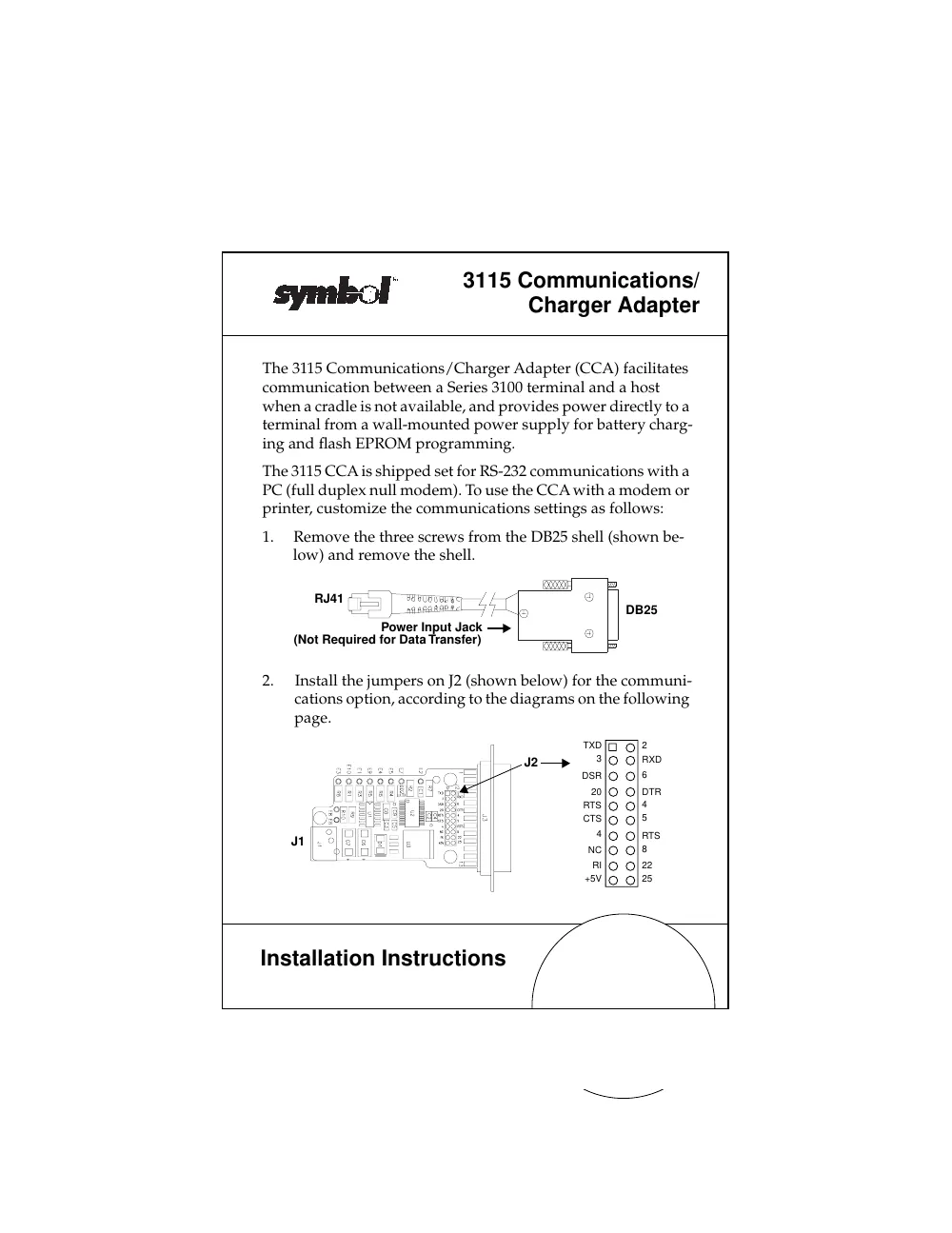
The text of page 1, from the PDF itself
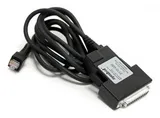
RS 2200/3200 Series 3115 Communications/ Charger Adapter The 3115 Communications/Charger Adapter (CCA) facilitates communication between a Series 3100 terminal and a host when a cradle is not available, and provides power directly to a terminal from a wall-mounted power supply for battery charging and flash EPROM programming. The 3115 CCA is shipped set for RS-232 communications with a PC (full duplex null modem). To use the CCA with a modem or printer, customize the communications settings as follows: 1.
Remove the three screws from the DB25 shell (shown below) and remove the shell. RJ41 DB25 Power Input Jack (Not Required for Data Transfer)
2.
Install the jumpers on J2 (shown below) for the communications option, according to the diagrams on the following page. J2
J1
Installation Instructions
TXD 32 RXDDSR620 RTS CTSDTR 4 54 NCRTS 8RI +5V22 25
Page2of 2
Open in the PDF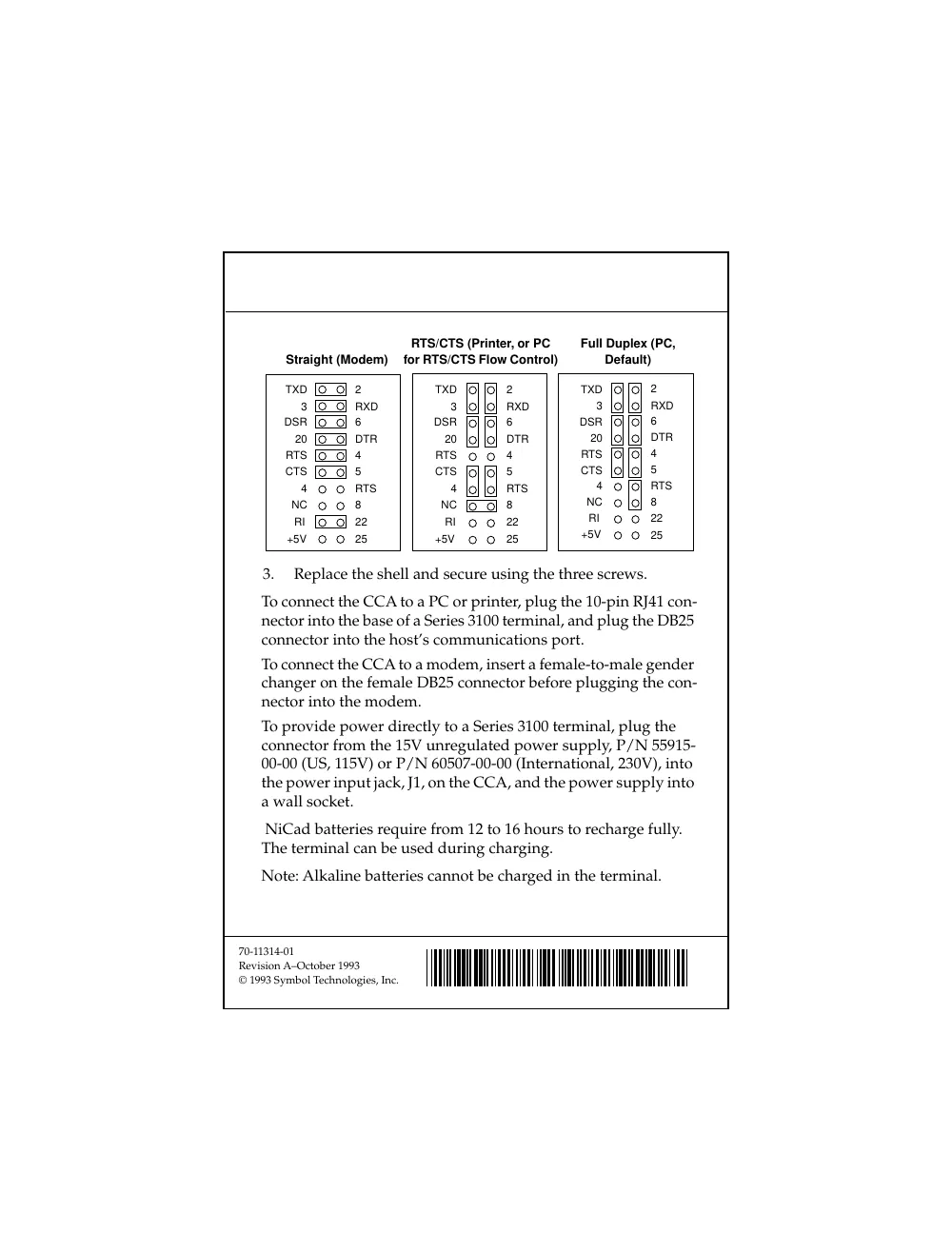
The text of page 2, from the PDF itself
Straight (Modem)
3.
RTS/CTS (Printer, or PC for RTS/CTS Flow Control)
TXD2TXD23 DSR 20RXD 6 DTR3 DSR 20RXD 6 DTRRTS CTS4 5RTS CTS4 54 NCRTS 84 NCRTS 8RI22RI22+5V25+5V25
Full Duplex (PC, Default) TXD 3 DSR 20 RTS CTS 4 NC RI +5V
2 RXD 6 DTR 4 5 RTS 8 22 25
Replace the shell and secure using the three screws.
To connect the CCA to a PC or printer, plug the 10-pin RJ41 connector into the base of a Series 3100 terminal, and plug the DB25 connector into the host’s communications port. To connect the CCA to a modem, insert a female-to-male gender changer on the female DB25 connector before plugging the connector into the modem. To provide power directly to a Series 3100 terminal, plug the connector from the 15V unregulated power supply, P/N 5591500-00 (US, 115V) or P/N 60507-00-00 (International, 230V), into the power input jack, J1, on the CCA, and the power supply into a wall socket. NiCad batteries require from 12 to 16 hours to recharge fully. The terminal can be used during charging. Note: Alkaline batteries cannot be charged in the terminal.
70-11314-01 Revision A–October 1993 © 1993 Symbol Technologies, Inc.