Manual · QSI Corp
QTERM-J10/N15 User's Manual
Manual34 pagesPDF 766 KB
User's manual for the QSI QTERM-J10 and QTERM-N15 industrial data-entry terminals: setup, command set and hardware.
Covers · 3 models
The models it covers

Summary
What is in it
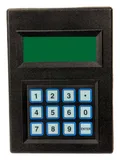
The user's manual for the QSI Corporation QTERM-J10 and QTERM-N15 data-entry terminals for industrial applications, covering the J10 handheld, J10 panel-mount and N15 panel-mount versions. It gives a quick start (power-on setup, wiring and power), the full QTERM software command set and default configuration, the JDEMO and JSETUP programs, and hardware details: dimensions, EIA-232, EIA-422 and 5-volt interfaces, pin assignments and specifications.
Its parts
- Quick Start
- QTERM Software
- Using JDEMO and JSETUP
- QTERM-J10/N15 Hardware
From the manual
Key facts from this manual
Each line names its page in the PDF.
User's manual (Revision 13) for the QSI QTERM-J10 and QTERM-N15 industrial data-entry terminals: the QTERM-J10 handheld and panel-mount versions and the QTERM-N15 panel-mount version. It explains the power-on setup, wiring and power, the host software commands, the JDEMO and JSETUP programs, and the hardware, interfaces and specifications.
- Device
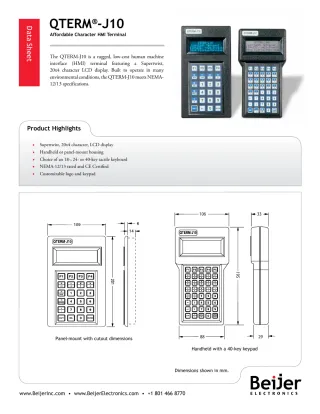
- Serial data-entry terminal for industrial use; QTERM-J10 handheld or panel-mount, QTERM-N15 panel-mount p. 5
- Display
- 4-line by 20-character supertwist LCD; backlight optional p. 24, 25
- Keypad
- QTERM-J10: 18, 24 or 40 keys; QTERM-N15: 12 keys; membrane dome keys p. 25
- Interfaces
- EIA-232 (up to about 15 meters), EIA-422 (about 1,000 meters) or 5-volt Buffered (about 5 meters) p. 24
- Power
- 4.75 to 5.25 volts DC; with the regulator option, 7.5 to 24 volts DC p. 10
- Current draw
- EIA-232 version 28 mA, EIA-422 version 25 mA; add 6 mA for regulator, 60 mA for backlight p. 25
- Connectors
- QTERM-J10 handheld: 6-pin modular connector; QTERM-J10 panel-mount and QTERM-N15: DB9 female at the rear p. 21, 22, 24
- Default serial setup
- 9600 baud, 8 data bits, 1 stop bit, no parity; XON/XOFF enabled p. 17
- Buffers
- Receive buffer 32 characters; transmit buffer 20 bytes p. 11
- Operating temperature
- -10 to +60 °C p. 25
- Storage and humidity
- Storage -40 to +85 °C; humidity 0 to 95% non-condensing p. 25
- Handheld housing
- QTERM-J10 handheld: black impact-resistant ABS; not waterproof, takes moderate rain or splash p. 21
- Software
- JDEMO.EXE demo and JSETUP.EXE setup program on a PC disk p. 19
- Document number
- M01-009-00 Rev 13, updated 14 October 2009 p. 1, 2
What this manual walks you through
- Setting display contrast, baud rate and data format with Power-On Setup p. 9
- Wiring the host transmit, receive, power and ground lines p. 9, 10
- Running the JDEMO program from a PC p. 10, 19
- Using XON/XOFF handshaking with the terminal p. 11
- Saving settings to EEPROM and restoring factory defaults p. 11, 20
- Controlling the terminal with host software commands p. 11, 12
- Setting power-up defaults from a .DAT file with JSETUP p. 19, 20
- Panel-mounting the QTERM-N15 p. 22, 23, 24
Good to know
- Power must come from an SELV source with its output current limited to 5 Amperes. p. 10
- An EIA-422 QTERM cannot connect directly to a PC COM port; an interface unit such as QSI's QCOM-2 is needed. p. 10
- Settings changed by software command are lost at power-off unless saved to EEPROM. p. 11
- Restore Factory Defaults resets every parameter except baud rate and data format. p. 11
- Without handshaking, use a slower baud rate or add delays so the receive buffer is not overrun. p. 11
Questions this manual answers
What voltage does the QTERM-N15 need?
4.75 to 5.25 volts DC, or 7.5 to 24 volts DC if it has the regulator option, from an SELV source. p. 10
How do I change the baud rate on a QTERM?
Use Power-On Setup: hold any key while applying power, then set contrast, baud rate and data format with keys 1, 2 and 3. p. 9
Can I connect an EIA-422 QTERM to a PC COM port?
Not directly. An interface unit such as QSI's QCOM-2 is needed. p. 10
Contents
Chapters and sections
Each line opens the PDF at its page.
The whole text · 4 parts
Read the manual here as text
Its text as extracted from the PDF, unedited, in parts; each page opens the PDF at that page.
The file