Manual · QSI Corp
Qlarity-Based Terminal Programmer's Reference Manual
Manual134 pagesPDF 1.5 MB
Programmer's reference for the Qlarity language on QSI Qlarity-based operator terminals such as the QTERM-G70.
Filed with · 1 model
Also filed with these models on the old site
Summary
What is in it
QSI Corporation's programmer's reference for its Qlarity-based terminals; the trademark list names the QTERM-G70, G75, G55 and Z60. It explains how the terminal software is built (firmware and user application), the object-based Qlarity language and its message handling, then gives the full language syntax, every system message with its handler prototype, and the Qlarity API functions for communications, objects, drawing and text. Appendices list constants, exceptions, the command line compiler and an API quick reference.
Its parts
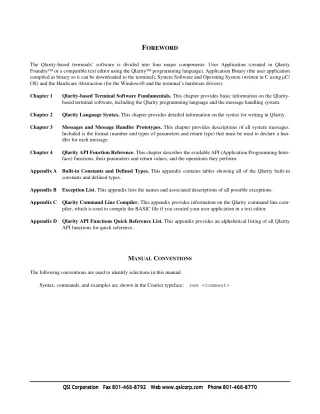
- Qlarity-based Terminal Software Fundamentals
- Qlarity Language Syntax
- Messages and Message Handler Prototypes
- Qlarity API Function Reference
From the manual
Key facts from this manual
Each line names its page in the PDF.
Programmer's reference manual (Revision 2.4, Manual 0060-01) for QSI Qlarity-based terminals in general; it names the QTERM-G70, QTERM-G75, QTERM-G55 and QTERM-Z60 only in its trademark line. It explains the terminal software layers, the Qlarity programming language, system messages and the Qlarity API functions, such as serial and Ethernet communications. It also lists the exception names and the command line compiler options.
- Document
- Qlarity-Based Terminal Programmer's Reference Manual, Revision 2.4, Manual 0060-01 p. 1
- Programming language
- Qlarity, an object-based, event driven language p. 13
- Development tools
- Qlarity Foundry for Windows, or a text editor with the qlarify command line compiler (Win32 or Linux) p. 13, 123
- Application storage
- Compiled application binary downloaded to the terminal and stored in flash memory p. 13
- System software
- Operating system based on µC/OS, Qlarity execution engine, message handling system and API functions p. 13
- Other components
- FreeType for TrueType fonts, a TCP/IP stack based on XINU, ZLIB for compression p. 13
- Communications API
- COM1 primary serial, COM2 secondary serial, and Ethernet channels opened with NetOpen() p. 47
- Network channels
- TCP or UDP; up to 64 channels open at once, 32 of them TCP p. 48
- Serial settings
- 600 to 115200 baud; 7 or 8 data bits; none, odd or even parity; 1 or 2 stop bits p. 101
- Keypad repeat
- Repeat delay and period each 20 ms to 2000 ms, in 20 ms steps p. 101
- Object types
- Non-drawable, area and container objects p. 14
- Exception names
- Non-fatal exceptions start with EXCEPT_, such as EXCEPT_NOMEM (unable to allocate memory) p. 117
What this manual walks you through
- How the terminal software is divided into layers p. 3, 13
- Defining object templates and creating object instances p. 14
- Non-drawable, area and container objects and the root container p. 14, 15
- Qlarity language syntax, messages and API reference chapters p. 3
- Sending data over serial and Ethernet with Send and Transmit p. 47
- Opening TCP, UDP and multicast channels with NetOpen p. 48
- Setting serial port and keypad options with system commands p. 101
- Looking up exception names and their messages p. 117, 118
- Compiling an application with the qlarify command line compiler p. 123, 124
Good to know
- Starting a network server with NetOpen() is deprecated; NetServerOpen() is the function to use. p. 48
- Multicast channels must use UDP; TCP/IP does not support multicast. p. 48
- The compiler needs natives.lib in its own directory or the program cannot be compiled. p. 123
- The Linux compiler is often in flux and may be only a snapshot of current development. p. 123
- The case sensitive compiler option must not be used with QSI provided code or libraries. p. 123
Questions this manual answers
What programming language do QSI Qlarity-based terminals use?
Applications are written in Qlarity, an object-based, event driven language, using Qlarity Foundry on Windows or a text editor. p. 13
How do I compile a Qlarity application without Qlarity Foundry?
Run the qlarify command line compiler on the file; it writes a .bff application file and needs natives.lib in its directory. p. 123
What serial baud rates can a Qlarity application set?
The baud rate commands accept values from 600 up to 115200 baud. p. 101
How many network connections can a Qlarity-based terminal open?
Up to 64 channels at any time, of which up to 32 can be TCP. p. 48
What does EXCEPT_NOMEM mean on a Qlarity terminal?
It is the memory exception for being unable to allocate memory. p. 117
Contents
Chapters and sections
Each line opens the PDF at its page.
- Chapter 1 Qlarity-based Terminal Software Fundamentals13
- Chapter 2 Qlarity Language Syntax19
- 2.1 Qlarity Statements19
- 2.2 White Space19
- 2.3 Comments19
- 2.4 Naming of Identifiers19
- 2.5 Built-In Data Types20
- 2.6 User-Defined Data Types20
- 2.7 Variables21
- 2.8 Object References22
- 2.9 Arrays23
- 2.10 Operators24
- 2.11 Casting25
- 2.12 Functions25
- 2.13 Conditionals (if Statement)28
- 2.14 Looping and Leaping28
- 2.15 Exception Handling29
- 2.16 Defining Objects29
- 2.17 Declaring Object Instances30
- 2.18 Level30
- 2.19 Including Files and Resources30
- 2.20 Libraries31
- 2.21 Precompile Directives31
- Chapter 3 Messages and Message Handler Prototypes33
- Chapter 4 Qlarity API Function Reference47
45 more lines, from page 52 on
- 4.2 Registering for Messages52
- 4.3 Manipulating Objects53
- 4.4 Manipulating Z-Order55
- 4.5 Redrawing Portions of the Display56
- 4.6 Painting to the Display56
- 4.7 Rendering Text on the Display65
- 4.8 Controlling the Speaker77
- 4.9 Array and String Functions80
- 4.10 Conversion Functions83
- 4.11 Math Functions85
- 4.12 User Message Functions86
- 4.13 User Input Capture88
- 4.14 Exception Functions89
- 4.15 User Non-Volatile Configuration Functions89
- 4.16 File System Functions90
- 4.17 Qlarity Foundry Functions94
- 4.18 Miscellaneous Functions94
- Appendix A Built-in Constants and Defined Types109
- Appendix B Exception List117
- B.1 Special Exceptions117
- B.2 Memory Exceptions117
- B.3 Message System Exceptions117
- B.4 Font Exceptions117
- B.5 Drawing Exceptions117
- B.6 Array Exceptions118
- B.7 Z-Order Exceptions118
- B.8 Miscellaneous Exceptions118
- B.9 Communications/Networking Exceptions118
- B.10 Math Exceptions119
- B.11 Flash Write Exceptions119
- B.12 File System Exceptions119
- B.13 Compiler Error Exceptions120
- B.14 Fatal Memory Exceptions120
- B.15 Fatal Flash Exceptions120
- B.16 Fatal Initialization Exceptions121
- B.17 Fatal Message System Exceptions121
- B.18 Network Fatal Exceptions121
- B.19 Miscellaneous Fatal Exceptions121
- B.20 Fatal Qlarity Foundry Exceptions121
- Appendix C Qlarity Command Line Compiler123
- Appendix D Qlarity API Functions Quick Reference List125
The whole text · 18 parts
Read the manual here as text
Its text as extracted from the PDF, unedited, in parts; each page opens the PDF at that page.
- Pages 1 to 41-4
- Contents, pages 5 to 85-8
- Contents, pages 9 to 129-12
- Chapter 1 Qlarity-based Terminal Software Fundamentals13-18
- Chapter 2 Qlarity Language Syntax, pages 19 to 2519-25
- Chapter 2 Qlarity Language Syntax, pages 26 to 3226-32
- Chapter 3 Messages and Message Handler Prototypes, pages 33 to 3933-39
- Chapter 3 Messages and Message Handler Prototypes, pages 40 to 4640-46
- Chapter 4 Qlarity API Function Reference, pages 47 to 5547-55
- Chapter 4 Qlarity API Function Reference, pages 56 to 6456-64
- Chapter 4 Qlarity API Function Reference, pages 65 to 7365-73
- Chapter 4 Qlarity API Function Reference, pages 74 to 8274-82
- Chapter 4 Qlarity API Function Reference, pages 83 to 9183-91
- Chapter 4 Qlarity API Function Reference, pages 92 to 10092-100
- Chapter 4 Qlarity API Function Reference, pages 101 to 108101-108
- Appendix A Built-in Constants and Defined Types109-116
- Appendix B Exception List117-122
- Pages 123 to 134123-134
The file