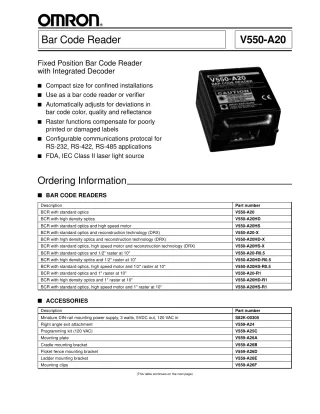
Spec sheet · Omron
Bar Code Reader V550-A20: Fixed Position Bar Code Reader with Integrated Decoder
Spec sheet20 pagesPDF 390 KB
Data sheet for the Omron V550-A20 fixed position laser bar code reader with integrated decoder and its HD, HS, DRX and raster versions.
Covers · 1 model
The models it covers
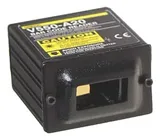
Summary
What is in it
Omron's data sheet for the V550-A20, a compact fixed position bar code reader with an integrated decoder that can also serve as a verifier. It gives ordering information for the standard, high density, high speed, DRX and raster models and their accessories, full specifications, operating range charts, the 15-pin connector pinout with RS-232, RS-422 and RS-485 wiring, setup with the BCSetup software, Omron PLC connection examples and a master/slave system, dimensions, sample symbologies and precautions.
Its parts
- Ordering Information
- Specifications
- Notes
- Engineering Data
- Connection
- Configuration
- PLC Connection Examples
- PLC Master/Slave System
- Dimensions
- Symbologies
- Precautions
From the sheet · read page by page
Key facts from this sheet
Each line names its page in the PDF.
Omron data sheet for the V550-A20 fixed position bar code reader with integrated decoder, including the V550-A20HD (high density), V550-A20HS (high speed), DRX (-X) and raster (-R0.5, -R1) versions. It gives ordering part numbers, specifications, read range charts, connector pinouts and wiring, BCSetup configuration, Omron PLC connection examples, dimension drawings and laser precautions.
- Device
- Fixed position bar code reader with integrated decoder, usable as a reader or verifier p. 1
- Interface
- D subminiature male 15 pin connector (RS-232, RS-422, RS-485) p. 2
- Power
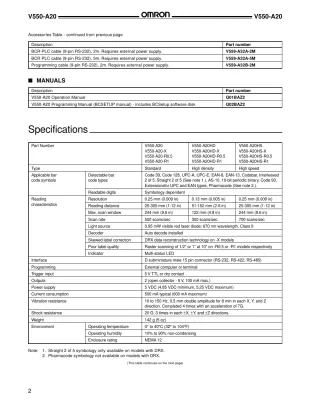
- 5 VDC (4.85 VDC minimum, 5.25 VDC maximum); 500 mA typical (600 mA maximum) p. 2
- Reading distance
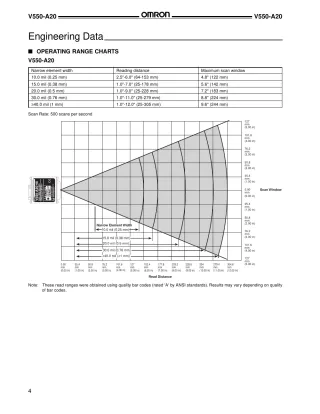
- Standard and high speed models: 25-305 mm (1-12 in); high density models: 51-152 mm (2-6 in) p. 2
- Scan rate
- Standard: 500 scans/sec; high density: 300 scans/sec; high speed: 700 scans/sec p. 2
- Weight
- 142 g (5 oz) p. 2
- Symbologies
- Code 39, Code 128, UPC-A, UPC-E, EAN-8, EAN-13, Codabar, Interleaved 2 of 5, Straight 2 of 5 (DRX models only), AS-10, 10-bit periodic binary, Code 93, extensions for UPC and EAN, Pharmacode (not on DRX models) p. 2
- Trigger and outputs
- Trigger input 5 V TTL or dry contact; 2 outputs, open collector, 5 V, 100 mA max. p. 2
- Resolution
- Standard and high speed: 0.25 mm (0.009 in); high density: 0.13 mm (0.005 in) p. 2
- Light source
- 0.95 mW visible red laser diode, 670 nm wavelength p. 2
- Environment
- Operating 0° to 40°C (32° to 104°F); 10% to 90% humidity non-condensing; NEMA 12 enclosure p. 2
- Cables and kit
- BCR-PLC cable V559-A32A-2M (2m) or V559-A32A-5M (5m); programming cable V559-A32B-2M; programming kit V559-A25C (120 VAC) p. 1, 2
- Mounting
- Right angle exit attachment V559-A24; mounting plate V559-A26A; brackets V559-A26B, V559-A26D, V559-A26E; mounting clips V559-A26F p. 1
- Manuals
- V550-A20 Operation Manual Q01BAZ2; Programming Manual with BCSetup software disk Q02BAZ2 p. 2
What this sheet walks you through
- Choosing a version by optics, motor, DRX and raster options p. 1
- Read range by narrow element width for each version p. 4, 5, 6
- Pin allocation of the 15 pin connector p. 7
- Wiring RS-232, RS-422 and RS-485 hosts p. 7, 8
- Configuring the reader from a PC with BCSetup p. 9
- Connecting to an Omron CQM1 PLC over RS-232 p. 10
- Connecting to an Omron C200HS or C200H alpha PLC over RS-232 p. 11
- Polling several readers on an RS-485 multidrop line p. 12
- Dimensions of the cables and mounting brackets p. 14, 15, 16, 17
- Installing the reader so the laser cannot reach the eyes p. 19
Good to know
- With RS-422 the receive lines on both sides must be terminated, with 220 ohm, 1/4 watt resistors. p. 7
- Each reader needs at least 500 mA, so a supply for several readers in parallel must be rated higher. p. 12
- Settings sent with Transfer Settings to Device and Use last only until the unit is powered down. p. 9
- Keep the laser beam from reflecting into eyes; the safety distance is about 1 m. p. 19
- Never disassemble the reader; it has no user serviceable parts. p. 19
Questions this sheet answers
What is the reading distance of the Omron V550-A20?
25-305 mm (1-12 in) for the standard and high speed models, and 51-152 mm (2-6 in) for the high density models. p. 2
What power supply does the V550-A20 need?
5 VDC (4.85 VDC minimum, 5.25 VDC maximum), drawing 500 mA typical and 600 mA maximum. p. 2
What is the difference between the V550-A20HD and V550-A20HS?
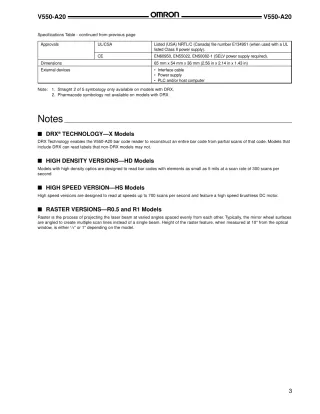
The HD has high density optics that read elements as small as 5 mils at 300 scans per second; the HS has a high speed brushless DC motor for up to 700 scans per second. p. 3
How many V550-A20 readers can share one RS-485 line?
Up to 32 slave readers per serial port on the master, depending on line length and required response time. p. 12
Contents
Chapters and sections
Each line opens the PDF at its page.
The whole text · 2 parts
Read the sheet here as text
Its text as extracted from the PDF, unedited, in parts; each page opens the PDF at that page.
The file