Manual · Intermec
RT1700 Radio Data Terminal User's Guide
Manual150 pagesPDF 1.6 MB
User's guide for the Intermec (Norand) RT1700 radio data terminal: setup, operation, menu settings, maintenance and specifications.
Names · 1 model
The models it names
Filed with · 1 model
Also filed with these models on the old site
Summary
What is in it
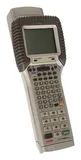
The user's guide for the RT1700 Radio Data Terminal from Intermec's Norand Mobile Systems Division. It explains setting up, operating and maintaining the hand-held terminal: the keyboard, display and battery pack, installing radio modules and attaching a bar code scanner, and the menu screens for setup, bar code, protocol (5250, 3270, VT220, Native) and display parameters. Appendices give terminal, scanner and radio specifications, bar code symbologies, keyboard overlays, connector pinouts and battery indicators.
Its parts
- General Information
- Terminal Operation
- Menu Screens
- Maintenance and Troubleshooting
From the manual
Key facts from this manual
Each line names its page in the PDF.
User's guide (May 1997) for the Intermec RT1700 Radio Data Terminal, the Norand hand-held radio terminal of the 1700 family, with UHF or spread-spectrum radio modules and optional integrated scanners. It covers setup, battery installation and charging, radio module replacement, menu settings, maintenance and troubleshooting, with specifications for the terminal, scanner and radio options.
- Device
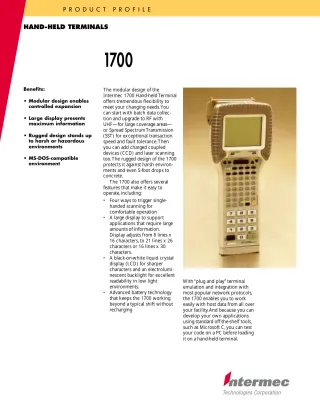
- RT1700 hand-held radio data terminal with a 57-key color-coded alphanumeric keyboard; data entered by keyboard or bar code scanner p. 13, 103
- Radio options
- Spread spectrum 2.4 GHz (RM80/RM90, 800 Kbps or 1.6Mbps) or 902 to 928 MHz (RM40/50 192 Kbps, RM60/70 405 Kbs); UHF 450 to 470 MHz at 4800 or 9600 baud; synthesized UHF 430 to 450 or 450 to 470 MHz at 19.2 Kbps p. 108
- Radio modules
- RM11 UHF; RM31 UHF with standard or long-range scanner; RM60 900 MHz; RM70 900 MHz with standard scanner; RM70LR 900 MHz long-range; RM80 2.4 GHz; RM90 2.4 GHz with standard scanner; RM90LR 2.4 GHz long-range p. 114
- Interconnect boards
- RM40 705-280-001; RM50 705-281-001; RM80 705-318-001; RM90 705-319-001 p. 37
- Memory
- RAM 512 K bytes; flash ROM 512 K bytes; masked ROM 128 K bytes for operating system, diagnostics and fonts p. 108
- Battery
- NiCd 6-cell pack P/N 317-081-001, 900 mA hour; optional NiMH 6-cell pack P/N 317-081-010, 1100 mA hour; 7.2 V dc nominal p. 108
- Battery life
- Average 10 to 12 hours of normal use p. 22
- Chargers
- In the terminal: NC1700 Charger on the 6-pin mini-DIN connector; pack removed: Alexander Fast Charger, 3 to 4 hours, or Alexander Optimizer and Cycle Charger, 1-1/2 hours p. 30, 108
- Ports
- 9 pin D-sub connector, 6-pin Mini-DIN RS-232 port and surface connector; external RS-232 up to 115.2 Kbps for printers, modems and tethered scanners p. 12, 108
- Size and weight
- Length 9.75 to 11.6 inches; width 4.15 inches (display), 2.625 inches (body); depth 2.6 to 3.75 inches (display), 1.375 inches (body); 28 to 35 oz., varying with options p. 107
- Environment
- Operating 0 to 50 C; storage -30 to 70 C; battery recharging 5 to 40 C; humidity 10 to 90% noncondensing p. 107
- Integrated scanner
- 670 nm VLD; standard range 55 scans per second, long range and VIN 36 scans per second; 4 foot drop to concrete p. 110
- Emulations
- Keyboard overlays for the host operating system, such as 5250, 3270 and VT220 p. 12
- Handstrap
- Replacement handstrap P/N 754-180-001 p. 102
What this manual walks you through
- Unpacking and inspecting the terminal p. 13
- Installing the battery pack p. 28, 29
- Charging the battery pack in the terminal p. 30
- Reading the battery power status indicator p. 25
- Replacing an SST radio module and its interconnect board p. 37
- Replacing the handstrap p. 102
- Troubleshooting power, keyboard, radio and scanner problems p. 103, 104, 105, 106
- Decoding the model number p. 109
- Network specifications of the 900 MHz, synthesized UHF and 2.4 GHz radio options p. 111, 112, 113
Good to know
- The terminal works only with 5-volt bar code scanners; a 12-volt scanner will not work and may damage it. p. 106
- Do not remove the battery pack while the charger is connected. p. 30
- Install the battery pack contact side first, or the contacts in the compartment are damaged. p. 29
- RAM data can be lost if the battery pack is out for more than five minutes or left low for 30 days or longer. p. 23
- The guide states long range and VIN scanners are Class IIIa laser products; do not stare into the beam. p. 37
Questions this manual answers
What battery does the RT1700 terminal use?
A 6-cell NiCd pack, P/N 317-081-001 (900 mA hour), or an optional 6-cell NiMH pack, P/N 317-081-010 (1100 mA hour), at 7.2 V dc nominal. p. 108
My RT1700 does not turn on. What should I check?
Make sure the battery pack is charged, try a known-good pack, and check that the pack is seated with its contacts touching the compartment contacts. p. 104
Can I use a 12-volt scanner with the RT1700?
No. It is compatible with 5-volt bar code scanners only; a 12-volt scanner will not work and may damage the terminal. p. 106
How long can the RT1700 keep its data while I change the battery?
It keeps RAM data for up to five minutes with the battery pack removed. p. 23
How long does an RT1700 battery last?
An average of 10 to 12 hours of normal use, depending on the pack's age and type and how the terminal is used. p. 22
The whole text · 15 parts
Read the manual here as text
Its text as extracted from the PDF, unedited, in parts; each page opens the PDF at that page.
- Pages 1 to 101-10
- Pages 11 to 2011-20
- Pages 21 to 3021-30
- Pages 31 to 4031-40
- Pages 41 to 5041-50
- Pages 51 to 6051-60
- Pages 61 to 7061-70
- Pages 71 to 8071-80
- Pages 81 to 9081-90
- Pages 91 to 10091-100
- Pages 101 to 110101-110
- Pages 111 to 120111-120
- Pages 121 to 130121-130
- Pages 131 to 140131-140
- Pages 141 to 150141-150
The file