Manual · Juniper Systems
Allegro DOS Owner's Manual
Manual166 pagesPDF 1.1 MB
Owner's manual for the Juniper Systems Allegro DOS rugged field PC: hardware, batteries, storage, MS-DOS utilities and programming.
Covers · 1 model
The models it covers
Summary
What is in it
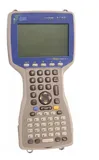
Juniper Systems' owner's manual for the Allegro Field PC running MS-DOS, a rugged, waterproof handheld for field data collection. It describes the case, keyboard, display, LED indicators, batteries and charging, serial ports, PC card slot and expansion pods; memory and storage options; the MS-DOS system with the Lynx and FileScout file utilities, terminal emulation and system setup; technical specifications; a software developer's guide; warranty; and the GPS expansion pod.
Its parts
- Introduction
- Hardware Components
- Memory Configuration and Data Storage Options
- MS-DOS Operating System
- Technical Reference
- Software Developer's Guide for DOS
- Warranty and Software License Agreement
- Expansion Pod
From the manual
Key facts from this manual
Some pages are scans or cannot be read; this says only what the readable text supports. Each line names its page in the PDF.
The Juniper Systems owner's manual for the Allegro DOS rugged field computer. It describes the hardware (keyboard, display, LEDs, batteries, serial ports, PC card slot, expansion pods), the MS-DOS utilities and setup program, the technical specifications, a software developer's guide and the GPS expansion pod.
- Device
- Rugged handheld field computer (Allegro Field PC) with keyboard and solid state disk storage p. 9
- Processor
- AMD SC 400, 486, 100 MHz p. 103
- Operating system
- MS-DOS 6.22 p. 103
- RAM
- 16 M low power RAM p. 104
- Display
- 1/4 VGA LCD, 320 x 240 pixels, 4.1 in diagonal; EL backlight, display heater, CGA graphics p. 103, 104
- Keyboard
- Large keys for gloved hands, 12 function keys, all printable ASCII characters p. 104
- Serial ports
- Two 9 pin D RS-232 ports (COM1, COM2), 300 baud to 115 Kbaud; +5 V for sensors on COM1 pin 4 (DTR) p. 44
- PC card slot
- PCMCIA 2.0 Type II, 16 bit; Type I or II cards, 5 V or 5 V/3 V (not 3 V only); drive D: p. 45
- Battery
- Rechargeable NiMH quick change pack, 10 to 16 hours typical; optional holder for 3 AA alkaline cells p. 105
- Power input
- 5.5 x 2.1 mm DC connector, 10 to 20 V DC; adapter must supply 12 V at 1 Amp p. 34
- Size and weight
- 10 in high x 5.25 in wide at display (3.1 in at narrowest) x 1.5 in deep (256 x 133 x 79 x 38 mm); 1.78 lbs (807 grams) p. 103
- Temperature
- Operating -22 to 130° F (-30 to 54° C); storage -30 to 140° F (-35 to 60° C) p. 103
- Standard accessories
- Distribution CD-ROM, NiMH battery pack, universal AC adapter, communication cable, mini and full size stylus, carrying straps p. 11
- Optional accessories
- Alkaline battery holder, vehicle power adapter, external battery charger, bar code wands, ATA flash and RAM PC cards, IrDA, USB and printer adapters, LandMark GPS package p. 11
What this manual walks you through
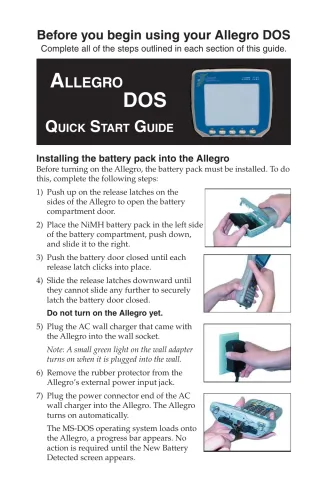
- Installing and first charging the battery pack p. 29, 30
- Charging with the AC adapter, vehicle adapter or external charger p. 34, 35
- Reading the LED indicators p. 28
- Connecting to a desktop PC and powering sensors from COM1 p. 44
- Inserting and changing PC cards p. 45, 46
- Using the C: solid state disk and D: PC card drives p. 52
- Attaching the GPS expansion pod antenna and its default settings p. 153, 154
- Handling a Power On Self Test error p. 110
- Opening the Quick Start Guide from the Allegro CD p. 12
Good to know
- A standard straight-through serial cable does not work; use the included 9 pin to 9 pin cable. p. 44
- When DTR goes low the COM1 output is -5 volts, so a connected device must accept or be protected against negative voltage. p. 44
- Use the supplied adapter or one that supplies 12 V at 1 Amp, or the battery pack could be damaged. p. 34
- Do not turn off the Allegro or remove a PC card while its LED is blinking. p. 46
- Put the Allegro in Vehicle Mode when it runs on vehicle power, to prevent excessive charging. p. 35
Questions this manual answers
What cable connects an Allegro DOS to a PC?
The 9 pin to 9 pin serial communication cable that comes with the Allegro; a standard straight-through serial cable does not work. p. 44
What memory cards does the Allegro DOS accept?
Type I or Type II PC cards such as ATA Flash, SRAM, Compact Flash or I/O cards, at 5 V or 5 V/3 V; 3 V only cards are not supported. p. 45
What processor and operating system does the Allegro DOS run?
An AMD SC 400 486 processor at 100 MHz running MS-DOS 6.22. p. 103
How long does the Allegro DOS battery last?
The NiMH pack lasts 10 to 16 hours between charges in typical use, depending on the application, backlight, heater and power management. p. 105
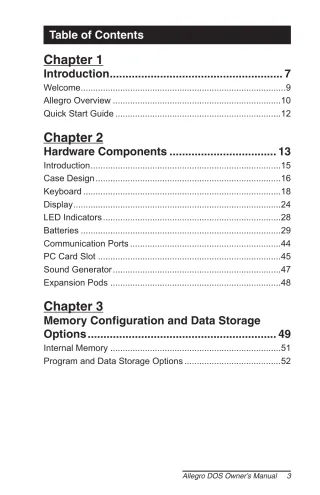
Contents
Chapters and sections
Each line opens the PDF at its page.
- Allegro DOS Owner's Manual1
- Chapter 1 Introduction7
- Chapter 2 Hardware Components13
- Chapter 3 Memory Configuration and Data Storage Options49
- Chapter 4 MS-DOS Operating System55
- MS-DOS Operating System Overview57
- Setting Up Communication58
- Lynx Windows File Management Utility61
- FileScout DOS File Manager67
- Text Editor74
- Terminal Emulation Program78
- System Setup Program80
- Startup Files89
- DOS Utility Programs and Device Drivers94
- Make Space Utility Program98
- Serial Printing Utility Program99
- Chapter 5 Technical Reference101
The whole text · 20 parts
Read the manual here as text
Its text as extracted from the PDF, unedited, in parts; each page opens the PDF at that page.
- Allegro DOS Owner's Manual1-6
- Chapter 1 Introduction7-12
- Chapter 2 Hardware Components, pages 13 to 2113-21
- Chapter 2 Hardware Components, pages 22 to 3022-30
- Chapter 2 Hardware Components, pages 31 to 3931-39
- Chapter 2 Hardware Components, pages 40 to 4840-48
- Chapter 3 Memory Configuration and Data Storage Options49-54
- Chapter 4 MS-DOS Operating System, pages 55 to 6455-64
- Chapter 4 MS-DOS Operating System, pages 65 to 7465-74
- Chapter 4 MS-DOS Operating System, pages 75 to 8475-84
- Chapter 4 MS-DOS Operating System, pages 85 to 9485-94
- Chapter 4 MS-DOS Operating System, pages 95 to 10095-100
- Chapter 5 Technical Reference, pages 101 to 108101-108
- Chapter 5 Technical Reference, pages 109 to 116109-116
- Chapter 6 Software Developer's Guide for MS-DOS, pages 117 to 125117-125
- Chapter 6 Software Developer's Guide for MS-DOS, pages 126 to 134126-134
- Chapter 6 Software Developer's Guide for MS-DOS, pages 135 to 142135-142
- Chapter 7 Warranty, and Software License Agreement143-150
- Chapter 8 Expansion Pod151-156
- Index157-166
The file