Manual · HHP
SCANTEAM 6180 Wand Programming Menu
Manual18 pagesPDF 96 KB
Bar code programming menu for the Welch Allyn SCANTEAM 6180 wand scanner: serial settings, data format and symbology options.
Names · 1 model
The models it names
Filed with · 1 model
Also filed with these models on the old site
Summary
What is in it
The programming menu for the Welch Allyn SCANTEAM 6180 wand. Each menu page is programmed by scanning its ENTER bar code, then selections and variables from the bar code chart, then EXIT. It shows how to check the firmware revision and software number, read the cord label, set baud rate, parity, preambles and postambles, intercharacter delay, beeper control, RTS/CTS, data format and low power mode, and enable and configure industrial and retail symbologies, with output formats, a Full ASCII Code 39 chart and sample bar codes.
From the manual · read page by page
Key facts from this manual
Each line names its page in the PDF.
The Welch Allyn programming menu (6180/PM, Rev G, 1999) for the SCANTEAM 6180 wand. It explains how to set the wand by scanning menu bar codes: serial settings, preambles and postambles, beeper control, which symbologies are read and their length limits, and how to check the firmware revision. Sample bar codes for testing are at the end.
- Baud rate
- Eight rates from 150 to 19200 baud p. 6
- Parity
- Mark, Space, Even or Odd p. 6
- Data format
- 7 or 8 data bits, 1 or 2 stop bits p. 6
- Symbologies
- Codabar, Code 39, UPC, EAN, Interleaved 2 of 5, Code 2 of 5, MSI, Code 93, Code 128, Code 11 (Code 11 not in all models) p. 9
- Handshake
- RTS/CTS for RS-232, not supported in all models or software revisions p. 6, 7
- Preamble, postamble
- Up to five characters each, added before or after the bar code data p. 6
- Intercharacter delay
- 01 to 99 milliseconds p. 6
- Beeper
- Beep on reset and beep on good read, each selectable p. 6
- Low power mode
- Pulses the LED and wakes on a black to white transition; Mask C firmware only p. 6, 7
- Firmware revision
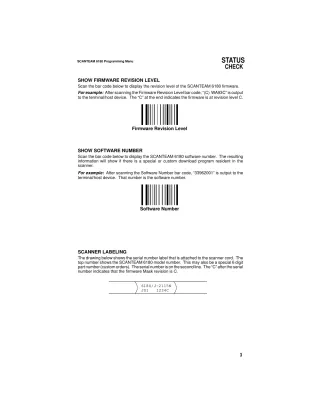
- Shown by scanning the Firmware Revision Level bar code; the last letter of the output, as in (C) WA93C, is the revision p. 3
- Cord label
- Top line model number (or a 6-digit custom part number); second line serial number ending in the firmware mask letter p. 3
- Code identifiers
- a Codabar, b Code 39, c UPC, d EAN, e Interleaved 2 of 5, f 2 of 5, g MSI, h Code 11, i Code 93, j Code 128 p. 8
- Full ASCII Code 39
- Character pairs decode as single ASCII characters when enabled p. 8
What this manual walks you through
- Checking the firmware revision and software number p. 3
- How the menu pages and bar code chart work together (ENTER, selections, EXIT) p. 5
- Returning one menu page or all settings to the defaults p. 5
- Setting baud rate, parity, data format and handshaking p. 6, 7
- Adding preambles and postambles with the Hex-ASCII chart p. 6
- Enabling symbologies and setting minimum and maximum lengths p. 8, 9
- Reading the UPC and EAN output formats and lengths p. 10
- Testing the setup with sample bar codes p. 17
Good to know
- Not every menu feature is supported in all models and software revisions of the SCANTEAM 6180. p. 2
- UPC Version D is not supported. p. 5
- For best data security, the menu advises disabling symbologies not in use. p. 8
- Indicator control changed with Mask C firmware; the cord label shows which firmware a wand has. p. 7
Questions this manual answers
How do I reset a SCANTEAM 6180 wand to its defaults?
Scan W.A. followed by DEFAULT to return all settings on both menu pages to defaults, or ENTER, DEFAULT, EXIT on one menu page. p. 5
How do I find the firmware revision of my SCANTEAM 6180?
Scan the Firmware Revision Level bar code; the wand sends a string such as (C) WA93C, and the last letter is the revision. The cord label also ends the serial number with the mask letter. p. 3
What baud rates does the SCANTEAM 6180 support?
Eight rates from 150 to 19200 baud, with Mark, Space, Even or Odd parity. p. 6
How do I make the SCANTEAM 6180 send a tab after each scan?
Program a Horizontal TAB postamble by scanning Enter, IV, D, 0, 9, EXIT. p. 6
The whole text · 2 parts
Read the manual here as text
Its text as extracted from the PDF, unedited, in parts; each page opens the PDF at that page.
The file