Manual · Fujitsu
iPAD Operations Guide (Draft)
Manual60 pagesPDF 1.3 MB
Draft operations guide for the Fujitsu iPAD100 handheld terminal, filed with its FCC report: batteries, charging, scanner and card readers.
What this file really is
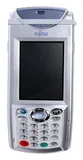
The old site listed this file as a manual for the Fujitsu CA72001-1895, FWTCA31 and 2 more models. The file is named for the FWTCA31, but it is a draft operations guide for the Fujitsu iPAD100 handheld terminal, taken from the manual appendix of an FCC test report.
Names · 1 model
The models it names
Filed with · 3 models
Also filed with these models on the old site
Summary
What is in it
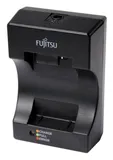
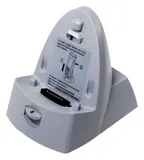
A draft of the operations guide for the Fujitsu iPAD (model iPAD100), a handheld wireless terminal with a laser bar code scanner, magnetic card reader and, on the IPAD100-20, an IC card reader/writer. It was filed as the manual appendix of an FCC test report. It names the parts, explains the main and auxiliary batteries and charging with the IPAD142-01 cradle, the single-pack charger and the CA72001-1895 daisychain cable, then covers power, touch screen calibration, the virtual keyboard, resets, LEDs, installing the wireless LAN card, the readers, troubleshooting, care and specifications.
Its parts
- Before Using the iPAD
- Setup
- Using the iPAD
- LED Indications
- Wireless LAN
- Bar Code Scanner
- Magnetic Card Reader
- IC Card Reader/Writer
- User Action Response to Messages
- Troubleshooting
- Correctly Using the iPAD
From the manual
Key facts from this manual
Some pages are scans or cannot be read; this says only what the readable text supports. Each line names its page in the PDF.
A draft of the Fujitsu iPAD Operations Guide (Revision 1.0, July 2002), filed with the FCC for the iPAD100-XX handheld, a Windows CE .NET terminal with bar code scanner, magnetic card reader, IC card reader/writer and wireless LAN card slot. It covers the parts, batteries and charging, resets, the scanner and card readers, messages, troubleshooting, care, specifications, consumables and options.
- Device
- Handheld terminal with touch panel, laser bar code scanner, magnetic card reader and IC card reader/writer p. 9, 45
- Processor
- Intel XScale-400MHz p. 50
- Memory
- ROM 32M bytes, RAM 64M bytes (SDRAM), FFS 32MB p. 50
- Operating system
- Windows CE .NET p. 50
- Display
- 3.5-inch TFT reflective color LCD, 240 x 320 dots, front light, resistive touch panel p. 50
- Main battery
- Lithium ion pack, 3.7 V 1700 mAh; product number 0644040; about 500 charges or two years p. 50, 52
- Interfaces
- Cradle USB client (for PC connection); one Compact flash slot (RF-LAN card); 2.5 mm headset jack p. 10, 50
- Wireless
- 11 Mbps wireless LAN through an RF card in the Compact flash slot, built-in antenna p. 9, 10
- Bar codes
- JAN/EAN-13/8, UPC-A/E, NW-7, CODE39/128, Interleaved2of5 (ITF) p. 50
- Temperature
- Operating 0 to 40°C; idle -20 to 60°C (non-condensing) p. 50
- Size and weight
- 84 (W) x 187 (D) x 23 (H) mm; about 340 g with battery p. 51
- Cradle
- IPAD142-01; two cradles link with cable CA72001-1895 p. 15, 53
- USB cable
- FHTCB271 (option) p. 53
- Auxiliary battery
- Built in, not replaceable; holds memory while the main battery is changed p. 14
What this manual walks you through
- Names of parts on the front and rear p. 9, 10
- Charging the main battery in the cradle or single-pack charger p. 15
- Using the screen keyboard and changing its type p. 32, 33
- Completely resetting the iPAD p. 35
- Reading a bar code with the scanner p. 40
- Cleaning the IC card reader/writer with the cleaning card p. 45
- What to do about battery alarms and other messages p. 46
- Troubleshooting an iPAD that will not turn on or a touch panel that does not respond p. 47
- Battery care, long-term storage and cleaning p. 48, 49
Good to know
- When changing the main battery, have a charged one ready and finish within ten minutes. p. 14
- A complete reset loses all data, settings and installed applications except the flash disk area. p. 35
- Run time drops in the cold: about 70% at 50°F and about 50% at 32°F. p. 48
- When stored with programs saved, charge the main battery once every week or memory is lost. p. 49
- This is a draft manual (Revision 1.0, July 2002) attached to an FCC filing. p. 1, 2, 3
Questions this manual answers
What battery does the Fujitsu iPAD use?
A 3.7 V 1700 mAh lithium ion pack, product number 0644040. p. 50, 52
What operating system does the Fujitsu iPAD100 run?
Windows CE .NET on an Intel XScale 400MHz processor. p. 50
What does the Fujitsu iPAD main battery alarm mean?
The main battery charge is too low; replace the battery or charge it in the charger or cradle. p. 46
What cradle fits the Fujitsu iPAD?
The cradle IPAD142-01; two cradles can be linked with cable CA72001-1895. p. 15, 53
Why won't my Fujitsu iPAD turn on?
The main battery may be flat, worn out, not installed correctly, or the battery lock switch may be unlocked. p. 47
The whole text · 6 parts
Read the manual here as text
Its text as extracted from the PDF, unedited, in parts; each page opens the PDF at that page.
The file