Manual · Datasouth
Fastmark 4000 Series Barcode Label Printer User's Guide
Manual114 pagesPDF 1.7 MB
User's guide for the Datasouth Fastmark 4000 Series label printers (FM4402, FM4602, FM4603): setup, loading, panel, commands and specs.
Covers · 1 model
The models it covers
Summary
What is in it
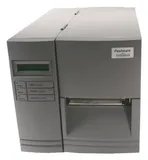
The user's guide for the AMT Datasouth Fastmark 4000 Series direct thermal and thermal transfer desktop barcode label printers, covering the FM4402, FM4602 and FM4603. It walks through unpacking, connecting to a host, loading ribbon and media, sensor calibration, self test and factory reset, then the front and back panels and setup menu, a PPLA and PPLB command quick reference, the Windows printer driver, troubleshooting and maintenance. Appendices give specifications, interfaces, fonts and bar codes.
Its parts
- Product Description
- Overview
- Unpacking and Inspection
- Installation and Configuration
- Panel Operation
- Command Quick Reference
- Printer Driver
- Troubleshooting and Maintenance
From the manual
Key facts from this manual
Some pages are scans or cannot be read; this says only what the readable text supports. Each line names its page in the PDF.
User's guide for the AMT Datasouth Fastmark 4000 Series barcode label printers, covering the FM4402, FM4602 and FM4603. It explains setup, the front and back panels, the PPLA and PPLB command sets, the Windows driver, troubleshooting and the interface pinouts.
- Printer type
- Direct thermal and thermal transfer desktop label printer p. 8
- Interfaces
- FM4602 and FM4603: RS-232 serial (female DB-9), Centronics parallel, and PS/2 port for a keyboard or wedge barcode reader p. 49, 80
- Parallel port
- Standard 36-pin Centronics p. 83
- Serial settings
- 2400, 4800, 9600, 19200 or 38400 baud; 8 data bits, no parity; XON/XOFF or CTS/RTS p. 82
- Power
- 110/220 VAC +10%, 50/60 Hz p. 76
- Emulations
- PPLA or PPLB p. 77
- Front panel
- FM4602 and FM4603: 16x2 LCD, plus 3 buttons and 3 LED indicators p. 11, 76
- Back panel switches
- FM4602 and FM4603: 8 switches set ribbon, cutter, gap size, peeler and baud rate p. 47, 48
- Label media
- Rolls up to 8 in. (203 mm) OD on 1.5 in. to 3.0 in. ID; die-cut, continuous, fan-fold, tags or tickets p. 76
- Ribbon
- Wax, wax/resin or resin; OD 3 in. (75mm), ID 1 in. (25 mm) p. 76
- Dimensions
- 9.8 x 16.0 x 10.2 in. (250 x 410 x 260 mm), width x depth x height p. 76
- Storage temperature
- -40° to 140°F (-40° to 60°C); humidity 15 to 85% RH p. 76
- Options
- Serial (RS-232) cable, Peel and Present, Cutter, Font board p. 78
- 2D bar codes
- MaxiCode and PDF417 in both PPLA and PPLB p. 77
What this manual walks you through
- Unpacking and checking the box contents p. 10
- Connecting the power cord and the host cable p. 13, 14
- Setting the back panel switches and baud rate on the FM4602 and FM4603 p. 47, 48
- Using a PS/2 keyboard or barcode reader in stand-alone mode p. 49
- Wiring a serial cable to a PC or terminal p. 80, 81
- Troubleshooting blinking LEDs and LCD error messages p. 70, 71, 72
- Reading the LCD status messages p. 84
- Cleaning the printhead, platen roller and media compartment p. 73, 74
Good to know
- Pin 9 of the serial port carries +5 V DC; leave it unconnected in your cable unless required. p. 14
- Sending data to the serial and parallel ports at the same time corrupts the receive buffer. p. 83
- A change to the back panel switches takes effect only after power is cycled. p. 47
- The font board and the flash module share one connector and cannot be fitted together. p. 78
- When the PS/2 keyboard port is used, the printer works stand-alone and the serial and parallel ports are discouraged. p. 49
Questions this manual answers
What ports does the Fastmark 4603 have?
An RS-232 serial port on a female DB-9, a standard 36-pin Centronics parallel port, and a PS/2 port for a keyboard or keyboard-wedge barcode reader. p. 49, 80, 83
How do I change the baud rate on a Fastmark 4603?
Set back panel switches 6, 7 and 8; all off gives 9600, the default. The change registers only after power is cycled. p. 47, 48
Why does my Fastmark show RIBBON OUT with direct thermal labels?
With direct thermal media switch 1 should be off; with it on, the printer expects a ribbon and detects end of ribbon. p. 47, 84
What printer languages does the Fastmark 4000 series use?
All three models, FM4402, FM4602 and FM4603, use PPLA or PPLB. p. 77
How do I clean the Fastmark printhead?
Turn the printer off, open the printhead module, remove the ribbon, and rub the head with cotton moistened with alcohol until the cotton comes away clean. p. 73
The whole text · 12 parts
Read the manual here as text
Its text as extracted from the PDF, unedited, in parts; each page opens the PDF at that page.
The file