Manual · Datalogic
DL910 Series Instruction Manual
Manual42 pagesPDF 503 KB
Instruction manual for the Datalogic DL910 and DL910-LR hand-held laser scanners: features, bar code configuration and specs.
Covers · 1 model
The models it covers
Summary
What is in it
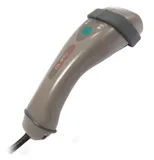
Datalogic's instruction manual for the DL910 series, hand-held laser bar code readers with a built-in interface. It describes how to aim the scanner, the gas tank that protects the laser from overheating, reading distance diagrams for the DL910 and long-range DL910-LR, and the LED and beeper indicators. The configuration chapter explains bar code menu, automatic and copy configuration, defaults and the bar code families for symbology selection and reading parameters, followed by maintenance, troubleshooting and technical features.
Its parts
- General Features
- Configuration
- Maintenance and Troubleshooting
- Technical Features
From the manual · read page by page
Key facts from this manual
Some pages are scans or cannot be read; this says only what the readable text supports. Each line names its page in the PDF.
Instruction manual for the Datalogic DL910 series hand-held laser bar code readers, including the long-range DL910-LR. It explains how to set the reader up by scanning configuration bar codes, what the default settings and beeper tones mean, how to keep the window clean, and what to check when the reader fails. It closes with the hardware and software specifications.
- Device type
- Hand-held laser bar code reader with a built-in interface p. 7
- Power supply
- 4.75 to 14 VDC p. 41
- Max. resolution
- 0.13 mm p. 41
- Scan rate
- 36 scans/sec. ± 3 p. 41
- Symbologies
- EAN/UPC with and without add-on, Code 39 (normal and Full ASCII), Code 32, C.I.P./39, C.I.P./HR, Codabar, ABC Codabar, Interleaved 2/5, Normal 2/5, Industrial 2/5 (IATA), Matrix 2/5, Code 93, Code 11, Code 128, MSI, Plessey, Telepen, IBM Delta, EAN 128 p. 42
- Code selection
- Single code or autodiscrimination of up to 5 codes p. 42
- Settings memory
- Internal nonvolatile EEPROM p. 42
- Decoding safety
- Up to 4 consecutive equal decodes before a code is accepted p. 42
- Indicators
- Red laser-on LED, green good-read LED and a two-tone beeper p. 10
- Protection class
- IP64 p. 41
- Humidity
- 95% non condensing, maximum p. 41
- ESD immunity
- 15 KV p. 41
- Reading mode
- Manual, using the on/off button p. 42
What this manual walks you through
- Configuring the reader by scanning the bar code menu p. 11
- Configuring from your own printed Code 128 labels p. 12
- Copying settings from one reader to another with a copy cable p. 12
- Restoring the factory default configuration p. 12, 13, 14
- Saving, discarding or restoring configuration changes p. 15
- Enabling bar code types, check digits and code lengths p. 16, 17, 18, 19, 20, 21, 22, 23
- Setting beeper volume, beeper tone and decoding safety p. 32, 33
- Understanding the LEDs and beeper tones p. 10
- Holding the scanner at the right angle to the code p. 7
- Cleaning the window and troubleshooting read problems p. 39
Good to know
- On standard DL910 models a "gas tank" limits laser on-time: after about 37 seconds of accumulated on-time the laser drops to a 50% duty cycle. p. 8
- Restoring the defaults also resets the output interface settings, so the correct interface parameters must be selected again right away. p. 14
- Changes ended with "End of modifications" are not saved and are lost at power off. p. 15
- Do not touch the window with fingers or abrasive materials; a dirty window slows reading and can stop it. p. 39
- The manual states the laser is Class 2 under EN60825-1 and CDRH. p. 41
Questions this manual answers
How do I reset a DL910 to factory defaults?
Scan the "Default" label in the configuration section. It replaces the saved setup with the factory defaults, including interface settings, which may then need to be selected again. p. 12, 14
What power supply does the DL910 need?
The technical features list a power supply of 4.75 to 14 VDC; consumption depends on the model. p. 41
Why does my DL910 beep continuously at power on?
The internal memory check (ROM/RAM/EEPROM) failed; the manual says to return the unit to the nearest Datalogic center. p. 39
Which bar codes can the DL910 read?
EAN/UPC, Code 39, Code 32, C.I.P., Codabar, the 2 of 5 codes, Code 93, Code 11, Code 128, MSI, Plessey, Telepen, IBM Delta and EAN 128, with up to 5 code types active at once. p. 42
Why does the DL910 laser slow down after heavy use?
The "gas tank" feature limits laser on-time to protect the laser from overheating; it switches fully off after about 37 seconds of inactivity. p. 8
The whole text · 5 parts
Read the manual here as text
Its text as extracted from the PDF, unedited, in parts; each page opens the PDF at that page.
The file