Manual · AML
Model 6000 Wireless Bar Code Decoder, Model 6200 Wireless Host, Model 6300 USB Wireless Host User's Manual
Manual24 pagesPDF 187 KB
User's manual for the AML M6000 wireless bar code decoder with the M6200 keyboard wedge and M6300 USB wireless hosts: setup, IDs and programming.
Covers · 2 models
The models it covers
Summary
What is in it
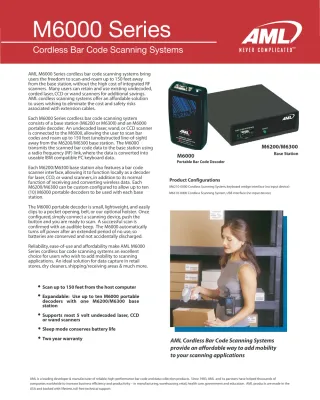
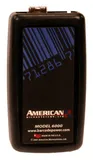
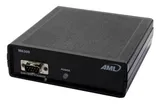
The user's manual for American Microsystems' wireless bar code system: the M6000 Wireless Bar Code Decoder, which turns an undecoded laser, CCD or wand into a wireless device, and the M6200 (AT or PS/2 keyboard) and M6300 (USB) Wireless Hosts that receive the data at the PC. It covers features, setup of each unit, radio usage guidelines, setting host and portable IDs, default settings, and a programming guide for symbologies, preamble and postamble, bar code options, keyboard type, beeps, diagnostics and shutdown time.
Its parts
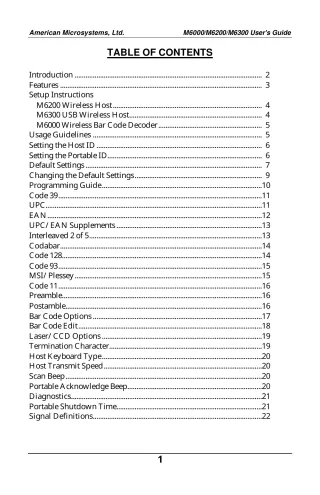
- Introduction
- Features
- Setup Instructions
- Usage Guidelines
- Setting the Host ID
- Setting the Portable ID
- Default Settings
- Changing the Default Settings
- Programming Guide
- Signal Definitions
From the manual
Key facts from this manual
Each line names its page in the PDF.
An American Microsystems user's manual (2002) for the Model 6000 Wireless Bar Code Decoder (M6000), the Model 6200 Wireless Host (M6200) and the Model 6300 USB Wireless Host (M6300). It covers connecting the hosts and the decoder, getting good radio range, setting Host and Portable IDs, changing settings with the Setup Menu bar codes, diagnostics and the scanner connector signals.
- System
- M6000 decoder makes an undecoded laser, CCD or wand wireless; the wireless host turns its data into PC keyboard data p. 4
- Host interface
- M6300: USB keyboard interface; M6200: AT or PS/2 keyboard interface p. 4
- Range
- About 150 feet, unobstructed line of sight p. 7
- Radio
- 916.5 MHz, in the 902-928 MHz ISM band p. 7, 8
- Battery
- M6000: one 9V battery p. 7
- Scanner port
- M6000: 9-pin D-shell connector with cable locking tabs, for laser, CCD or wand p. 7
- Scanners supported
- Any 5 volt undecoded laser, CCD or wand device p. 5
- System size
- Ten M6000 portables per wireless host; up to eight wireless hosts p. 5
- USB setup
- M6300: 6 ft. A-B USB cable supplied; Windows 98/ME/2000/XP p. 6
- Auto shutoff
- M6000: 01 to 99 minutes idle, 00 for no power off; default 10 minutes p. 23
- Default terminator
- Carriage return (ASCII 13 on M6200 and M6000, Enter key on M6300) p. 21
- Diagnostics
- Self-test reports firmware version, Host and Portable IDs, RAM, EPROM checksum, character set and beeper tests p. 23
- Bar codes
- Code 39, Extended Code 39, Interleaved 2 of 5, UPC-A, UPC-E, EAN-8, EAN-13, UPC/EAN supplements, Codabar, Code 128, Code 93, Code 11, MSI/Plessey p. 5
- Keyboard types
- M6200: USA (English), French, German, Italian or Universal p. 22
What this manual walks you through
- Connecting the M6200 to an AT or PS/2 keyboard port p. 6
- Installing the M6300 on a Windows PC USB port p. 6, 7
- Fitting the battery and scanner to the M6000 p. 7
- Getting the best radio range around metal and people p. 7, 8
- Setting the Host ID and Portable ID p. 8, 9
- Restoring the factory default settings p. 9
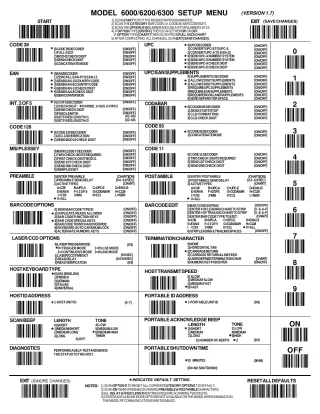
- Changing settings by scanning the Setup Menu p. 11
- Running the diagnostics self-test p. 23
- Setting the M6000 shutdown time p. 23
- Building or repairing scanner and keyboard cables from the DB9 signal list p. 24
Good to know
- Do not use USB extension cables with the M6300; use a USB hub if more length is needed. p. 7
- The M6200 wedge needs a keyboard connected to work. p. 6
- Each Host ID and Portable ID pair must be used only once; the default Host ID 1 must change when more than one host is used. p. 8
- Continuous and Blink laser modes are not available on the M6000; on the M6200 they disable wireless communication. p. 21
- A PC screen saver can pull keystrokes away from the data collection program and lose data. p. 8
Questions this manual answers
What battery does the AML M6000 use?
A 9V battery. If it is inserted backwards the M6000 will not turn on. p. 7
How do I reset the M6000 and M6300 to factory defaults?
Scan START, RESET ALL DEFAULTS and EXIT (SAVE CHANGES) on the Setup Menu. p. 9
How long before the M6000 turns itself off?
Ten minutes idle by default; it can be set from 01 to 99 minutes, or 00 to never power off. p. 23
Why is my M6000 range getting shorter?
The manual suggests trying a fresh battery, and keeping about two feet from metal objects. p. 7
Can I use a USB extension cable with the M6300?
No. The manual says to use a USB hub if extra length is needed. p. 7
The whole text · 3 parts
Read the manual here as text
Its text as extracted from the PDF, unedited, in parts; each page opens the PDF at that page.
The file