Manual · Allied Telesis
AT-WA7500 and AT-WA7501 Access Points Installation and User's Guide
Manual352 pagesPDF 3.4 MB
Installation and user's guide for the Allied Telesyn AT-WA7500 and AT-WA7501 wireless access points, software version 2.2.
Filed with · 4 models
Also filed with these models on the old site
Summary
What is in it
Installation and user's guide for the AT-WA7500 and AT-WA7501 access points, software release 2.2. It explains how the access points fit in a network, setting the IP address, installation on wired, fiber optic and Power over Ethernet connections, antenna placement, and configuring the Ethernet side, the 802.11g, 802.11b and 802.11a radios, spanning tree and IP tunnels, security (WEP, 802.1x, WPA), the embedded authentication server, management, troubleshooting and upgrades. Appendices list specifications and default settings.
Its parts
- Preface
- Getting Started
- Installing the Access Points
- Configuring the Ethernet Network
- Configuring the Radios
- Configuring the Spanning Tree
- Configuring Security
- Configuring the Embedded Authentication Server (EAS)
- Managing, Troubleshooting, and Upgrading Access Points
- Additional Access Point Features
From the manual
Key facts from this manual
Each line names its page in the PDF.
Installation and user's guide, version 2.2, for the Allied Telesyn AT-WA7500 and AT-WA7501 wireless access points running software release 2.2; it covers those two models only. It explains their features, LEDs and ports, how to mount, power and connect each model, how to set up radios, security and the network, and how to troubleshoot. An appendix gives the technical specifications of both access points and of their 802.11g, 802.11b and 802.11a radios.
- Device
- Wireless access point that can also work as a point-to-point or point-to-multipoint bridge, or as a wireless access point (WAP) or repeater p. 13
- Radios
- IEEE 802.11g, 802.11b and 802.11a; two radio slots (dual radio support) p. 13, 15, 17
- Ethernet port
- 10BaseT/100BaseTx, auto-negotiating p. 19
- Serial port
- RS-232, used with a null-modem cable to a terminal or PC for configuration; up to 115,200 bps p. 19, 310
- Power
- AT-WA7500: power over Ethernet from an 802.3af power bridge; AT-WA7501: AC power, power over Ethernet, or both p. 53, 54, 59
- PoE rating
- 48V, 315 mA p. 309, 311
- AC rating
- AT-WA7501: 100 to 240V, 1.0 to 0.5A, 50 to 60 Hz (standard) p. 311
- Operating temperature
- AT-WA7500: -20°C to +55°C (-4°F to +131°F) p. 309
- Operating temperature
- AT-WA7501: -25°C to +70°C standard; -30°C to +70°C with the optional heater (AC only) p. 311
- Size and weight
- AT-WA7500: 4.6 cm x 25.0 cm x 15.9 cm (HxLxW), 526 g (1.16 lb) p. 309
- Weight
- AT-WA7501: 2.63 kg (5.8 lb) p. 311
- Fiber optic option
- AT-WA7501 only: 100BaseFX port with a male MT-RJ connector; needs a multimode 62.5/125 µm patch cord with a female MT-RJ end p. 19, 55, 56
- LEDs
- Five: Power, Wireless #1, Wireless #2, Wired LAN, Root/error p. 17
- Software
- Release 2.2 p. 12
What this manual walks you through
- Mounting the AT-WA7501 on a desk, wall or beam p. 52
- Connecting the AT-WA7501 to the wired LAN and to AC power p. 53
- Mounting and connecting the AT-WA7500 p. 54
- Connecting the fiber optic option to an MT-RJ, SC or ST network p. 55, 56, 57, 58
- Running power over Ethernet from a power bridge p. 59
- Reading the LEDs and ports p. 17, 18, 19, 20, 21
- Resolving configuration error messages p. 245, 246, 247, 248, 249, 250
- Following the LED boot diagnostics p. 250
Good to know
- The 802.11g radio does not support wireless bridging or wireless hops. p. 16
- With an 802.11a full-range radio installed, only the antennas already attached to the antenna connectors may be used. p. 52
- Inserting a male MT-RJ connector into the fiber optic port may give unreliable operation. p. 55
- Only the appropriate Allied Telesyn power supply may be used, or equipment damage may occur. p. 53
- The manual states that the AT-WA7501 keeps its IP54 environmental rating only when mounted horizontally or vertically. p. 52
Questions this manual answers
How is the AT-WA7500 powered?
By power over Ethernet: it connects to a power bridge or another 802.3af power bridge, and the feature table lists no power supply for it. p. 16, 54, 59
Which radios does the AT-WA7500 support?
IEEE 802.11g, 802.11b and 802.11a radios, with a second radio slot for a second radio. p. 17, 310
What fiber optic cable does the AT-WA7501 need?
A multimode 62.5/125 µm patch cord with a female MT-RJ connector for the access point's male MT-RJ port, plus an adapter for an MT-RJ, SC or ST network. p. 55, 56
What is the range of the 802.11b radio?
At 11 Mbps, 160 m (525 ft) in an open environment, 50 m (165 ft) semi-open and 24 m (80 ft) in a closed environment. p. 314
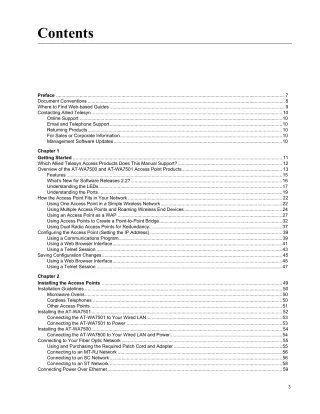
Contents
Chapters and sections
Each line opens the PDF at its page.
- Preface7
- Chapter 111
- Getting Started11
- Chapter 249
- Installing the Access Points49
- Chapter 365
- Configuring the Ethernet Network65
- Chapter 499
- Configuring the Radios99
- Chapter 5129
- Configuring the Spanning Tree129
- Chapter 6171
- Configuring Security171
45 more lines, from page 172 on
- Understanding Security172
- Chapter 7207
- Configuring the Embedded Authentication Server (EAS)207
- Chapter 8223
- Managing, Troubleshooting, and Upgrading Access Points223
- Chapter 9269
- Additional Access Point Features269
- Appendix A309
- Specifications309
- Appendix B317
- Default Settings317
- TCP/IP Settings Menu Defaults318
- DHCP Server Setup Menu Defaults320
- IEEE 802.11g Radio Menu Defaults321
- IEEE 802.11b Radio Menu Defaults323
- IEEE 802.11a Radio Menu Defaults325
- Spanning Tree Settings Menu Defaults327
- Global Flooding Menu Defaults328
- Global RF Parameters Menu Defaults329
- Telnet Gateway Configuration Menu Defaults331
- Ethernet Configuration Menu Defaults332
- IP Tunnels Menu Defaults335
- Network Management Menu Defaults337
- Security Menu Defaults338
- Appendix C343
- Glossary343
The whole text · 40 parts
Read the manual here as text
Its text as extracted from the PDF, unedited, in parts; each page opens the PDF at that page.
- Pages 1 to 61-6
- Preface7-10
- Chapter 1, pages 11 to 2011-20
- Chapter 1, pages 21 to 3021-30
- Chapter 1, pages 31 to 4031-40
- Chapter 1, pages 41 to 4841-48
- Chapter 2, pages 49 to 5649-56
- Chapter 2, pages 57 to 6457-64
- Chapter 3, pages 65 to 7365-73
- Chapter 3, pages 74 to 8274-82
- Chapter 3, pages 83 to 9183-91
- Chapter 3, pages 92 to 9892-98
- Chapter 4, pages 99 to 10899-108
- Chapter 4, pages 109 to 118109-118
- Chapter 4, pages 119 to 128119-128
- Chapter 5, pages 129 to 137129-137
- Chapter 5, pages 138 to 146138-146
- Chapter 5, pages 147 to 155147-155
- Chapter 5, pages 156 to 164156-164
- Chapter 5, pages 165 to 170165-170
- Chapter 6, pages 171 to 179171-179
- Chapter 6, pages 180 to 188180-188
- Chapter 6, pages 189 to 197189-197
- Chapter 6, pages 198 to 206198-206
- Chapter 7, pages 207 to 214207-214
- Chapter 7, pages 215 to 222215-222
- Chapter 8, pages 223 to 232223-232
- Chapter 8, pages 233 to 242233-242
- Chapter 8, pages 243 to 252243-252
- Chapter 8, pages 253 to 262253-262
- Chapter 8, pages 263 to 268263-268
- Chapter 9, pages 269 to 278269-278
- Chapter 9, pages 279 to 288279-288
- Chapter 9, pages 289 to 298289-298
- Chapter 9, pages 299 to 308299-308
- Appendix A309-316
- Appendix B, pages 317 to 325317-325
- Appendix B, pages 326 to 334326-334
- Appendix B, pages 335 to 342335-342
- Appendix C343-352
The file