Manual · Adtran
ISU 128 128 kbps ISDN Service Unit User Manual
Manual152 pagesPDF 809 KB
User manual for the ADTRAN ISU 128, a 128 kbps ISDN service unit: installation, operation, configuration, testing and specifications.
Covers · 1 model
The models it covers
Summary
What is in it
The user manual for the ADTRAN ISU 128 ISDN service unit (part numbers 1202029L2 and 1202029L3, the latter with a V.34 modem option). It explains ISDN and ISDN ordering codes, installing the network, DTE, dial and maintenance connections, operating the unit from the front panel or a VT 100 terminal, loopback testing, dial line and leased line configuration, DTE options, protocol options such as BONDING, V.120, V.110 and PPP, quick setup, dialing, remote configuration, troubleshooting and specifications, with appendices on AT commands, status messages, S-registers and connector pinouts.
Its parts
- Understanding ISDN and the ISU 128
- ISDN Ordering Codes (IOCs)
- Installation
- Operation
- Testing
- Configuration
- Protocol Options
- Quick Setup
- Dial Options
- Remote Configuration
- Troubleshooting
- Specifications
From the manual
Key facts from this manual
Each line names its page in the PDF.
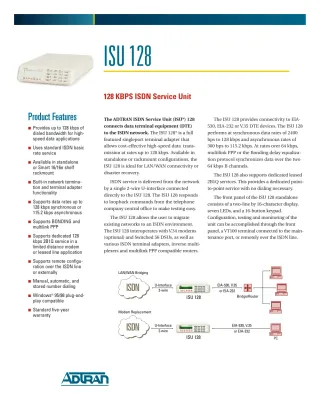
ADTRAN ISU 128 User Manual, document 61202.029L2-1D of January 1998, for the ISU 128 128 kbps ISDN Service Unit, part numbers 1202029L2 and 1202029L3 (with the V.34 modem option). It explains installation, configuration, dialing, testing and troubleshooting on ISDN and leased lines, with specifications and connector pinouts.
- What it is
- Stand-alone unit that connects data equipment to ISDN or a leased digital line at up to 128 kbps, with network termination built in p. 16
- Part numbers
- 1202029L2 115 VAC; 1202029L3 115 VAC with V.34 Modem Option p. 1
- Network interface
- RJ-45 jack labelled ISDN IFC for ISDN Basic Rate U-Interface and leased 2B1Q service; pin 4 Ring, pin 5 Tip p. 26, 98, 133
- DTE interfaces
- RS-530 (50 feet max cable), V.35 (30 feet), EIA-232 (15 feet), selected on the front panel p. 16, 27
- Data rates
- DTE 300 bps to 115.2 kbps asynchronous, 2400 bps to 128 kbps synchronous; network 64 kbps (one B channel) or 128 kbps (two) p. 98
- Dialing
- Front panel, up to ten stored numbers, RS-366 dial port, AT commands, V.25 bis, DTR assertion p. 17, 18
- Front panel
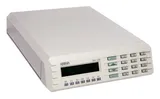
- 2-line, 16 character LCD; seven LEDs (RS, CS, TD, RD, CD, TR, SR); keypad p. 18
- Maintenance port
- 9600 bps, 8 data bits, no parity, asynchronous, on the RS-366/Maintenance port, for a VT 100 terminal over an EIA-232 cable p. 28
- Power
- 115 VAC, 60 Hz, 8 W maximum dissipation, from a grounded receptacle p. 26, 100
- Size and weight
- 2.25 in. H x 8.75 in. W x 11.00 in. D; 3 lbs p. 100
- Operating environment
- 0 to 50 C; up to 95% relative humidity, non-condensing p. 100
- ISDN switches
- AT&T 5ESS, NTI DMS-100, National ISDN-1, NEC p. 99
- Rate adaption
- T-Link, CCITT V.120, CCITT V.110, SAP, DSU 57.6 Async, BONDING mode 1, V.34 (optional), PPP, MP p. 99
- Works with
- Switched 56 DSUs (2-wire and 4-wire), ISDN terminal adapters, BONDING inverse multiplexers, analog modems with the V.34 option 1202029L3 p. 19
What this manual walks you through
- Connecting the ISDN or leased line and the DTE cable p. 26, 27
- Using the maintenance port with a VT 100 terminal p. 28
- Choosing a recommended protocol and rate for each call type p. 21, 22
- Front panel LEDs and what they show p. 18
- Self test failure and resetting to factory defaults p. 92
- Troubleshooting a unit that shows Link Down p. 93, 94
- Troubleshooting Getting TEI and Register SPID messages p. 94, 95, 96, 97
- Pinouts of the EIA-232, RS-530, V.35, RS-366, ISDN and maintenance connectors p. 130, 131, 132, 133, 134
Good to know
- A shielded V.35 cable is required to prevent possible radio frequency interference emissions. p. 27
- Flow control is required at 115,200 bps with PPP, V.120, SAP or asynchronous bonding. p. 21
- The maintenance port is disabled when the dial mode is RS-366, and it cannot pass data. p. 28
- The unit has no user-serviceable parts; service personnel replace fuse F1 only with a .2 A, 250 V fuse. p. 3
- V.35 pin J (ring indicator) is needed for most video conferencing applications. p. 132
Questions this manual answers
How do I reset an ADTRAN ISU 128 to factory defaults?
Turn it off, hold down the 0 key while powering it back on, and keep pressing 0 for 15 seconds. p. 92
What does Link Down mean on the ISU 128?
A physical problem with the ISDN line. Check that the unit is set for dial line service and that the line is a Basic Rate U-Interface with 2B1Q coding, not connected through another NT1. p. 93
What is the maximum V.35 cable length for the ISU 128?
30 feet; RS-530 allows 50 feet and EIA-232 15 feet. p. 27
What are the maintenance port settings on the ISU 128?
9600 bps, 8 data bits, no parity, asynchronous, on the RS-366/Maintenance port; the dial mode must be Front Panel or AT commands. p. 28
Which ISDN switches does the ISU 128 work with?
AT&T 5ESS, NTI DMS-100, National ISDN-1 and NEC. p. 99
The whole text · 16 parts
Read the manual here as text
Its text as extracted from the PDF, unedited, in parts; each page opens the PDF at that page.
- Pages 1 to 101-10
- Pages 11 to 2011-20
- Pages 21 to 3021-30
- Pages 31 to 4031-40
- Pages 41 to 5041-50
- Pages 51 to 6051-60
- Pages 61 to 7061-70
- Pages 71 to 8071-80
- Pages 81 to 9081-90
- Pages 91 to 10091-100
- Pages 101 to 110101-110
- Pages 111 to 120111-120
- Pages 121 to 130121-130
- Pages 131 to 140131-140
- Pages 141 to 150141-150
- Pages 151 to 152151-152
The file