Manual · Aceeca
User's Guide for the Meazura MEZ1000
Manual98 pagesPDF 2.0 MB
User's guide for the Aceeca Meazura MEZ1000 RDA, a Palm OS handheld: setup, data entry, applications, HotSync and battery care.
Covers · 1 model
The models it covers
Summary
What is in it
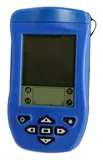
The user's guide for the Aceeca Meazura MEZ1000 RDA, a Palm Powered handheld. It introduces the front and back panel components and cradle, then explains customizing the device, installing Palm Desktop software, entering data with the onscreen keyboard and Graffiti 2 handwriting, managing and securing applications, the Date Book, To Do List, Address Book, Memo Pad and Calculator, the Attention Manager, expansion cards, beaming, HotSync synchronization and maintaining the RDA and its battery pack.
Its parts
- Introduction to the Meazura MEZ1000 RDA
- Entering Data in Your Meazura MEZ1000 RDA
- Managing Applications
- Working with Applications
- Using the Attention Manager
- Using an Expansion Card
- Performing Common Tasks
- Beaming Information
- Exchanging and Updating Data using HotSync Operations
- Maintaining Your RDA
From the manual
Key facts from this manual
Each line names its page in the PDF.
Aceeca's User's Guide (printed June 2007) for the Meazura MEZ1000 RDA, a waterproof handheld that runs Palm applications. It covers the buttons and connectors, Palm Desktop and HotSync setup, the built-in applications, resets, battery care and module removal.
- Device
- Handheld (RDA) with Date Book, Address Book, To Do List, Memo Pad and Expense; expandable by an MZIO module p. 12, 13
- Battery
- Custom rechargeable lithium-ion pack; 45 days standby, 60 hours continual use; 300-500 charge cycles p. 13, 97
- Connection
- Cradle or communications cable to a serial or USB (COM) port; AC adapter for charging p. 13, 14
- Infrared port
- Beams data to other Meazura MEZ1000 RDAs and performs HotSync operations p. 14
- PC requirements
- Windows 95 or later, 486 or higher, 8 MB RAM (16 MB recommended), 20 MB disk, CD-ROM, mouse, one serial or USB port p. 10
- Desktop software
- Palm Desktop and HotSync Manager from the Meazura Desktop CD (D:\install_menu.exe); conduits for other PIMs such as Microsoft Outlook p. 10, 21
- Sealing
- The manual states dustproof and waterproof to IP67 standards p. 96
- Case material
- Bayer Bayblend FR2000 plastic; resists mineral acids, many organic acids and saline solutions p. 96
- Battery temperatures
- Charge at 0°C to 45°C; store at -20°C to 40°C p. 97
- Soft reset
- Press and release Power and Backlight together; records are kept p. 11
- Hard reset
- Hold Power and Backlight, release Backlight, release Power at the Palm Powered logo, then up arrow to continue; erases all records p. 11, 12
- Contrast
- Hold the Backlight button about 1.5 seconds for the contrast slider p. 12
- Center button
- User configurable quick start button, set in Prefs, Buttons; default switches application categories p. 12
- Accessories in the box
- Two styli (one replacement); cable or cradle p. 14
What this manual walks you through
- Upgrading Palm Desktop when moving to a new RDA p. 10, 11
- Soft and hard resets p. 11, 12
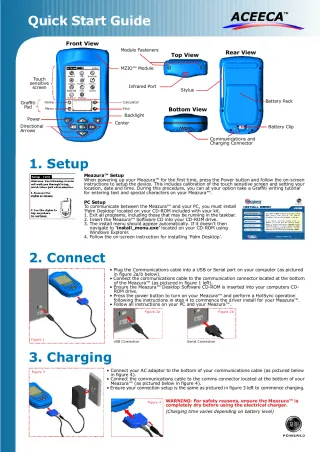
- Front, back and top panel components p. 12, 13, 14
- Connecting the cable or cradle to a PC p. 14
- Installing Palm Desktop on Windows p. 21
- First HotSync operation and user profiles p. 91
- Setting HotSync Manager port and speed options p. 92
- Customizing HotSync conduit settings p. 93
- Cleaning the RDA and caring for the battery pack p. 96, 97
- Removing and re-installing the MZIO module p. 98
Good to know
- The RDA must be completely dry before charging or use near electrical equipment. p. 96
- The case is not resistant to bases, aromatics, ketones, esters, chlorinated hydrocarbons and some greases and oils. p. 96
- After the module is removed, its screws must be retightened (hand tight) to keep the IP67 seal. p. 98
- The RDA needs a dedicated serial or USB port; it cannot share one with an internal modem. p. 14
- The manual says not to operate the RDA in extreme conditions such as long periods underwater, extreme heat or cold, or extreme altitude. p. 96
Questions this manual answers
How long does the Meazura MEZ1000 battery last?
The lithium-ion pack gives about 45 days standby or 60 hours of continual use, and 300-500 charge cycles. p. 13, 97
How do I hard reset the Aceeca Meazura MEZ1000?
Hold Power and Backlight, release Backlight, release Power when the Palm Powered logo appears, then press the up arrow to continue. It erases all records. p. 11, 12
What does the Meazura MEZ1000 need on the PC?
Windows 95 or later with Palm Desktop installed from the Meazura Desktop CD, and one free serial or USB port. p. 10, 21
Is the Meazura MEZ1000 waterproof?
The manual states it is dustproof and waterproof to IP67 standards, but not for long periods underwater. p. 96
At what temperature can the Meazura battery be charged?
Between 0°C and 45°C; it can be stored between -20°C and 40°C. p. 97
Contents
Chapters and sections
Each line opens the PDF at its page.
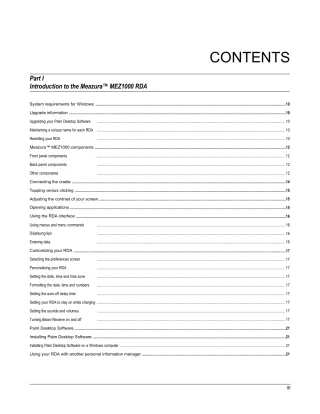
- Introduction to the Meazura™ MEZ1000 RDA10
- System requirements for Windows10
- Upgrade information10
- Meazura™ MEZ1000 components12
- Connecting the cradle14
- Tapping versus clicking15
- Adjusting the contrast of your screen15
- Opening applications15
- Using the RDA interface16
- Customizing your RDA17
- Palm Desktop Software21
- Installing Palm Desktop Software21
- Using your RDA with another personal information manager21
- Entering Data in Your Meazura™ MEZ1000 RDA23
- Managing Applications32
- Working with Applications41
- Using the Attention Manager68
- Using an Expansion Card72
The whole text · 14 parts
Read the manual here as text
Its text as extracted from the PDF, unedited, in parts; each page opens the PDF at that page.
- Pages 1 to 61-6
- Pages 7 to 97-9
- Introduction to the Meazura™ MEZ1000 RDA10-22
- Entering Data in Your Meazura™ MEZ1000 RDA23-31
- Managing Applications32-40
- Working with Applications, pages 41 to 4941-49
- Working with Applications, pages 50 to 5850-58
- Working with Applications, pages 59 to 6759-67
- Using the Attention Manager68-71
- Using an Expansion Card72-77
- Performing Common Tasks78-87
- Beaming Information88-90
- Exchanging and Updating Data using HotSync® Operations91-95
- Maintaining Your RDA96-98
The file