Manual · Zebex
ZB-800 Series User's Manual
Manual22 pagesPDF 133 KB
User's manual for the Zebex ZB-800 series bar code wand scanners, with the programming bar codes for every setting.
Covers · 1 model
The models it covers

Summary
What is in it
User's manual for the Zebex ZB-800 series bar code wand scanners in keyboard emulation (ZB-800K), RS-232C and CMOS serial versions. It explains how the wand is configured by scanning programming bar code labels, lists the default parameters, and gives the labels for header and trailer, delays, beeper tone, bar code identifiers, RS-232C communication settings, keyboard type and language, and the decoding options for Code 39, Interleaved 2 of 5, UPC/EAN/JAN, Codabar, Code 128 and other symbologies.
Its parts
- Introduction
- Default Parameters
- Program Procedure
- System Setting
- Header And Trailer
- Inter-Message Delay
- Inter-Character Delay
- Message/Block Mode Selection
- Beeper Tone Selection
- Bar Code ID Selection
- RS-232C Serial Communication Parameters Setting
- Keyboard Emulation Parameters Setting
- Reading Code Selection
- Code 39 Parameters Setting
- Interleaved 2 Of 5 Parameters Setting
From the manual · read page by page
Key facts from this manual
Each line names its page in the PDF.
Programming manual from December 1995 for the ZEBEX ZB-800 Series bar code wand scanners, including the ZB-800K keyboard emulation and ZB-800R and ZB-800C serial versions. It lists the defaults and gives the bar code labels that set interface, serial and keyboard parameters and symbologies.
- Setup method
- Wand scanners configured by scanning programming bar code labels p. 5
- Interfaces
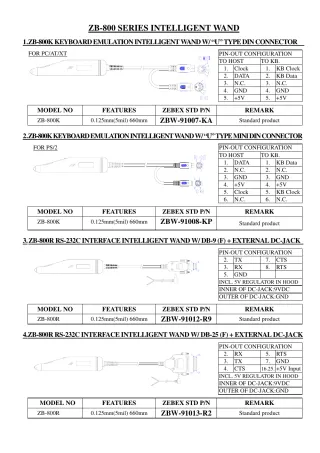
- Keyboard emulation, RS-232C serial, CMOS serial p. 2
- Power, RS-232C type
- External power adaptor required p. 5
- Power, keyboard type
- Drawn from the keyboard port on IBM PC/XT/AT, PS/2 and compatibles p. 5
- Settings memory
- Non-volatile; kept when power is removed p. 5
- Symbologies
- Code 39, Codabar, UPC/EAN/JAN, Italian Pharmac, ITF 2 of 5, SLZ 2 of 5, Code 128, MSI, Code 93, IATA p. 12, 13
- Book codes
- ISBN/ISSN conversion p. 16
- Handshaking
- None, RTS/CTS, ACK/NAK, Xon/Xoff p. 10
- Baud rates
- 600, 1200, 2400, 4800, 9600 or 19200 p. 10
- Keyboard types
- IBM XT, IBM AT, PS/2, NEC 9801, APPLE MAC II (optional) and several IBM terminals p. 11, 12
- Keyboard languages
- USA, UK, Germany, French, Spanish, Italian, Swiss, Swedish p. 12
- Beeper tone
- 1 KHz or 2 KHz, at 120 or 200 mSec p. 9
- Document date
- Printed December 1995 p. 2
What this manual walks you through
- Resetting the wand to its default parameters p. 8
- Selecting the interface the first time the wand is configured p. 8
- Setting headers, trailers and message delays p. 8
- Setting message or block mode and the send command p. 9
- Choosing the good-read beeper tone p. 9
- Setting bar code identifier codes p. 9, 10
- Setting RS-232C serial parameters and terminator p. 10, 11
- Choosing keyboard type, language and terminator p. 11, 12
- Enabling symbologies and setting check digits and lengths p. 12, 13, 14, 15, 16
Good to know
- The scanner must be powered before it can be programmed. p. 5
- A keyboard emulation wand on a computer that is not IBM PC compatible may need an external power adaptor. p. 5
- The first time a ZB-800R or ZB-800C is configured, its serial interface label must be scanned. p. 8
Questions this manual answers
How do I reset a Zebex ZB-800 wand to defaults?
Scan Start of configuration, then RESET, then End of configuration. p. 8
Does the ZB-800 RS-232C wand need a power adapter?
Yes, RS-232C types need an external power adaptor; keyboard emulation types draw power from the keyboard port of IBM compatible PCs. p. 5
What does the ABORT label do?
It discards all parameters scanned before the End of configuration label. p. 8
What do the beeps mean while programming the ZB-800?
A short beep means a good, valid reading; long beeps mean an invalid or bad reading. p. 5
Which keyboard languages does the ZB-800 support?
USA, UK, Germany, French, Spanish, Italian, Swiss and Swedish. p. 12
The whole text · 3 parts
Read the manual here as text
Its text as extracted from the PDF, unedited, in parts; each page opens the PDF at that page.
The file