Manual · Zebex
Zebex ZB-800 Pin Out List
Manual3 pagesPDF 201 KB
All 3 pages are below, each with its text.
Covers · 1 model
The models it covers
From the manual · read page by page
Key facts from this manual
Each line names its page in the PDF.
ZEBEX selection guide for the ZB-800 Series intelligent wand: the ZB-800K keyboard emulation and ZB-800R RS-232C versions. It gives each connector version's part number and pin-out, plus wand holders, power adapters and an ordering example.
- Device
- Intelligent wand: ZB-800K keyboard emulation, ZB-800R RS-232C p. 1
- Keyboard, PC/AT/XT
- ZB-800K with "U" type DIN connector: ZBW-91007-KA p. 1
- Keyboard, PS/2
- ZB-800K with "U" type mini DIN connector: ZBW-91008-KP p. 1
- RS-232C, DB-9 with jack
- ZB-800R, DB-9 (F) plus external DC jack: ZBW-91012-R9 p. 1
- RS-232C, DB-25 with jack
- ZB-800R, DB-25 (F) plus external DC jack: ZBW-91013-R2 p. 1
- RS-232C, DB-9 only
- ZB-800R, DB-9 (F), +5V on pin 9: ZBW-91015-R9 p. 2
- DC jack
- Inner 9VDC, outer GND; 5V regulator in the hood p. 1
- Power adapters
- 9 VDC 450mA: PWO-90801-NL (110 VAC) or PWO-90804-VD (220 VAC) p. 2
- Cable
- 6.5 feet (2m) straight p. 2
- Wand holders
- ZBW-91093-HL and ZBW-91092-HL; ivory for ZB-800K, black for ZB-800R p. 2
- DB-9 pins, jack version
- 2 TX, 3 RX, 5 GND, 7 CTS, 8 RTS p. 1
- DB-9 pins, no jack
- 2 RX, 3 TX, 5 GND, 7 RTS, 8 CTS, 9 +5V p. 2
- DB-25 pins
- 2 RX, 3 TX, 4 CTS, 5 RTS, 7 GND p. 1
- AT/XT DIN pins
- To host: 1 Clock, 2 DATA, 3 N.C., 4 GND, 5 +5V p. 1
What this manual walks you through
- Pin-outs of each connector version p. 1, 2
- Optional wand holders and power adapters p. 2
- Choosing interface, connector and accessories when ordering p. 3
Good to know
- The document warns that not every RS-232C pin-out follows the IEEE standard; special pin-outs were offered for orders of at least 50 pcs. p. 2
- The power adapters are for external power on the RS-232C versions. p. 2
Questions this manual answers
What power supply does the Zebex ZB-800R need?
A 9 VDC 450mA adapter: PWO-90801-NL for 110 VAC or PWO-90804-VD for 220 VAC. p. 2
What is the part number of the ZB-800 wand for a PS/2 keyboard port?
ZBW-91008-KP, the ZB-800K with a mini DIN connector. p. 1, 3
How long is the ZB-800 cable?
6.5 feet (2m), straight. p. 2
What is the DB-9 pin-out of the ZB-800R with DC jack?
Pin 2 TX, 3 RX, 5 GND, 7 CTS, 8 RTS. p. 1
The file
Size and text
Every page · 3
Read it here
Each page as it is printed, and its words beside it, so a phone can search and copy them.
Page1of 3
Open in the PDF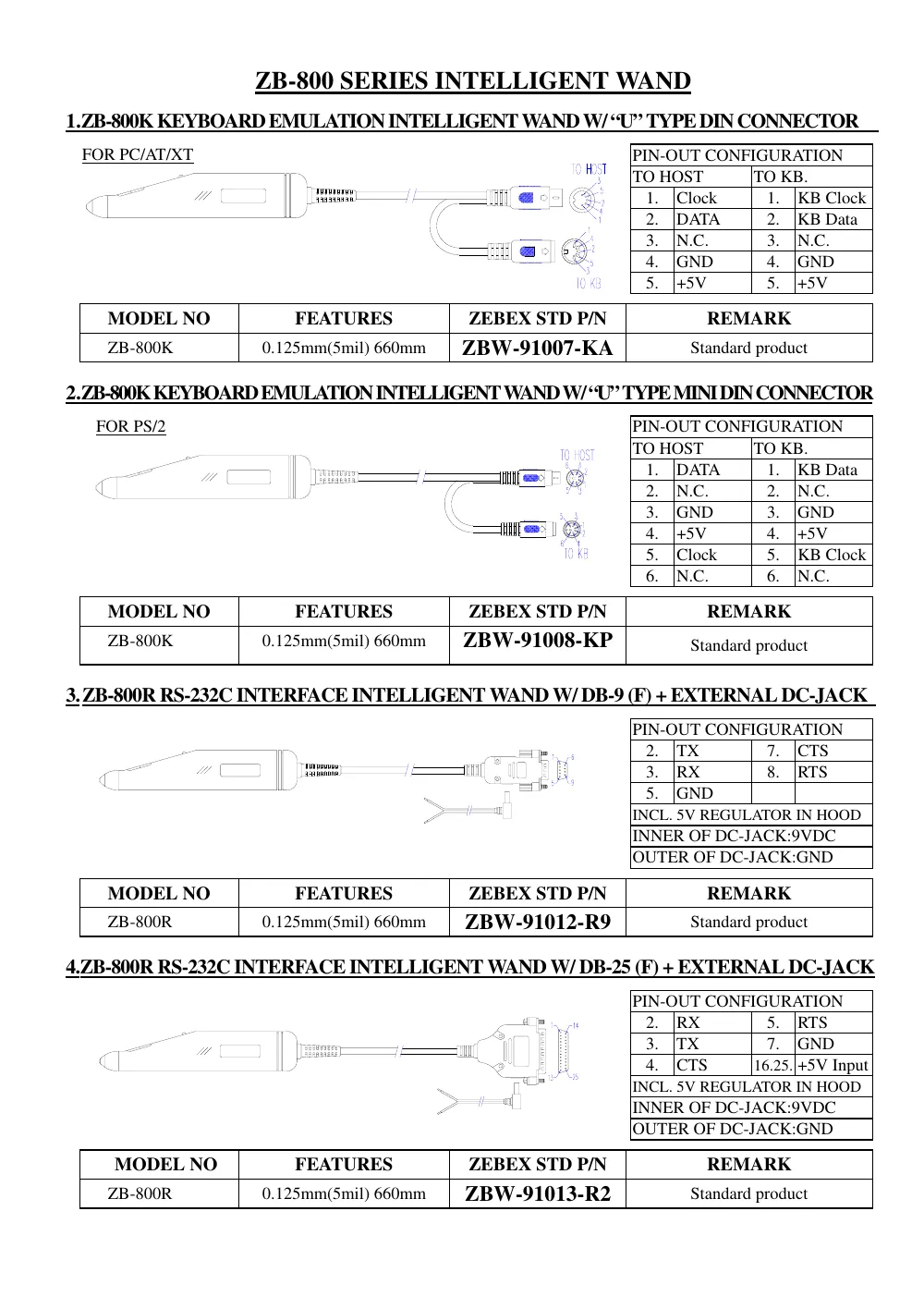
The text of page 1, from the PDF itself
ZB-800 SERIES INTELLIGENT WAND 1.ZB-800K KEYBOARD EMULATION INTELLIGENT WAND W/ “U” TYPE DIN CONNECTOR FOR PC/AT/XT
MODEL NO ZB-800K
PIN-OUT CONFIGURATION TO HOST TO KB. 1. Clock 1. KB Clock 2. DATA 2. KB Data 3. N.C. 3. N.C. 4. GND 4. GND 5. +5V 5. +5V
FEATURESZEBEX STD P/NREMARK0.125mm(5mil) 660mmZBW-91007-KAStandard product
2.ZB-800K KEYBOARD EMULATION INTELLIGENT WAND W/ “U” TYPE MINI DIN CONNECTOR FOR PS/2
MODEL NO ZB-800K
PIN-OUT CONFIGURATION TO HOST TO KB. 1. DATA 1. KB Data 2. N.C. 2. N.C. 3. GND 3. GND 4. +5V 4. +5V 5. Clock 5. KB Clock 6. N.C. 6. N.C.
FEATURESZEBEX STD P/NREMARK0.125mm(5mil) 660mmZBW-91008-KPStandard product
3. ZB-800R RS-232C INTERFACE INTELLIGENT WAND W/ DB-9 (F) + EXTERNAL DC-JACK PIN-OUT CONFIGURATION 2. TX 7. CTS 3. RX 8. RTS 5. GND INCL. 5V REGULATOR IN HOOD
INNER OF DC-JACK:9VDC OUTER OF DC-JACK:GND
MODEL NO ZB-800RFEATURESZEBEX STD P/NREMARK0.125mm(5mil) 660mmZBW-91012-R9Standard product
4.ZB-800R RS-232C INTERFACE INTELLIGENT WAND W/ DB-25 (F) + EXTERNAL DC-JACK PIN-OUT CONFIGURATION 2. RX 5. RTS 3. TX 7. GND 16.25. +5V Input 4. CTS INCL. 5V REGULATOR IN HOOD
INNER OF DC-JACK:9VDC OUTER OF DC-JACK:GND
MODEL NO ZB-800RFEATURESZEBEX STD P/NREMARK0.125mm(5mil) 660mmZBW-91013-R2Standard product
Page2of 3
Open in the PDF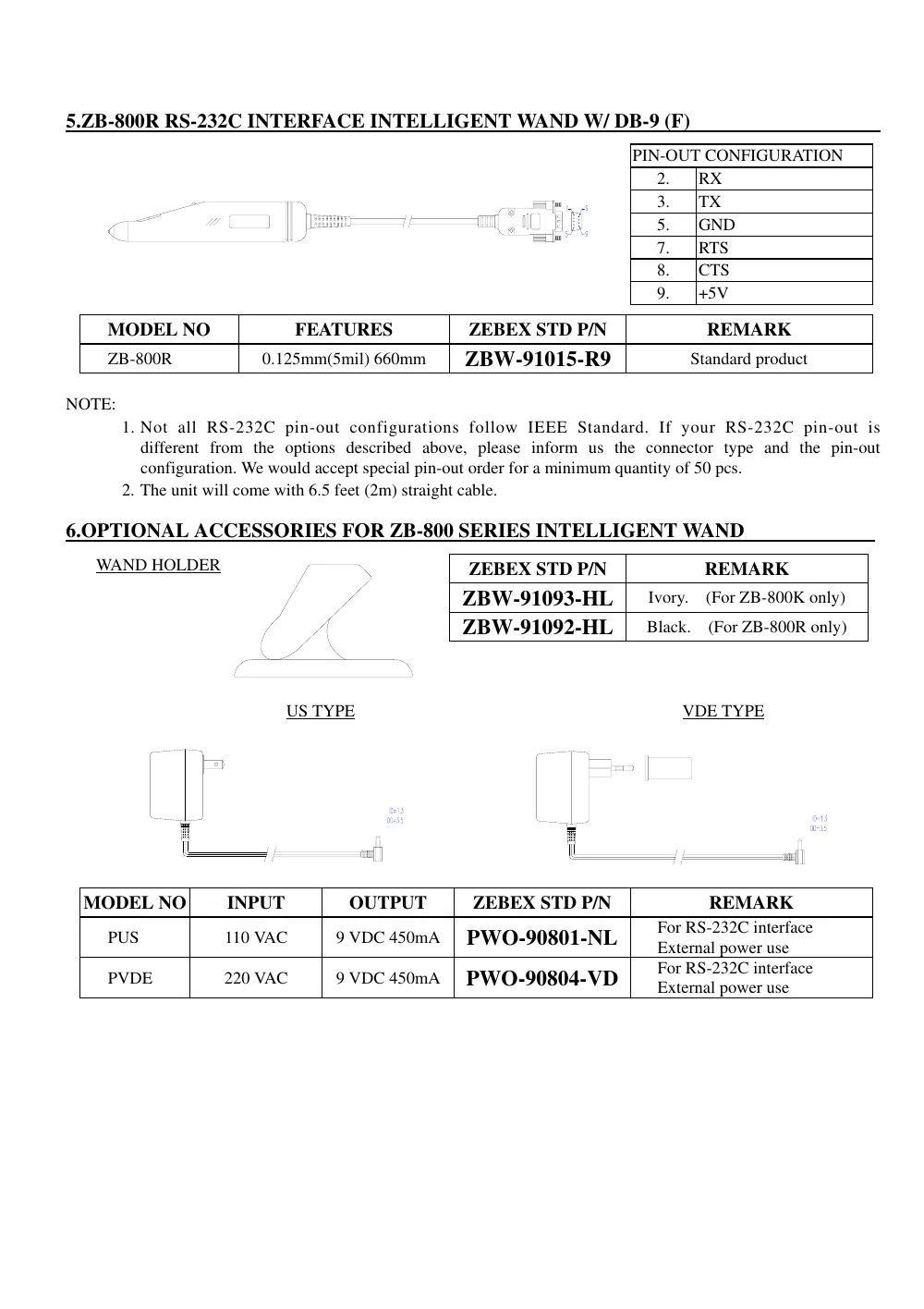
The text of page 2, from the PDF itself
5.ZB-800R RS-232C INTERFACE INTELLIGENT WAND W/ DB-9 (F) PIN-OUT CONFIGURATION 2. RX 3. TX 5. GND 7. RTS 8. CTS 9. +5V
MODEL NO ZB-800RFEATURESZEBEX STD P/NREMARK0.125mm(5mil) 660mmZBW-91015-R9Standard product
NOTE: 1. Not all RS-232C pin-out configurations follow IEEE Standard. If your RS-232C pin-out is different from the options described above, please inform us the connector type and the pin-out configuration. We would accept special pin-out order for a minimum quantity of 50 pcs. 2. The unit will come with 6.5 feet (2m) straight cable.
6.OPTIONAL ACCESSORIES FOR ZB-800 SERIES INTELLIGENT WAND WAND HOLDER
ZEBEX STD P/N
ZBW-91093-HL ZBW-91092-HL
US TYPEREMARK Ivory.(For ZB-800K only)Black.(For ZB-800R only)VDE TYPEMODEL NOINPUTOUTPUTZEBEX STD P/NPUS110 VAC9 VDC 450mAPWO-90801-NLPVDE220 VAC9 VDC 450mAPWO-90804-VD
REMARK For RS-232C interface External power use For RS-232C interface External power use
Page3of 3
Open in the PDF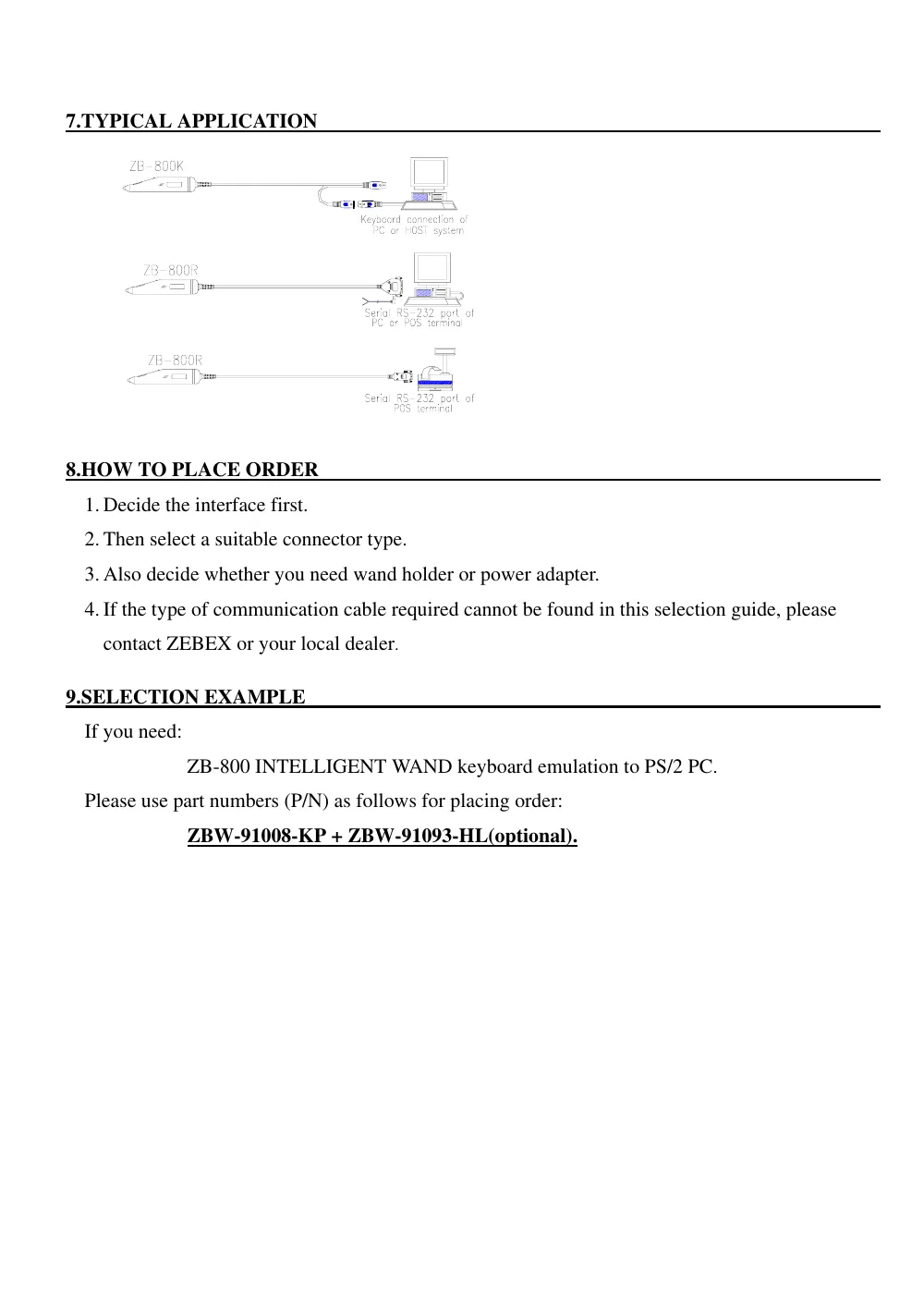
The text of page 3, from the PDF itself
7.TYPICAL APPLICATION
8.HOW TO PLACE ORDER 1. Decide the interface first. 2. Then select a suitable connector type. 3. Also decide whether you need wand holder or power adapter. 4. If the type of communication cable required cannot be found in this selection guide, please contact ZEBEX or your local dealer. 9.SELECTION EXAMPLE If you need: ZB-800 INTELLIGENT WAND keyboard emulation to PS/2 PC. Please use part numbers (P/N) as follows for placing order: ZBW-91008-KP + ZBW-91093-HL(optional).