Manual · Unitech
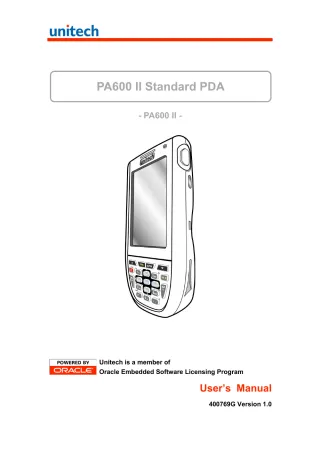
PA600 II Standard PDA User's Manual
Manual55 pagesPDF 12 MB
User's manual for the Unitech PA600 II Standard PDA mobile computer: setup, battery, laser scanner, ActiveSync and settings.
Filed with · 1 model
Also filed with these models on the old site
Summary
What is in it
The user's manual for the Unitech PA600 II Standard PDA, a mobile computer with an optional laser scanner. It explains how to install, operate and maintain the unit: package contents, a tour of the hardware, installing and charging the battery, keypads, screen brightness, stylus, SD/MMC cards and the laser scanner, connecting and synchronizing with a PC through ActiveSync, the Scan2Key and scanner setting programs, battery status, flash memory and hardware reset.
Its parts
- Preface
- Getting Started
- Using the Hardware
- Getting Connected
- Bar Code Scanner Programs
- Advanced Settings
From the manual
Key facts from this manual
Each line names its page in the PDF.
The Unitech user's manual (400769G, version 1.0) for the PA600 II Standard PDA, a rugged Windows Mobile 6.1 handheld with a built-in laser bar code scanner. It covers the PA600 II, not the earlier PA600 the site files it under. It shows how to fit and charge the battery, connect to a PC with ActiveSync, set up the scanner and reset the unit, and it lists the specifications and accessories.
- Device
- PA600 II: rugged mobile computer with Windows Mobile 6.1, laser bar code scanner, color touch screen and keypad p. 13
- Processor
- Intel PXA270, up to 624MHz p. 14
- Memory
- 128MB (32 bits) SDRAM; 576MB (H3) Flash ROM p. 53
- Display
- 3.5-inch QVGA color transflective TFT touch screen with backlight, sunlight readable p. 14, 53
- Keypad
- 20-key alpha-numeric keypad with backlight p. 53
- Scanner
- Laser scan engine (CCD optional); 104 scans/sec. plus or minus 12; scan angle 47 degrees default, 35 degrees reduced p. 53
- Communication
- USB Host and Client V1.1, IrDA 1.2 (SIR), Summit CCX4 certified 802.11b/g WLAN, Bluetooth 2.0 + EDR p. 53
- Main battery
- 3.7V 2200mAh Li-ion pack, 3300mAH optional; up to 11 hours (2200mAH) or 15 hours (3300mAH) p. 53
- Charging
- 5V/2A AC-DC adapter through the USB charging cable or the docking station; 4 hours charging time p. 6, 14
- Expansion slot
- SDIO 1.2a, SDHC supported p. 53
- Size and weight
- About 5.8 in. L x 1 in. H x 3.3 in. W; 10 ounces with battery (11 ounces with 3300mAH battery) p. 53
- Temperature
- Operating 14 to 122 F (-10 to 50 C); storage -4 to 140 F (-20 to 60 C) p. 53
- Accessories
- USB desktop cradle with battery charger, 4-slot battery charger, 4-slot multi-bay Ethernet cradle, 3300mAH extension battery, vehicle charging cable p. 54
- Software
- Unitech PA600 SDK, Microsoft Windows Mobile 6 SDK for Pocket PC, Visual Studio 2005, Oracle Database Lite p. 54
What this manual walks you through
- Installing the battery pack p. 18, 19
- Charging with the USB charging cable or the docking station p. 20
- Reading the charging and docking station LEDs p. 21
- Connecting the PA600 II to a PC for ActiveSync p. 21
- Powering on and calibrating the screen p. 22
- Inserting and removing an SD card p. 27
- Testing the scanner and sending scans to the keyboard with Scan2Key p. 28, 29
- Enabling bar code symbologies in the Scanner Control Panel p. 42, 43
- Changing the automatic power-off settings p. 47
- Warm boot, cool boot and registry cleanup resets p. 50, 51, 52
Good to know
- Batteries must be charged between 10 and 45 C; the battery is not charged above 50 degrees. p. 7, 8
- Use only the supplied adapter; the wrong adapter may damage the unit. p. 8
- Charge the unit with the main battery for at least 16 hours so the backup cell can keep RAM data. p. 18
- A cool boot erases all records and added programs and restores factory settings. p. 51
- Replace the rechargeable battery every year or after 500 charge cycles. p. 7
Questions this manual answers
What battery does the Unitech PA600 II use?
A 3.7V 2200mAh Li-ion battery pack, with a 3300mAH pack as an option, plus a built-in rechargeable backup battery. p. 53
What operating system does the PA600 II run?
Windows Mobile 6.1 Classic. p. 53
How do I cold boot a PA600 II?
Hold Func and Backspace, press the reset button with the stylus until the Unitech logo shows, wait 5 seconds, then release. This erases data and restores factory settings. p. 51
How do I turn on the PA600 II scanner outside the test screen?
Enable Scan2Key from the To Kpd tab in Scanner Settings; scans then go to the keyboard buffer. p. 28, 29
What wireless does the PA600 II have?
802.11b/g WLAN (Summit CCX4 certified) and Bluetooth 2.0 + EDR, plus an IrDA infrared port. p. 53
The whole text · 6 parts
Read the manual here as text
Its text as extracted from the PDF, unedited, in parts; each page opens the PDF at that page.
The file