Manual · Unitech
PA600 Programming Manual
Manual41 pagesPDF 301 KB
Programming manual for the Unitech PA600 handheld: scanner, keypad, backlight, WiFi and Bluetooth APIs for application developers.
Covers · 1 model
The models it covers
Summary
What is in it
A programmer's reference for the Unitech PA600 handheld terminal. It explains how the bar code subsystem works (a decoder chip driving the SE950 laser engine over a serial port), the Scan2Key keyboard-buffer utility, and the COM port assignments. It then documents the function calls of USI.DLL (scanner control, scan data, profiles, 2D imaging), decoder chip control commands, the Scanner3.DLL and ScanKey3.DLL backward-compatible APIs for PT930 software, SYSIOAPI.DLL (keypad, LEDs, backlight, SD slot, vibration, WiFi, Bluetooth) and BTAPI.DLL.
Its parts
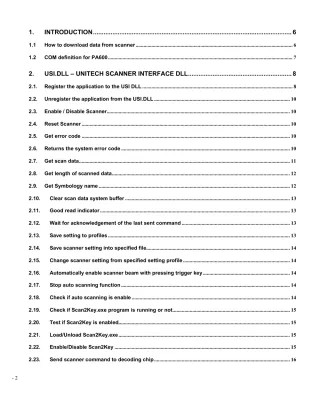
- Introduction
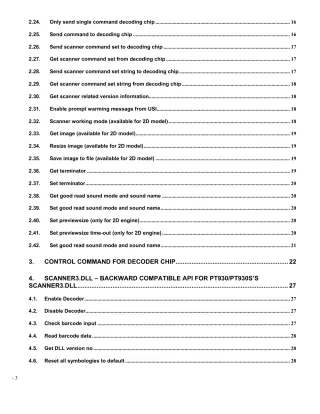
- USI.DLL: Unitech Scanner Interface DLL
- Control Command for Decoder Chip
- SCANNER3.DLL: Backward Compatible API for PT930/PT930S's SCANNER3.DLL
- SCANKEY3.DLL: Backward Compatible API for PT930/PT930S's SCANKEY3.DLL
- SYSIOAPI.DLL
- BlueTooth Relative API: BTAPI.DLL
- Dynamic Load DLL
- Useful Function Call: Without Include SYSIOAPI.DLL
From the manual
Key facts from this manual
Each line names its page in the PDF.
Unitech's programming manual for the PA600 terminal, written for application developers. It describes the scanner libraries (USI.DLL, plus Scanner3.DLL and ScanKey3.DLL for PT930 compatibility), the SysIOAPI.DLL and BTAPI.DLL device functions, low-level decoder chip commands, and sample code for rebooting and reading the device ID.
- Scan engine
- SE950 laser engine run by an advanced decoder chip p. 6
- Scanner port
- Decoder chip on COM4, fixed at 38400 baud, no parity, 8 data bits, 1 stop bit p. 6, 8
- Scanner library
- USI.DLL (Unitech Scanner Interface) for scanner input, symbology settings and profiles p. 6, 8
- Legacy libraries
- Scanner3.DLL and ScanKey3.DLL for porting PT930/PT930SA software p. 6
- Device libraries
- SysIOAPI.DLL (keypad, scanner, LED, backlight, SD slot, vibration, WiFi, Bluetooth); BTAPI.DLL (Bluetooth power) p. 4, 5
- Keyboard wedge
- Scan2Key.exe puts scanned data into the keyboard buffer p. 6
- Symbology setup
- Scanner Setting in the Control Panel sets symbologies and delimiter p. 6
- Scan buffer
- 4K bytes by default p. 8
- Scanner error codes
- SERR_INVALID_HWND, SERR_INVALID_MSGID, SERR_OPEN_SCANNER, SERR_CHECKSUM, SERR_DATALOST, SERR_BUFFEROVERFLOW p. 8
- 2D model
- 2D model: image capture, resize and save, and scanner working mode functions p. 3
- Device ID
- Unique ID burnt into the terminal, shown with Func+9 p. 41
What this manual walks you through
- Reading bar code data through Scan2Key or USI.DLL p. 6
- Registering an application with USI.DLL and handling scanner messages p. 8
- Enabling, disabling and resetting the scanner p. 10
- Reading USI and system error codes p. 10
- Porting PT930 software with Scanner3.DLL and ScanKey3.DLL p. 6
- Low-level control commands for the decoder chip p. 22
- Loading Unitech DLLs dynamically p. 40
- Warm boot, cold boot and power off from code p. 41
- Reading the device ID in code p. 41
Good to know
- Several Scanner3.DLL and ScanKey3.DLL APIs were removed on the PA600. p. 6
- Unitech supplies no .H or .LIB files for the Mobile 5.0 OS, so its built-in DLLs must be loaded dynamically. p. 8
- Low-level decoder commands are not suggested because of serial timing issues; the manual points to USI instead. p. 22
- No gap within a command sent to the decoder chip may exceed 1 second. p. 22
- The decoder chip sleeps while COM4 is not open. p. 6
Questions this manual answers
How do I read barcodes on the PA600 without COM port programming?
Run Scan2Key.exe, which puts scanned data into the PA600 keyboard buffer, so the program simply reads keyboard input. p. 6
Which COM port does the PA600 scanner use?
The decoder chip talks on COM4 with fixed settings of 38400 baud, no parity, 8 data bits and 1 stop bit. p. 6, 8
Can PT930 software be ported to the PA600?
Scanner3.DLL and ScanKey3.DLL are provided for porting PT930/PT930SA software, but several of their APIs were removed on the PA600. p. 6
How do I see the PA600 device ID?
Press Func+9; the manual also gives sample code that reads the ID with KernelIoControl. p. 41
Which scan engine is in the Unitech PA600?
An SE950 laser engine, controlled by an advanced decoder chip. p. 6
The whole text · 5 parts
Read the manual here as text
Its text as extracted from the PDF, unedited, in parts; each page opens the PDF at that page.
The file