Manual · Unitech
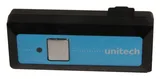
MS910 Wireless Barcode Scanner Quick Guide
Manual12 pagesPDF 193 KB
Quick guide for the MS910 mini wireless barcode scanner: specifications, charging, SPP and HID pairing, smartphone use and setup barcodes.
Covers · 1 model
The models it covers
Summary
What is in it
The quick guide for the MS910 mini wireless barcode reader. It lists what is in the box and the specifications, explains charging over the mini USB port and what the beeps and LED colors mean, and walks through pairing in SPP or HID mode, entering a pincode and connecting to iOS and Android devices. The rest is setup barcodes for link quality, power-off timeout, reading mode, beeper, keyboard layout, symbologies and terminator, plus test barcodes.
From the manual · read page by page
Key facts from this manual
Each line names its page in the PDF.
Quick guide (version 1.2) for the Unitech MS910 mini wireless barcode scanner, a Bluetooth reader that works in SPP or HID mode. It covers charging, the beep signals, pairing with PCs, iOS and Android devices, and setup bar codes for power-off timeout, reading mode, keyboard layout, symbologies and terminator.
- What it is
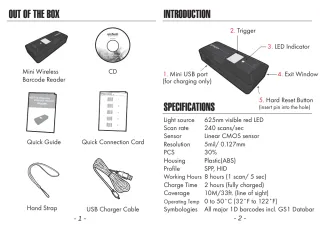
- Mini wireless barcode reader with SPP and HID wireless profiles p. 2
- Scan engine
- Linear CMOS sensor with 625nm visible red LED light source p. 2
- Scan rate
- 240 scans/sec p. 2
- Resolution
- 5mil/ 0.127mm; PCS 30% p. 2
- Wireless range
- 10M/33ft. (line of sight) p. 2
- Battery
- 8 working hours at 1 scan per 5 sec; 2 hours to full charge p. 2
- Charging
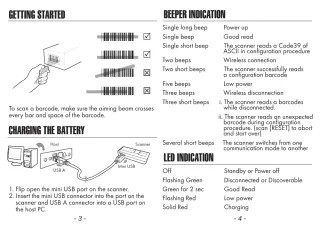
- Mini USB port, for charging only, with USB charger cable to a USB A port on the host PC p. 2, 3
- Operating temperature
- 0 to 50˚C (32˚F to 122˚F) p. 2
- Symbologies
- All major 1D barcodes including GS1 Databar p. 2
- Housing
- Plastic (ABS) p. 2
- In the box
- Scanner, CD, quick guide, quick connection card, hand strap, USB charger cable p. 2
- Power-off timeout
- 1, 3, 5 or 10 min, or no power-off p. 7
- Beep signals
- Two beeps: wireless connection; three beeps: wireless disconnection; five beeps: low power p. 3
- Keyboard layouts
- English (USA, UK), French, German, Italian, Spanish, Japan (106 key), Norwegian, Swedish, Danish, Czech, Hungarian, Swiss and more, plus Alt code p. 9, 10
What this manual walks you through
- Charging the battery from a PC USB port p. 3
- Connecting in SPP mode through a serial com port p. 4
- Connecting in HID mode p. 4
- Entering a pincode generated by the host p. 4
- Pairing with an iPhone or iPad, with SSP and the iOS keyboard hotkey p. 6
- Connecting to Android and using the BluetoothConnect keyboard wedge app p. 6
- Setting the power-off timeout and Link Quality p. 7
- Reading mode, beeper, reset and version check p. 8
- Choosing a keyboard layout p. 9, 10
- Enabling symbologies, setting the terminator and test bar codes p. 11, 12
Good to know
- The mini USB port is for charging only. p. 2
- Turning off Link Quality widens the range but makes data transmission less reliable. p. 7
- The iOS touch keyboard hotkey needs firmware 1.04 or higher. p. 6
- Pairing without a pincode (SSP) needs Bluetooth 2.1 or above on the host. p. 6
Questions this manual answers
How do I connect the MS910 to an iPhone?
Pair it in HID mode. Scanning Enable SSP first lets it pair with iOS without a pincode. p. 6
How do I use the MS910 with an Android phone?
Pair in SPP mode. If the app cannot take external devices, the BluetoothConnect app on the CD turns SPP data into keystrokes. p. 6
How long does the MS910 battery last?
About 8 working hours at one scan every 5 seconds, and a full charge takes 2 hours. p. 2
What is the wireless range of the MS910?
10M/33ft. in line of sight. p. 2
What does it mean when the MS910 gives five beeps?
It signals low power. p. 3
The whole text · 2 parts
Read the manual here as text
Its text as extracted from the PDF, unedited, in parts; each page opens the PDF at that page.
The file