Manual · Unitech
CCD Barcode Scanner MS250 User's Manual
Manual70 pagesPDF 2.5 MB
User's manual for the Unitech MS250 CCD barcode scanner: USB setup, configuration bar codes, symbology settings and specifications.
Covers · 1 model
The models it covers
Summary
What is in it
The user's manual for the Unitech MS250, a CCD barcode scanner that connects to a host PC by USB. It explains installation, the programming loop of start, parameter and end configuration bar codes, factory defaults, interface and reading mode selection, RS232, keyboard wedge and wand emulation parameters, settings for each symbology from UPC/EAN to GS1 Databar, miscellaneous options such as bar code ID and beep tone, ASCII and function key tables, and full specifications.
Its parts
- Quick Tour
- Installation and Operation
- CONFIGURATION
- Interface and Reading Mode Selection
- Communication Parameters
- Bar Codes & Others
- Miscellaneous Parameters
- SPECIFICATION
From the manual
Key facts from this manual
Each line names its page in the PDF.
User's manual for the Unitech MS250 CCD barcode scanner. It covers hookup, programming the scanner with setup bar codes (interface, reading mode, RS232 and keyboard settings, symbologies, code IDs, character editing) and the technical specifications.
- Device
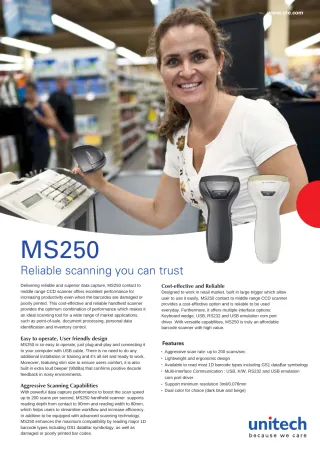
- CCD barcode scanner with trigger, connected to the host by USB p. 1, 6
- Interface modes
- USB (default), Keyboard, RS232 or WAND Emulation p. 10
- Power
- DC +5V ± 10%; 120mA operating, 20mA standby (typical) p. 68
- Processor
- ARM Cortex-M3, 32-bit, 8 MHz p. 68
- Sensor and light
- Linear CCD sensor; visible red light 635nm LED p. 68
- Scan speed
- 200 scans/second ±10% p. 68
- Reading range
- Up to 75mm @ 20mil, PCS90%, Code39; 80 mm width of field; 3mil (0.076mm) resolution p. 68
- Symbologies
- UPC/EAN/JAN, EAN128, Code 39 and Full ASCII, Code32/Italian Pharmacy, Code 128, Codabar/NW7, Interleave, Industrial and Matrix 25, MSI/Plessey, Code 93, Code 11, China Postage, LCD25, GS1 DataBar types p. 69
- Enabled by default
- UPC/EAN/JAN, EAN128, Code 39, Code 128, Codabar/NW7, Interleave 25 p. 69
- RS232 settings
- Default 9600 baud, 8 data bits, 1 stop bit, no parity; 1200 to 38400 baud selectable p. 8, 12, 13
- Keyboard languages
- US and UK English, Italian, Spanish, French, German, Swedish, Switzerland, Hungarian, Japanese, Belgium, Portuguese, Denmark, Netherlands, Turkey p. 48, 49
- Operating temperature
- 0°C to 50°C (32°F to 122°F) p. 68
- Drop
- 59.06 inches (150cm) onto concrete p. 70
- Reliability
- Trigger switch 1,000,000 times; MTBF (calculated) 50,000 hours p. 70
What this manual walks you through
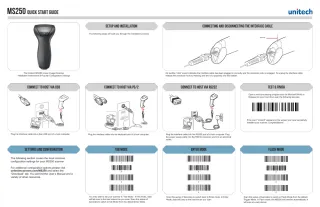
- Connecting the scanner by USB and scanning p. 6
- Programming with setup bar codes and saving the settings p. 8, 9
- Choosing the interface and the reading mode (trigger, continuous, flash) p. 10, 11
- Setting RS232 baud rate, data bits, stop bits, parity and handshaking p. 12, 13, 14
- Keyboard wedge settings: terminal type, letter case, Caps Lock, ALT method p. 14, 15, 16, 17
- Choosing the terminator and the delay between characters p. 17, 18
- Wand emulation output settings p. 19
- Turning symbologies on or off and setting GS1 DataBar options p. 20, 46, 47
- Adding code ID characters to identify the symbology p. 49, 50, 51
- Deleting or inserting characters in the scanned output p. 54, 55, 56, 57, 58, 59, 60, 61
Good to know
- Settings that are not saved with the Save Parameters label are lost when power is turned off. p. 8
- A user-defined code ID overrides the default, and the scanner does not check whether two symbologies share one. p. 50
Questions this manual answers
How do I save MS250 settings permanently?
After programming, scan the Save Parameters label; otherwise the settings are lost when power goes off. p. 8
How do I reset the MS250 to factory defaults?
Scan the Set All Defaults label on the main configuration page. p. 9
Which interfaces can the MS250 be set to?
USB (the default), keyboard, RS232 or wand emulation, chosen by scanning a setup bar code. p. 10
How long before the MS250 rereads the same bar code in continuous mode?
The default delay is 0.3 seconds; it can be set from 0.1 to 5 seconds in 0.1 second steps. p. 53
What is the MTBF of the MS250?
50,000 hours (calculated), with a trigger switch life of 1,000,000 presses. p. 70
The whole text · 7 parts
Read the manual here as text
Its text as extracted from the PDF, unedited, in parts; each page opens the PDF at that page.
The file