Manual · Symbol
Series 3300 System Administration Manual
Manual99 pagesPDF 894 KB
System administration manual for the Symbol Series 3300 hand-held computers, the PDT 3300 and the PRC 3310 radio model.
Covers · 1 model
The models it covers
Summary
What is in it
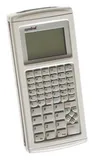
System administration manual for the Symbol Series 3300 hand-held data collection computers, the PDT 3300 and the PRC 3310. It gives an overview of the system and its accessories (battery chargers, cradles, scanners and radio), then covers cleaning, batteries and backup batteries, initializing and loading programs, powering on and off, warm and cold booting, display adjustment, scanning and the keyboard. It closes with error messages, troubleshooting, the self test, memory transfer, port pin-outs, keyboard layouts and communications status codes.
Its parts
- The Series 3300 System
- Maintaining the Series 3300
- Operating the Series 3300
- Error Recovery and Troubleshooting
From the manual
Key facts from this manual
Each line names its page in the PDF.
This is the Symbol Series 3300 System Administration Manual (59040-00-90, Revision A, July 1993). It covers the Series 3300 hand-held computers, the PDT 3300 and the PRC 3310 (the model with an internal radio). It explains care, batteries and charging, loading application programs, troubleshooting, the self test, memory transfer, port pin-outs and status codes.
- Device
- Environmentally sealed, battery-powered hand-held computer for portable data collection p. 16
- Operating system
- DR DOS, compatible with IBM PC-DOS p. 16
- Ports
- Scanner port, COM1 serial (DB-25), COM2 serial (RJ-41), battery charger port, optional internal modem port p. 17
- Keyboard
- 56 or 35 keys p. 17
- Power
- Two 9-Volt alkaline batteries in a carrier tray, or a rechargeable NiCad battery pack p. 26
- NiCad packs
- Standard systems: product numbers 3045-005 and 3045-010 p. 28
- Alkaline batteries
- Eveready #522, Duracell #MN1604 or #MN1604-AS, Panasonic 6LR61 (6AM6) p. 28, 30
- Backup batteries
- Two CR1/3N lithium cells, product number 3027-160; keep memory about 300 to 400 hours p. 33
- Charging
- 12V adapter in the unit for 12 to 16 hours; Universal Battery Charger for up to four packs; or a cradle p. 18, 31
- Program load cable
- Null modem cable, product number 3057-F03, male DB-25 to female DE-9 p. 35
- Typical comm settings
- 38400 bps, 7 data bits, odd parity, Xon/Xoff flow control p. 35
- Environment
- 32 to 122 F (0 to 50 C), 0 to 90% humidity non-condensing, up to 10,000 feet p. 21
- Options
- One-way acoustic coupler, expansion memory, scanners, internal modem p. 16
- Cradles
- One-slot or four-slot; communicate optically and charge; need the optical end cap p. 19
What this manual walks you through
- Replacing the battery pack and the alkaline batteries p. 29, 30
- Charging the NiCad pack with the 12V adapter p. 31, 32
- Replacing the lithium backup batteries without losing memory p. 33, 34
- Loading an application program from a PC with sendhex and the Program Loader p. 35, 36, 37, 38, 39, 40
- Reading error messages and the troubleshooting chart p. 59, 60
- Handling startup and driver load failures p. 61
- Running the self test and keyboard test p. 62, 63, 64
- Sending memory to a host with Memory Transfer p. 66, 67, 68, 69
- Pin-outs of the scanner, COM1 and COM2 ports and the null modem p. 70, 71, 72, 73
- Program loader status codes p. 94
Good to know
- The lithium backup batteries cannot run the system, and removing main and backup power together loses RAM contents. p. 26, 33
- Charge NiCad packs between 0 and 45 C (32 to 113 F). p. 32
- Below 10 C the LCD responds slowly, and batteries drain faster in extreme heat or cold. p. 21
- Alkaline batteries are not recommended for the PRC 3310 except in an emergency, because of the radio's power draw. p. 26
- If a pack needs charging more often, discharge it fully and recharge for at least 16 but not more than 24 hours. p. 32
Questions this manual answers
What batteries does the PDT 3300 use?
Two 9-Volt alkaline batteries in a carrier tray, or a NiCad pack (product numbers 3045-005 and 3045-010 for standard systems). p. 26, 28
Which 9-volt batteries fit the PDT 3300 battery tray?
Eveready #522, Duracell #MN1604 or #MN1604-AS, or Panasonic 6LR61 (6AM6); other brands may be too small to make good contact. p. 28
What backup battery does the PDT 3300 use?
Two CR1/3N lithium batteries, product number 3027-160, which hold memory for about 300 to 400 hours. p. 33
What cable do I need to load a program into a PDT 3300?
A null modem cable, Symbol product number 3057-F03, with a male DB-25 at one end and a female DE-9 at the other. p. 35
What does program loader status 0000 mean on a Series 3300?
The transfer succeeded. Any other code means a failure, and the codes add together. p. 94
Contents
Chapters and sections
Each line opens the PDF at its page.
The whole text · 10 parts
Read the manual here as text
Its text as extracted from the PDF, unedited, in parts; each page opens the PDF at that page.
The file