Manual · Symbol
AP-51XX v2.3.0.0-019R Release Notes
Manual5 pagesPDF 184 KB
Firmware release notes for version 2.3.0.0-019R of the AP-5131 indoor and AP-5181 outdoor wireless access points.
Filed with · 1 model
Also filed with these models on the old site

Summary
What is in it
Release notes for standalone firmware version 2.3.0.0-019R of the AP-51XX access points: the AP-5131 indoor AP and the AP-5181 outdoor AP. They introduce the access points, describe the new Reliable Multicast feature, give a hardware and software compatibility matrix and the default WAN and LAN configurations by version, explain the firmware update steps (including the two-step upgrade from 1.0 to 2.X), resetting a forgotten password, and how the MAC addresses of each radio's four BSSs are derived.
Its parts
- Introduction
- New Features
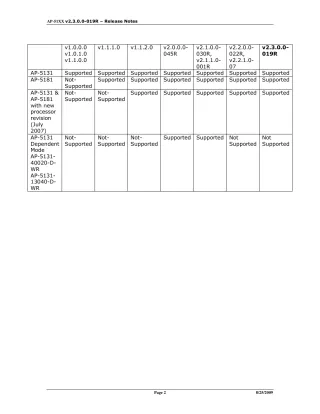
- AP-51XX Hardware/ Software Compatibility Matrix
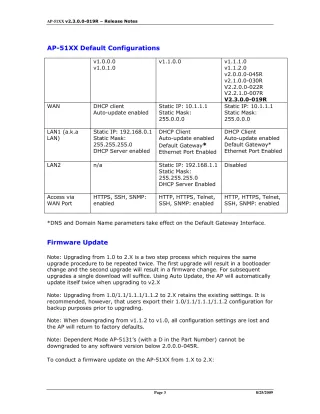
- AP-51XX Default Configurations
- Firmware Update
- Resetting the AP-51XX Password
- AP-51XX MAC Addresses
From the manual · read page by page
Key facts from this manual
Each line names its page in the PDF.
Release notes dated 8/25/2009 for standalone firmware v2.3.0.0-019R for the AP-51XX access points, the AP-5131 indoor AP and the AP-5181 outdoor AP. They describe the new Reliable Multicast feature, version compatibility, default settings, the firmware update steps and how MAC addresses are assigned. They do not cover a mounting kit.
- What it is
- Release notes for AP-51XX standalone firmware v2.3.0.0-019R (AP-5131 indoor and AP-5181 outdoor access points); Part Number 72E-126383-01 p. 1
- New feature
- Reliable Multicast: sends 802.11 multicast data as unicast transmissions for more reliable delivery in noisy RF areas p. 1
- AP-5131 functions
- AP-5131: router and DHCP server, stateful inspection firewall, VPN endpoint (IPSec), QoS engine, AAA server with Hotspot Gateway; mesh networking with v1.1 or newer p. 1
- Firmware split
- From version 2.2, standalone AP and Adaptive AP firmware are released separately; these notes cover the standalone code only p. 1
- Upgrade from 1.0
- 1.0 to 2.X takes two updates: first the bootloader, then the firmware; Auto Update does both automatically p. 3
- Settings on upgrade
- Upgrading from 1.0/1.1/1.1.1/1.1.2 to 2.X keeps settings; downgrading from v1.1.2 to v1.0 returns to factory defaults p. 3
- Dependent Mode limit
- Dependent Mode AP-5131 units (D in the part number) cannot go below 2.0.0.0-045R p. 3
- Update method
- Web GUI System Configuration, Firmware Update, from an FTP or TFTP server on the WAN or LAN p. 4
- MAC addresses
- One MAC address per LAN; each radio supports four BSS, numbered from the radio MAC address plus 1, 2 and 3 p. 5
What this manual walks you through
- Updating the firmware from 1.X to 2.X through the web interface p. 3, 4
- Hardware and software compatibility across firmware versions p. 1, 2
- Default WAN and LAN configurations by firmware version p. 3
- Working out the MAC address of each BSS p. 5
Good to know
- Export the existing configuration as a backup before upgrading. p. 3
- Downgrading from v1.1.2 to v1.0 loses all configuration settings. p. 3
- Only an installation professional should reset the access point's password, then set a new restrictive one. p. 5
- Each firmware update step may take several minutes while the access point reboots. p. 4
Questions this manual answers
What is new in AP-5131 and AP-5181 firmware 2.3?
Reliable Multicast, which converts multicast packets to unicast so they are acknowledged and retransmitted when needed. p. 1
How do I upgrade an AP-51XX from firmware 1.0 to 2.X?
Run the same update twice: the first changes the bootloader and the second the firmware. Auto Update does both on its own. p. 3
How do I find the MAC addresses of each BSS on an AP-51XX?
BSS #1 uses the radio MAC address shown under Radio Settings; BSS #2, #3 and #4 add 1, 2 and 3 to it. p. 5
Can a Dependent Mode AP-5131 be downgraded?
Not below firmware 2.0.0.0-045R. p. 3
The whole text · 1 part
Read the manual here as text
Its text as extracted from the PDF, unedited, in parts; each page opens the PDF at that page.
The file