Manual · Symbol
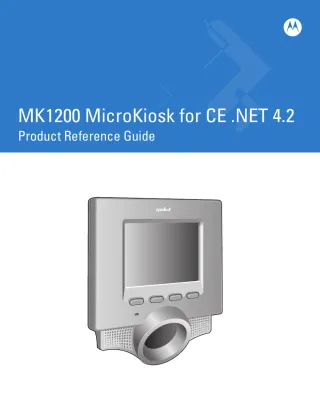
Symbol MK-1200 Quick Reference Guide
Manual2 pagesPDF 1.1 MB
Both pages are below, each with its text.
Covers · 1 model
The models it covers
From the manual · read page by page
Key facts from this manual
Each line names its page in the PDF.
Symbol quick reference guide from August 2006 for the MK1200 and MK2200 kiosks. It names the parts and connectors, the approved power supply and radio card, and shows how to unpack the unit and mount it directly on a wall with the template. Most of the sheet is regulatory, laser, RF exposure and software license text.
- Power supply
- Symbol power supply 50-14001-006R, rated 24 Vdc and minimum 1.3 A, with DC line cord p/n 25-85052-01R p. 1
- MK1200 connectors
- MK1200: Debug, Ethernet/Bias-T (some models), 12-24 VDC power, Printer p. 2
- Front parts
- Optional touch screen, four function buttons (A to D), scanner window p. 2
- Back parts
- PCMCIA access cover, accessory bay connections access cover, vertical cable run, four keyhole mounts p. 2
- Radio module
- Symbol Compact Flash RLAN (11Mbps DSSS) radio card, Type LA-4137 p. 1
- Country roaming
- International Roaming feature (IEEE802.11d) selects the correct channels for the country of use p. 1
- Wall screws
- #10 cross recessed pan head screws fit the key slots; leave 1/8" - 3/16" between screw head and wall p. 2
- MK2200 extras
- MK2200: microphone, headphones jack, RS-485 port, Scanner/Printer (RS-232) port p. 2
- Radio approvals
- The guide states regulatory markings for the United States, Canada, Australia, Japan and Europe p. 1
- Document number
- 72-88687-01 Rev. A, August 2006 p. 1
What this manual walks you through
- Unpacking and inspecting the unit p. 2
- Mounting the unit directly on a wall with the template p. 2
- Identifying the parts and connectors p. 2
- Regulatory, laser and RF exposure information p. 1
- Terms of the Microsoft software license agreement p. 2
Good to know
- Mounting directly to the wall without the Wall Mount Kit gives up the locking and security features. p. 2
- Use only the approved power supply; another supply invalidates the device's approvals and may be dangerous. p. 1
- A mobile transmitting device must operate at least 20 cm from a person's body to meet FCC RF exposure rules. p. 1
- Keep the packing: it is the approved shipping container for returns. p. 2
Questions this manual answers
What power supply does the MK1200 use?
Symbol power supply 50-14001-006R, rated 24 Vdc and at least 1.3 A, with DC line cord 25-85052-01R. p. 1
What screws do I need to mount an MK1200 on a wall?
Size #10 cross recessed pan head screws suited to the wall material, leaving 1/8" to 3/16" between the screw head and the wall. p. 2
Which radio card is in the MK1200?
The guide names the Symbol Compact Flash RLAN (11Mbps DSSS) radio card, Type LA-4137. p. 1
How do I hang the MK1200 on the screws?
Slide the device onto the screw heads with a left and down motion, then adjust the screw heights for the fit. p. 2
The file
Size and text
Every page · 2
Read it here
Each page as it is printed, and its words beside it, so a phone can search and copy them.
Page1of 2
Open in the PDF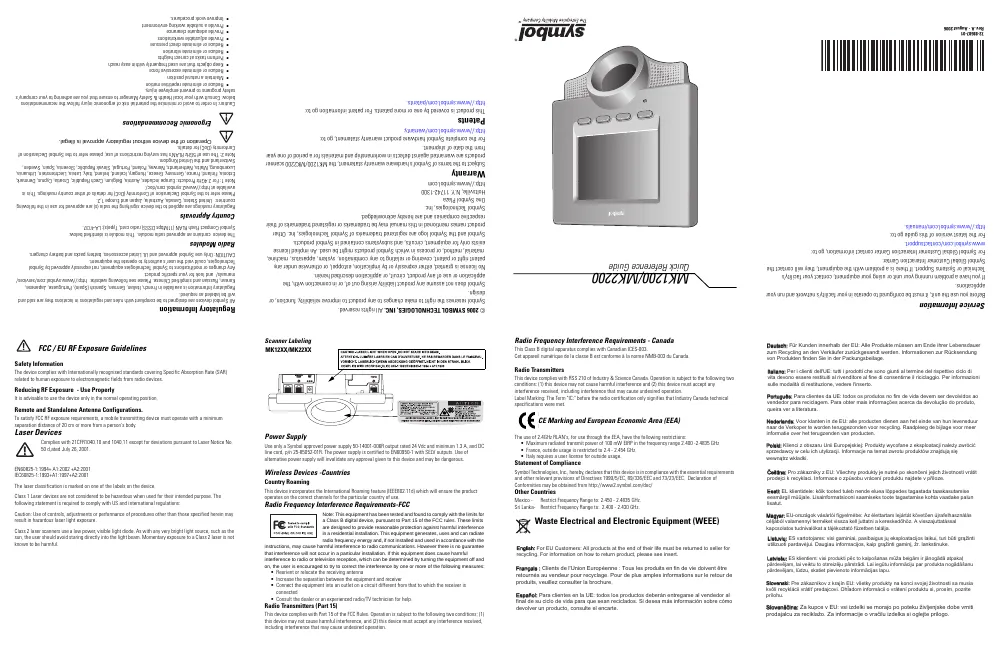
The text of page 1, from the PDF itself
Caution: In order to avoid or minimize the potential risk of ergonomic injury follow the recommendations below. Consult with your local Health & Safety Manager to ensure that you are adhering to your company's safety programs to prevent employee injury.
- Reduce or eliminate repetitive motion
- Maintain a natural position
- Reduce or eliminate excessive force
- Keep objects that are used frequently within easy reach
- Perform tasks at correct heights
- Reduce or eliminate vibration
- Reduce or eliminate direct pressure
- Provide adjustable workstations
- Provide adequate clearance
- Provide a suitable working environment
- Improve work procedures.
72-88687-01 Rev. A - August 2006
This product is covered by one or more patents. For patent information go to: http://www.symbol.com/patents.
Patents
Ergonomic Recommendations
Subject to the terms of Symbol's hardware warranty statement, the MK1200/MK2200 scanner products are warranted against defects in workmanship and materials for a period of one year from the date of shipment. For the complete Symbol hardware product warranty statement, go to: http://www.symbol.com/warranty.
Warranty 12-24 VDC
PRINTER
Country Approvals The device contains an approved radio module. This module is identified below. Symbol Compact Flash RLAN (11Mbps DSSS) radio card, Type(s): LA-4137.
Radio Modules All Symbol devices are designed to be compliant with rules and regulations in locations they are sold and will be labeled as required. Regulatory Information is available in French, Italian, German, Spanish (Spain), Portuguese, Japanese, Korean, Russian and simplified Chinese. Please see following website: http://www.symbol.com/services/ manuals/ and look for your specific product. Any changes or modifications to Symbol Technologies equipment, not expressly approved by Symbol Technologies, could void the user's authority to operate the equipment. CAUTION: Only use Symbol approved and UL Listed accessories, battery packs and battery chargers.
Regulatory Information It is advisable to use the device only in the normal operating position.
Remote and Standalone Antenna Configurations. To satisfy FCC RF exposure requirements, a mobile transmitting device must operate with a minimum separation distance of 20 cm or more from a person's body. Complies with 21CFR1040.10 and 1040.11 except for deviations pursuant to Laser Notice No. 50 d,ated July 26, 2001.
EN60825-1:1994+ A1:2002 +A2:2001 IEC60825-1:1993+A1:1997+A2:2001 The laser classification is marked on one of the labels on the device. Class 1 Laser devices are not considered to be hazardous when used for their intended purpose. The following statement is required to comply with US and international regulations: Caution: Use of controls, adjustments or performance of procedures other than those specified herein may result in hazardous laser light exposure. Class 2 laser scanners use a low power, visible light diode. As with any very bright light source, such as the sun, the user should avoid staring directly into the light beam. Momentary exposure to a Class 2 laser is not known to be harmful.
Service Information Radio Transmitters
ETHERNET/ BIAS-T
Reducing RF Exposure - Use Properly
Laser Devices
Quick Reference Guide
This Class B digital apparatus complies with Canadian ICES-003. Cet appareil numérique de la classe B est conforme à la norme NMB-003 du Canada.
Safety Information The device complies with Internationally recognised standards covering Specific Absorption Rate (SAR) related to human exposure to electromagnetic fields from radio devices.
MK1200/MK2200 Radio Frequency Interference Requirements - Canada
Scanner Labeling MK12XX/MK22XX
This device complies with RSS 210 of Industry & Science Canada. Operation is subject to the following two conditions: (1) this device may not cause harmful interference and (2) this device must accept any interference received, including interference that may cause undesired operation. Label Marking: The Term "IC:" before the radio certification only signifies that Industry Canada technical specifications were met.
CE Marking and European Economic Area (EEA) Power Supply Use only a Symbol approved power supply 50-14001-006R output rated 24 Vdc and minimum 1.3 A, and DC line cord, p/n 25-85052-01R. The power supply is certified to EN60950-1 with SELV outputs. Use of alternative power supply will invalidate any approval given to this device and may be dangerous.
Wireless Devices -Countries Country Roaming This device incorporates the International Roaming feature (IEEE802.11d) which will ensure the product operates on the correct channels for the particular country of use.
Radio Frequency Interference Requirements-FCC Note: This equipment has been tested and found to comply with the limits for a Class B digital device, pursuant to Part 15 of the FCC rules. These limits are designed to provide reasonable protection against harmful interference in a residential installation. This equipment generates, uses and can radiate radio frequency energy and, if not installed and used in accordance with the instructions, may cause harmful interference to radio communications. However there is no guarantee that interference will not occur in a particular installation. If this equipment does cause harmful interference to radio or television reception, which can be determined by turning the equipment off and on, the user is encouraged to try to correct the interference by one or more of the following measures:
- Reorient or relocate the receiving antenna
- Increase the separation between the equipment and receiver
- Connect the equipment into an outlet on a circuit different from that to which the receiver is connected
- Consult the dealer or an experienced radio/TV technician for help.
Radio Transmitters (Part 15) This device complies with Part 15 of the FCC Rules. Operation is subject to the following two conditions: (1) this device may not cause harmful interference, and (2) this device must accept any interference received, including interference that may cause undesired operation.
Before you use the unit, it must be configured to operate in your facility’s network and run your applications. If you have a problem running your unit or using your equipment, contact your facility’s Technical or Systems Support. If there is a problem with the equipment, they will contact the Symbol Global Customer Interaction Center. For Symbol Global Customer Interaction Center contact information, go to: www.symbol.com/contactsupport. For the latest version of this guide go to: http://www.symbol.com/manuals.
© 2006 SYMBOL TECHNOLOGIES, INC. All rights reserved. Symbol reserves the right to make changes to any product to improve reliability, function, or design. Symbol does not assume any product liability arising out of, or in connection with, the application or use of any product, circuit, or application described herein. No license is granted, either expressly or by implication, estoppel, or otherwise under any patent right or patent, covering or relating to any combination, system, apparatus, machine, material, method, or process in which Symbol products might be used. An implied license exists only for equipment, circuits, and subsystems contained in Symbol products. Symbol and the Symbol logo are registered trademarks of Symbol Technologies, Inc. Other product names mentioned in this manual may be trademarks or registered trademarks of their respective companies and are hereby acknowledged. Symbol Technologies, Inc. One Symbol Plaza Holtsville, N.Y. 11742-1300 http://www.symbol.com
Regulatory markings are applied to the device signifying the radio (s) are approved for use in the following countries: United States, Canada, Australia, Japan and Europe 1,2. Please refer to the Symbol Declaration of Conformity (DoC) for details of other country markings. This is available at http://www2.symbol.com/doc/. Note 1: For 2.4GHz Products: Europe includes, Austria, Belgium, Czech Republic, Croatia, Cyprus, Denmark, Estonia, Finland, France, Germany, Greece, Hungary, Iceland, Ireland, Italy, Latvia, Liechtenstein, Lithuania, Luxembourg, Malta, Netherlands, Norway, Poland, Portugal, Slovak Republic, Slovenia, Spain, Sweden, Switzerland and the United Kingdom. Note 2: The use of 5GHz RLAN's has varying restrictions of use; please refer to the Symbol Declaration of Conformity (DoC) for details. Operation of the device without regulatory approval is illegal.
FCC / EU RF Exposure Guidelines
The use of 2.4GHz RLAN's, for use through the EEA, have the following restrictions:
- Maximum radiated transmit power of 100 mW EIRP in the frequency range 2.400 -2.4835 GHz
- France, outside usage is restricted to 2.4 - 2.454 GHz.
- Italy requires a user license for outside usage.
Statement of Compliance
Symbol Technologies, Inc., hereby, declares that this device is in compliance with the essential requirements and other relevant provisions of Directives 1999/5/EC, 89/336/EEC and 73/23/EEC. Declaration of Conformities may be obtained from http://www2.symbol.com/doc/
Other Countries
Mexico - Restrict Frequency Range to: 2.450 - 2.4835 GHz. Sri Lanka- Restrict Frequency Range to: 2.400 - 2.430 GHz.
Waste Electrical and Electronic Equipment (WEEE)
Page2of 2
Open in the PDF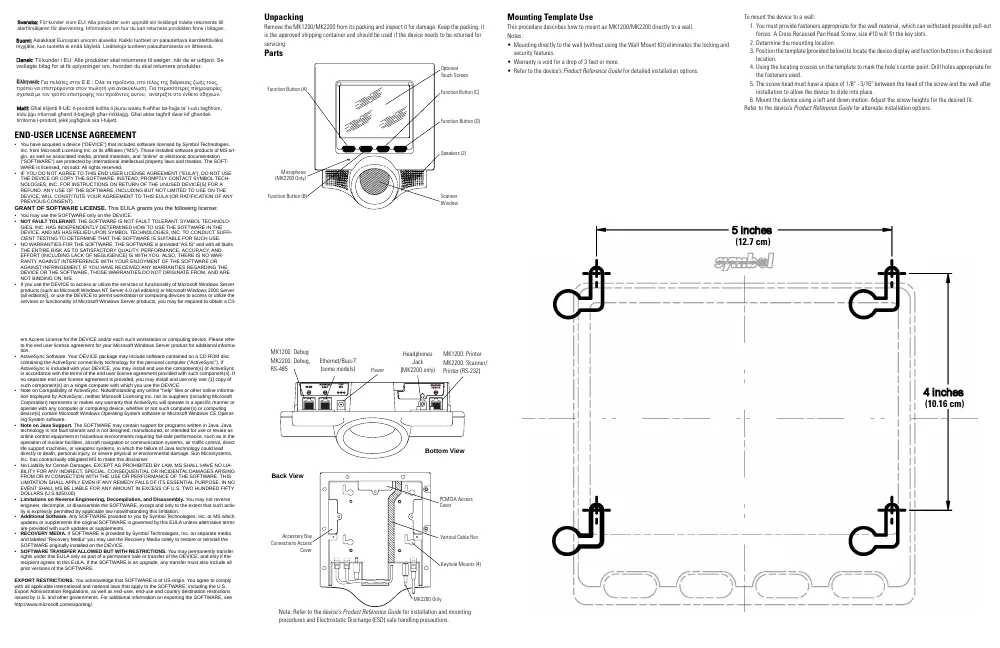
The text of page 2, from the PDF itself
Unpacking
Mounting Template Use
Remove the MK1200/MK2200 from its packing and inspect it for damage. Keep the packing, it is the approved shipping container and should be used if the device needs to be returned for servicing.
This procedure describes how to mount an MK1200/MK2200 directly to a wall. Notes:
- Mounting directly to the wall (without using the Wall Mount Kit) eliminates the locking and security features.
- Warranty is void for a drop of 3 feet or more.
- Refer to the device’s Product Reference Guide for detailed installation options.
Parts Optional Touch Screen Function Button (A)
Function Button (C)
To mount the device to a wall: 1. You must provide fasteners appropriate for the wall material, which can withstand possible pull-out forces. A Cross Recessed Pan Head Screw, size #10 will fit the key slots. 2. Determine the mounting location. 3. Position the template (provided below) to locate the device display and function buttons in the desired location. 4. Using the locating crosses on the template to mark the hole's center point. Drill holes appropriate for the fasteners used. 5. The screw head must have a space of 1/8" - 3/16" between the head of the screw and the wall after installation to allow the device to slide into place. 6. Mount the device using a left and down motion. Adjust the screw heights for the desired fit. Refer to the device’s Product Reference Guide for alternate installation options.
Function Button (D)
END-USER LICENSE AGREEMENT
- You have acquired a device (“DEVICE”) that includes software licensed by Symbol Technologies, Inc. from Microsoft Licensing Inc. or its affiliates (“MS”). Those installed software products of MS origin, as well as associated media, printed materials, and “online” or electronic documentation (“SOFTWARE”) are protected by international intellectual property laws and treaties. The SOFTWARE is licensed, not sold. All rights reserved.
- IF YOU DO NOT AGREE TO THIS END USER LICENSE AGREEMENT (“EULA”), DO NOT USE THE DEVICE OR COPY THE SOFTWARE. INSTEAD, PROMPTLY CONTACT SYMBOL TECHNOLOGIES, INC. FOR INSTRUCTIONS ON RETURN OF THE UNUSED DEVICE(S) FOR A REFUND. ANY USE OF THE SOFTWARE, INCLUDING BUT NOT LIMITED TO USE ON THE DEVICE, WILL CONSTITUTE YOUR AGREEMENT TO THIS EULA (OR RATIFICATION OF ANY PREVIOUS CONSENT).
Speakers (2) Microphone (MK2200 Only) Function Button (B)
Scanner Window
GRANT OF SOFTWARE LICENSE. This EULA grants you the following license:
- You may use the SOFTWARE only on the DEVICE.
- NOT FAULT TOLERANT. THE SOFTWARE IS NOT FAULT TOLERANT. SYMBOL TECHNOLOGIES, INC. HAS INDEPENDENTLY DETERMINED HOW TO USE THE SOFTWARE IN THE DEVICE, AND MS HAS RELIED UPON SYMBOL TECHNOLOGIES, INC. TO CONDUCT SUFFICIENT TESTING TO DETERMINE THAT THE SOFTWARE IS SUITABLE FOR SUCH USE.
- NO WARRANTIES FOR THE SOFTWARE. THE SOFTWARE is provided “AS IS” and with all faults. THE ENTIRE RISK AS TO SATISFACTORY QUALITY, PERFORMANCE, ACCURACY, AND EFFORT (INCLUDING LACK OF NEGLIGENCE) IS WITH YOU. ALSO, THERE IS NO WARRANTY AGAINST INTERFERENCE WITH YOUR ENJOYMENT OF THE SOFTWARE OR AGAINST INFRINGEMENT. IF YOU HAVE RECEIVED ANY WARRANTIES REGARDING THE DEVICE OR THE SOFTWARE, THOSE WARRANTIES DO NOT ORIGINATE FROM, AND ARE NOT BINDING ON, MS.
- If you use the DEVICE to access or utilize the services or functionality of Microsoft Windows Server products (such as Microsoft Windows NT Server 4.0 (all editions) or Microsoft Windows 2000 Server (all editions)), or use the DEVICE to permit workstation or computing devices to access or utilize the services or functionality of Microsoft Windows Server products, you may be required to obtain a Cli-
ent Access License for the DEVICE and/or each such workstation or computing device. Please refer to the end user license agreement for your Microsoft Windows Server product for additional information. ActiveSync Software. Your DEVICE package may include software contained on a CD ROM disc containing the ActiveSync connectivity technology for the personal computer (“ActiveSync”). If ActiveSync is included with your DEVICE, you may install and use the component(s) of ActiveSync in accordance with the terms of the end user license agreement provided with such component(s). If no separate end user license agreement is provided, you may install and use only one (1) copy of such component(s) on a single computer with which you use the DEVICE. Note on Compatibility of ActiveSync. Notwithstanding any online “help” files or other online information displayed by ActiveSync, neither Microsoft Licensing Inc. nor its suppliers (including Microsoft Corporation) represents or makes any warranty that ActiveSync will operate in a specific manner or operate with any computer or computing device, whether or not such computer(s) or computing device(s) contain Microsoft Windows Operating System software or Microsoft Windows CE Operating System software. Note on Java Support. The SOFTWARE may contain support for programs written in Java. Java technology is not fault tolerant and is not designed, manufactured, or intended for use or resale as online control equipment in hazardous environments requiring fail-safe performance, such as in the operation of nuclear facilities, aircraft navigation or communication systems, air traffic control, direct life support machines, or weapons systems, in which the failure of Java technology could lead directly to death, personal injury, or severe physical or environmental damage. Sun Microsystems, Inc. has contractually obligated MS to make this disclaimer. No Liability for Certain Damages. EXCEPT AS PROHIBITED BY LAW, MS SHALL HAVE NO LIABILITY FOR ANY INDIRECT, SPECIAL, CONSEQUENTIAL OR INCIDENTAL DAMAGES ARISING FROM OR IN CONNECTION WITH THE USE OR PERFORMANCE OF THE SOFTWARE. THIS LIMITATION SHALL APPLY EVEN IF ANY REMEDY FAILS OF ITS ESSENTIAL PURPOSE. IN NO EVENT SHALL MS BE LIABLE FOR ANY AMOUNT IN EXCESS OF U.S. TWO HUNDRED FIFTY DOLLARS (U.S.$250.00). Limitations on Reverse Engineering, Decompilation, and Disassembly. You may not reverse engineer, decompile, or disassemble the SOFTWARE, except and only to the extent that such activity is expressly permitted by applicable law notwithstanding this limitation. Additional Software. Any SOFTWARE provided to you by Symbol Technologies, Inc. or MS which updates or supplements the original SOFTWARE is governed by this EULA unless alternative terms are provided with such updates or supplements. RECOVERY MEDIA. If SOFTWARE is provided by Symbol Technologies, Inc. on separate media and labeled “Recovery Media” you may use the Recovery Media solely to restore or reinstall the SOFTWARE originally installed on the DEVICE. SOFTWARE TRANSFER ALLOWED BUT WITH RESTRICTIONS. You may permanently transfer rights under this EULA only as part of a permanent sale or transfer of the DEVICE, and only if the recipient agrees to this EULA. If the SOFTWARE is an upgrade, any transfer must also include all prior versions of the SOFTWARE.
EXPORT RESTRICTIONS. You acknowledge that SOFTWARE is of US-origin. You agree to comply with all applicable international and national laws that apply to the SOFTWARE, including the U.S. Export Administration Regulations, as well as end-user, end-use and country destination restrictions issued by U.S. and other governments. For additional information on exporting the SOFTWARE, see http://www.microsoft.com/exporting/.
(12.7 cm)
MK1200: Debug MK2200: Debug, RS-485 RS 485
Ethernet/Bias-T (some models) ETHERNET/ BIAS-T
12-24 VDC
Power
Headphones Jack (MK2200 only)
MK1200: Printer MK2200: Scanner/ Printer (RS-232)
SCANNER/ PRINTER(10.16 cm)Bottom ViewBack ViewPCMCIA Access Cover
Accessory Bay Connections Access Cover
Vertical Cable RunKeyhole Mounts (4)MK2200 Only
Note: Refer to the device’s Product Reference Guide for installation and mounting procedures and Electrostatic Discharge (ESD) safe handling precautions.