Manual · Symbol
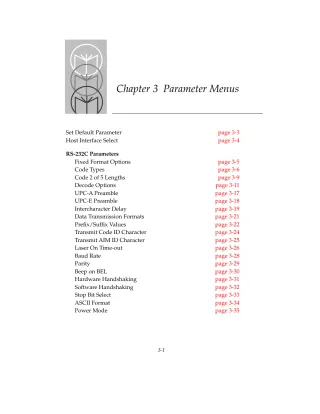
LS 3203ER Product Reference Guide: Chapter 3 Parameter Menus
Manual71 pagesPDF 136 KB
Parameter menu bar codes for programming the Symbol LS 3203ER scanner for RS-232C, wand and Synapse hosts.
What this file really is
The old site listed this file as a manual for the Symbol LS-3200, LS-3203ER and 2 more models. The file holds only Chapter 3, Parameter Menus, of the LS 3203ER Product Reference Guide, not a complete manual.
Names · 1 model
The models it names
Filed with · 3 models
Also filed with these models on the old site
Summary
What is in it
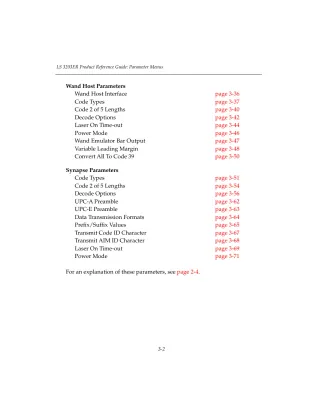
Chapter 3, Parameter Menus, of the LS 3203ER Product Reference Guide: pages of programming bar codes you scan to set up the scanner. It covers setting defaults and choosing the host interface, then the options for each host: RS-232C (fixed formats for Nixdorf, Fujitsu and ICL terminals, code types, decode options, prefix and suffix, baud rate, parity, handshaking), wand host (wand emulator bar output, convert all to Code 39) and Synapse.
Its parts
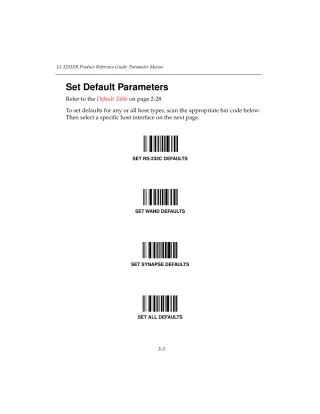
- Set Default Parameters
- Host Interface Select
- RS-232C Parameters
- Wand Host Parameters
- Synapse Parameters
From the manual · read page by page
Key facts from this manual
Each line names its page in the PDF.
Chapter 3, Parameter Menus, of Symbol's LS 3203ER Product Reference Guide: the programming bar codes for the decoded LS 3203ER scanner. It lets the reader pick the host interface (RS-232C, wand or Synapse) and set code types, decode options, data formats and communication settings by scanning bar codes. Only this chapter is in the file.
- Document
- Programming bar code menus (Chapter 3) of the LS 3203ER Product Reference Guide p. 1, 2
- Host interfaces
- RS-232C, wand, Synapse p. 4
- Code types
- Code 39, UPC-A, UPC-E, Codabar, EAN-8, EAN-13, I 2 of 5, D 2 of 5, Code 128, MSI/Plessey, Code 93, EAN 128 p. 6, 7, 8
- Baud rates
- 600, 1200, 2400, 4800, 9600, 19200 p. 28
- Parity
- Odd, even, mark, space, none p. 29
- Handshaking
- Hardware: none or RTS/CTS; software: none, ACK/NAK, ENQ only, ACK/NAK with ENQ, XON/XOFF p. 31, 32
- Data bits and stop bits
- 7-bit or 8-bit ASCII; 1 or 2 stop bits p. 33, 34
- Fixed RS-232C formats
- Nixdorf, Fujitsu, ICL p. 5
- Wand hosts
- SymbolLink controller, Symbol portable terminal, Norand terminal p. 36
- Wand output options
- Bar high or bar low output; leading margin 80 to 200 msec; optional conversion of all output to Code 39 p. 47, 48, 49, 50
- Laser on time-out
- 0.5 to 5.0 seconds in 0.5 second steps p. 26, 27
- Power mode
- Laser continuously on, or low power (off after a decode attempt) p. 35
- Intercharacter delay
- RS-232C: 00 to 99 msec p. 19
What this manual walks you through
- Restoring default parameters for one or all host types p. 3
- Selecting the host interface p. 4
- Adding or deleting bar code types p. 6, 7, 8
- Setting Interleaved and Discrete 2 of 5 lengths p. 9, 10
- Setting UPC, EAN, Code 39, MSI and Codabar decode options p. 11, 12, 13, 14, 15, 16
- Adding a prefix or suffix to scanned data p. 21, 22, 23
- Setting RS-232C baud rate, parity, handshaking and data format p. 28, 29, 30, 31, 32, 33, 34
- Setting laser time-out and power mode p. 26, 27, 35
- Matching the wand emulation output to the host p. 36, 47, 48
- Setting parameters for the Synapse host p. 51, 64, 65
Good to know
- Each 2 of 5 length takes two digit bar codes; a length of 3 is scanned as 0 then 3. p. 9
- A prefix or suffix value takes four digit bar codes on the RS-232C host and three on the Synapse host. p. 22, 65
- The default values are in the Default Table on page 2-28 of the guide, which is not part of this chapter. p. 3
Questions this manual answers
How do I set the LS 3203ER to RS-232?
Scan the SET RS-232C HOST bar code on the Host Interface Select page, then set baud rate, parity and handshaking from the RS-232 Host pages. p. 4, 28
What baud rates does the LS 3203ER support?
600, 1200, 2400, 4800, 9600 and 19200 for RS-232C. p. 28
How do I restore the LS 3203ER default settings?
Scan SET RS-232C DEFAULTS, SET WAND DEFAULTS, SET SYNAPSE DEFAULTS or SET ALL DEFAULTS, then select a host interface. p. 3
Contents
Chapters and sections
Each line opens the PDF at its page.
The whole text · 8 parts
Read the manual here as text
Its text as extracted from the PDF, unedited, in parts; each page opens the PDF at that page.
The file