Spec sheet · Symbol
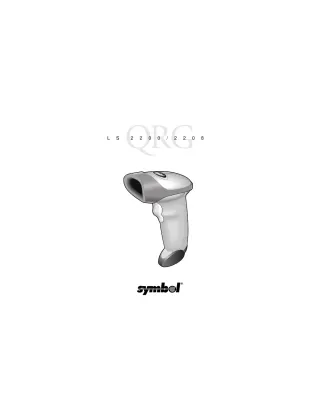
LS 2200/2208 Quick Reference
Spec sheet96 pagesPDF 1.6 MB
Multilingual quick reference guide for the Symbol LS 2208 and undecoded LS 2200 hand-held laser scanners: setup, scanning and host bar codes.
What this file really is
The old site listed this file as “Technical Spec” for the Symbol LS-2208. Linked as a technical spec, this is the multilingual LS 2200/2208 quick reference guide for setup, scanning and basic programming, not a specification sheet.
Filed under · 1 model
Filed under these models in the old catalog
Summary
What is in it
A multilingual quick reference guide for the Symbol LS 2200/2208 Series hand-held laser scanners, in English, French, Italian, German, Spanish, Portuguese, Japanese, Chinese and Korean. It shows the parts of the scanner, installing and removing the interface cable, aiming, hand-held and hands-free scanning in a stand, and troubleshooting, followed by frequently used programming bar codes for the LS 2208 (set defaults and host type) and ergonomic and regulatory information.
Its parts
- Introduction
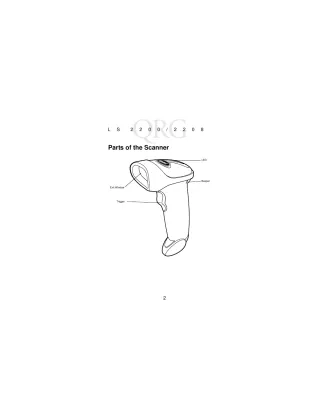
- Parts of the Scanner
- Installing the Interface Cable
- Removing the Interface Cable
- Aiming
- Scanning In Hand-Held Mode
- Scanning in Hands-Free Mode
- Troubleshooting
- Programming Bar Codes
- Ergonomic Recommendations
- Regulatory Information
From the sheet
Key facts from this sheet
Some pages are scans or cannot be read; this says only what the readable text supports. Each line names its page in the PDF.
Symbol quick reference guide (2003) for the LS 2200/2208 Series laser scanner, covering the LS 2208 and the undecoded LS 2200. It shows how to attach and remove the interface cable, scan in hand-held and hands-free modes and troubleshoot, and prints programming bar codes for host type, keyboard country and an Enter suffix, which apply to the LS 2208 only.
- What it is
- Lightweight laser scanner used hand-held or hands-free in a stand p. 3
- Host types
- Keyboard Wedge, RS-232, Wand Emulation, IBM 46XX, USB and Synapse p. 67, 68
- USB
- Autodetected; defaults to HID keyboard; IBM Hand-Held USB selectable by bar code p. 68, 74
- Synapse cable
- Part number STIxx-xxxx; the scanner autodetects it, no bar codes needed p. 67
- RS-232 host types
- Standard, ICL, Nixdorf Mode A, Nixdorf Mode B, Fujitsu, OPOS/JPOS p. 72, 73
- IBM 46XX ports
- Port 5B and Port 9B p. 74
- Keyboard countries
- North American, French, French Canadian, German, Spanish, Italian, Swedish, UK English, Japanese, Portuguese-Brazilian p. 69, 70, 71, 72
- Wand emulation
- Symbol Wand host type, with optional conversion of data to Code 39 p. 75
- Programming
- LS 2208 by bar codes; the undecoded LS 2200 through an external interface controller such as the LL500 OmniLink p. 3
- Hands-free mode
- Constant-on in the stand; normal hand-held mode when lifted out p. 7
- Good-read signal
- Beep and green LED p. 7
- Laser (label)
- 630-680 nm, 1.0 mW max output p. 79
- Full manual
- LS 2200/2208 Product Reference Guide p/n 7258808-xx, on the LS 2200/2208 CD p. 67
- Document number
- 72-58807-01 Revision A, March 2003 p. 96
What this sheet walks you through
- Installing the interface cable p. 5
- Removing the interface cable p. 6
- Aiming and scanning in hand-held mode p. 6, 7
- Scanning in hands-free mode in the stand p. 7
- Troubleshooting no power, no decode and wrong data on the host p. 8, 9
- Setting all parameters back to defaults p. 67
- Selecting the host type and keyboard country p. 68, 69, 70, 71, 72, 73, 74
- Adding a carriage return/line feed after scanned data p. 76
- Ergonomic recommendations p. 77
Good to know
- The scanner reads best when it is not exactly perpendicular to the bar code. p. 6
- The programming bar codes apply only to the LS 2208, not the undecoded LS 2200. p. 3
- With a keyboard wedge, the system must be set for the correct keyboard type and CAPS LOCK must be off. p. 9
- Class 2 laser: avoid staring directly into the beam. p. 78
Questions this sheet answers
How do I reset an LS 2208 to factory defaults?
Scan the SET DEFAULTS bar code in the programming section; it sets all parameters to their default values. p. 67
What mode does the LS 2208 use on USB?
It detects USB by itself and defaults to HID keyboard. A bar code selects IBM Hand-Held USB instead. p. 68, 74
Why does LS 2208 scanned data show up wrong on the computer?
The scanner is not set for the host. Check the host type, RS-232 settings, keyboard type and CAPS LOCK, and editing options. p. 9
How do I make the LS 2208 send Enter after each scan?
Scan the carriage return/line feed bar codes in the order shown. Scanning Set Defaults cancels it. p. 76
How do I remove the LS 2208 cable?
Press the connector clip with the tip of a screwdriver and unplug the modular connector. p. 6
Contents
Chapters and sections
Each line opens the PDF at its page.
- Introduction3
- Parts of the Scanner4
- Installing the Interface Cable5
- Removing the Interface Cable6
- Aiming6
- Scanning In Hand-Held Mode6
- Scanning in Hands-Free Mode7
- Troubleshooting8
- Présentation10
- Description du lecteur11
- Installation du câble d'interface12
- Retrait du câble d'interface12
- Visée13
- Lecture en mode portable13
- Lecture en mode mains-libres14
- Dépannage15
- Introduzione17
- Parti dello scanner18
- Installazione del cavo di interfaccia19
- Rimozione del cavo di interfaccia20
- Puntamento20
- Modalità di scansione portatile20
- Modalità di scansione a mani libere21
- Risoluzione dei problemi22
- Einführung24
- Teile des Scanners25
- Installieren des Schnittstellenkabels26
- Entfernen des Schnittstellenkabels27
- Zielen27
- Scannen im Freihandmodus27
- Scannen im stationären Modus28
- Problembehebung29
- Introducción31
- Partes del scanner32
- Instalación del cable de interfaz33
- Extracción del cable de interfaz34
- Cómo apuntar al código de barras34
- Lectura en modo manual34
- Lectura en modo manos libres35
- Solución de problemas36
76 more lines, from page 38 on
- Introdução38
- Partes do scanner39
- Instalando o cabo de interface40
- Removendo o cabo de interface41
- Direcionamento41
- Leitura no modo manual41
- Leitura no modo sem o uso das mãos42
- Solução de problemas44
- はじめに46
- 各部の名称47
- インタフェースケーブルを取り付ける48
- インタフェースケーブルを取り外す48
- 読み取り操作のポイント49
- ハンドヘルドモードでのスキャン49
- ハンズフリーモードでのスキャン50
- トラブルシューティング51
- 简介53
- 扫描器部件54
- 安装接口电缆55
- 拆除接口电缆55
- 瞄准56
- 以手持模式扫描56
- 以免提模式扫描57
- 疑难解答58
- 소개60
- 스캐너의 구성 부품61
- 인터페이스 케이블 설치62
- 인터페이스 케이블 제거62
- 조준63
- 핸드헬드 모드 스캔 작업63
- 핸즈프리 모드 스캔 작업64
- 문제 해결65
- Programming Bar Codes67
- Ergonomic Recommendations77
- Regulatory Information77
- Recommandations ergonomiques81
- Informations réglementaires81
- Raccomandazioni ergonomiche83
- IInformazioni normative83
- Ergonomische Empfehlungen85
- Regulatorische Informationen86
- Recomendaciones ergonómicas87
- Información sobre normativas88
- Recomendações Ergonómicas89
- Informação Regulamentar90
- 人間工学関係の推奨事項92
- 人体工学建议92
- 인간공학적 권고사항94
The whole text · 10 parts
Read the sheet here as text
Its text as extracted from the PDF, unedited, in parts; each page opens the PDF at that page.
The file