Manual · Symbol
LS 2010MX Product Reference Guide: User's Guide
Manual22 pagesPDF 90 KB
User's guide for the Symbol LS 2010MX hand-held laser scanner, a wand emulator: setup, scanning, decode zone and specifications.
Covers · 1 model
The models it covers
Summary
What is in it
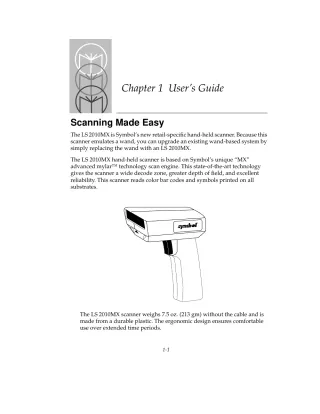
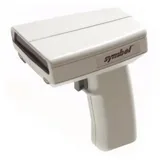
The user's guide chapter of the Symbol LS 2010MX product reference guide. The LS 2010MX is a retail hand-held laser scanner that emulates a wand, so it can replace the wand in an existing wand-based system. The guide covers unpacking, connecting with a battery box or external power supply, testing and aiming, troubleshooting, the decode zone, changing and recharging batteries, maintenance, factory service, accessories, technical specifications, wand emulator pin-outs and scanner labeling.
Its parts
- Scanning Made Easy
- Set Up
- Ready, Test, Scan
- Aiming
- What If...
- LS 2010MX Decode Zone
- Battery Units
- Maintenance
- Factory Service
- Symbol Support Center
- Accessories
- Technical Specifications
- Wand Emulator Pin-outs
- Scanner Labeling
From the manual · read page by page
Key facts from this manual
Each line names its page in the PDF.
User's guide chapter of the Symbol LS 2010MX Product Reference Guide, for the LS 2010MX hand-held laser scanner (labeled in variants such as LS 2010-IXXXAG and LS 2010-EXXXEG). It explains how to connect the scanner to a wand port with a battery box or power supply, scan, change the battery, clean the window, and solve simple problems. It also gives the technical specifications, the wand emulator pin-outs, and a glossary.
- Device
- Retail hand-held laser scanner that emulates a wand, so it can replace the wand on a wand-based system p. 1
- Connection
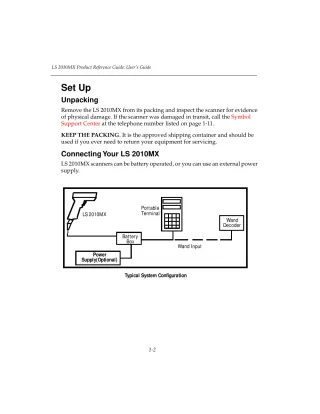
- 9-pin connector on the coil cord plugs into a battery box; an output cable runs to the host port, chosen by the wand being replaced p. 3
- Power requirements
- 4.75 VDC (min) to 14 VDC (max); 175 mA at 5 VDC typical p. 13
- Battery
- 9-volt alkaline or nickel-cadmium rechargeable, in the battery box; an external power supply is optional p. 3, 8
- Bar codes read
- UPC/EAN, Code 39, Codabar, Interleaved 2 of 5, Code 128, Discrete 2 of 5, Code 93 p. 13
- Working range
- Up to 25 in. (63.5 cm) typical; 5 mil minimum element width p. 13
- Scan rate
- 36 (± 3) scans per second, bidirectional p. 13
- Weight
- 7.5 oz. (213 gm) without cable p. 1
- Dimensions
- 5.8 in. high, 4.9 in. long, 2.6 in. wide (14.7 x 12.4 x 6.5 cm) p. 14
- Operating temperature
- 32 to 104 °F (0 to 40 °C) p. 14
- Coil cable
- 8 ft. (244 cm); data output cable varies by interface p. 14
- Wand pin-outs
- Pin 2 digital bar pattern, pin 5 analog bar pattern, pin 7 ground, pin 9 V+ p. 15
- Durability
- 4 ft. drop to concrete p. 13
- Skew and pitch
- Skew ± 65° from normal; pitch ± 55° left or right of normal p. 13
What this manual walks you through
- Connecting the scanner with a 9-volt battery in the battery box p. 3
- Connecting the scanner with an external power supply p. 3
- Testing the scanner and reading a bar code p. 4
- Aiming the scan beam across the whole symbol p. 5
- Checking what to do when nothing happens p. 6
- Reading the decode zone chart p. 7
- Changing the battery and recharging a nickel-cadmium battery p. 8
- Cleaning the exit window p. 9
- Wand emulator pin-outs and Code 39 signal timing p. 15
Good to know
- Four short, high beeps with scanning interruptions mean the battery is low. p. 8
- Holding the scanner directly over the bar code can bounce light back and prevent a decode. p. 5
- Water or cleaning liquid should not be sprayed directly into the window. p. 9
- Not every installation needs the battery box or power supply; the output cable model depends on the wand being replaced. p. 3
- The manual states the LS 2010-IXXXAG carries a CDRH Class II label: 680 nm laser, 1.0 milliwatt maximum output. p. 16
Questions this manual answers
What battery does the LS 2010 scanner use?
A 9-volt alkaline or nickel-cadmium rechargeable battery, fitted in the battery box between the scanner cord and the host cable. p. 3, 8
How far away can the LS 2010MX read a bar code?
The maximum typical working distance is 25 in. (63.5 cm), with a minimum element width of 5 mils. p. 13
Which bar code types does the LS 2010MX decode?
UPC/EAN, Code 39, Codabar, Interleaved 2 of 5, Code 128, Discrete 2 of 5, and Code 93, in any combination. p. 13
What do four short beeps mean on the LS 2010MX?
Low battery power. Change or recharge the battery as soon as possible. p. 8
How is the LS 2010MX programmed?
By scanning sequences of bar codes; the parameters and bar codes are in the Programmer's Guide. p. 5
Contents
Chapters and sections
Each line opens the PDF at its page.
The whole text · 3 parts
Read the manual here as text
Its text as extracted from the PDF, unedited, in parts; each page opens the PDF at that page.
The file