Spec sheet · Symbol
Symbol EB-2401 Spec Sheet
Spec sheet3 pagesPDF 80 KB
All 3 pages are below, each with its text.
Covers · 1 model
The models it covers
From the sheet · read page by page
Key facts from this sheet
Each line names its page in the PDF.
A 1998 Symbol overview sheet, Spectrum24 at a Glance, on the Spectrum24 wireless LAN family: the AP 3020 and AP 2410 access points, the EB 2401 Ethernet Access Bridge, the SB 2401 Serial Client Bridge, LA 3020 and LA 3025 adapters, SpectrumSoft software and the NetVision Phone. It describes each product briefly and lists radio and network specification highlights for the system.
- What it is
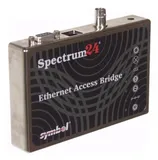
- EB 2401 Ethernet Access Bridge (EAB): a Spectrum24 wireless LAN interface for Ethernet-enabled devices p. 2
- Makeup
- EB 2401: a wireless LAN adapter plus an Ethernet software interface p. 2
- Typical devices
- EB 2401: printers, scales, portable computers, bar code readers, medical equipment, POS devices, time clocks, data collection devices p. 2
- Access point match
- The AP 3020 Ethernet Access Point is backward compatible with EB 24XX series products p. 2
- Radio
- Spectrum24: frequency hopping spread spectrum, 2.4 to 2.5 GHz, programmable for country regulations p. 2, 3
- Standard
- Spectrum24: supports IEEE 802.11 p. 2
- Hopping
- Spectrum24: 78 hops in U.S. and Europe, 23 in Japan; 10 hops/sec p. 3
- Range
- Spectrum24: up to 2,000 ft./606m in the open; 180 to 250 ft./54.5 to 75.7m in a typical office or store p. 3
- Network
- Spectrum24: CSMA/CA access; ODI version 1.6 and NDIS version 2.01 drivers p. 3
- Document
- Spectrum24 at a Glance, printed 10/98 p. 3
What this sheet walks you through
- What makes up the Spectrum24 product family p. 2
- Infrastructure products: AP 3020, AP 2410 Token Ring, EB 2401 and SB 2401 p. 2
- LA 3020 PC Card and LA 3025 ISA card adapters p. 2
- SpectrumSoft software: Tools, Web Client, Telnet Client, STEP and WNMS p. 2
- NetVision Phone voice over a Spectrum24 network p. 2
- Spectrum24 radio and network specifications p. 3
Good to know
- Specifications are subject to change without notice. p. 3
Questions this sheet answers
What is the Symbol EB 2401 Ethernet Access Bridge?
A Spectrum24 wireless LAN interface for Ethernet-enabled devices, made of a wireless LAN adapter and an Ethernet software interface. p. 2
What devices can connect through the EB 2401?
Devices with Ethernet ports, such as printers, scales, bar code readers, medical equipment, POS devices and time clocks. p. 2
Does the AP 3020 access point work with the EB 2401?
The sheet says the AP 3020 is fully backward compatible with EB 24XX series products. p. 2
What is the difference between the EB 2401 and the SB 2401?
The EB 2401 connects Ethernet devices to Spectrum24; the SB 2401 connects serial (RS-232) devices. p. 2
What frequency band does Spectrum24 use?
2.4 to 2.5 GHz, programmable for different country regulations. p. 3
The file
Size and text
Every page · 3
Read it here
Each page as it is printed, and its words beside it, so a phone can search and copy them.
Page1of 3
Open in the PDF
The text of page 1, from the PDF itself
SYM-B-3275 Spec24 at a glance 10/19/98 3:24 PM Page 1
Wireless LAN Solutions®Spectrum24 at a Glance
Extend the Reach of Your Information System to the Point of Activity
Page2of 3
Open in the PDF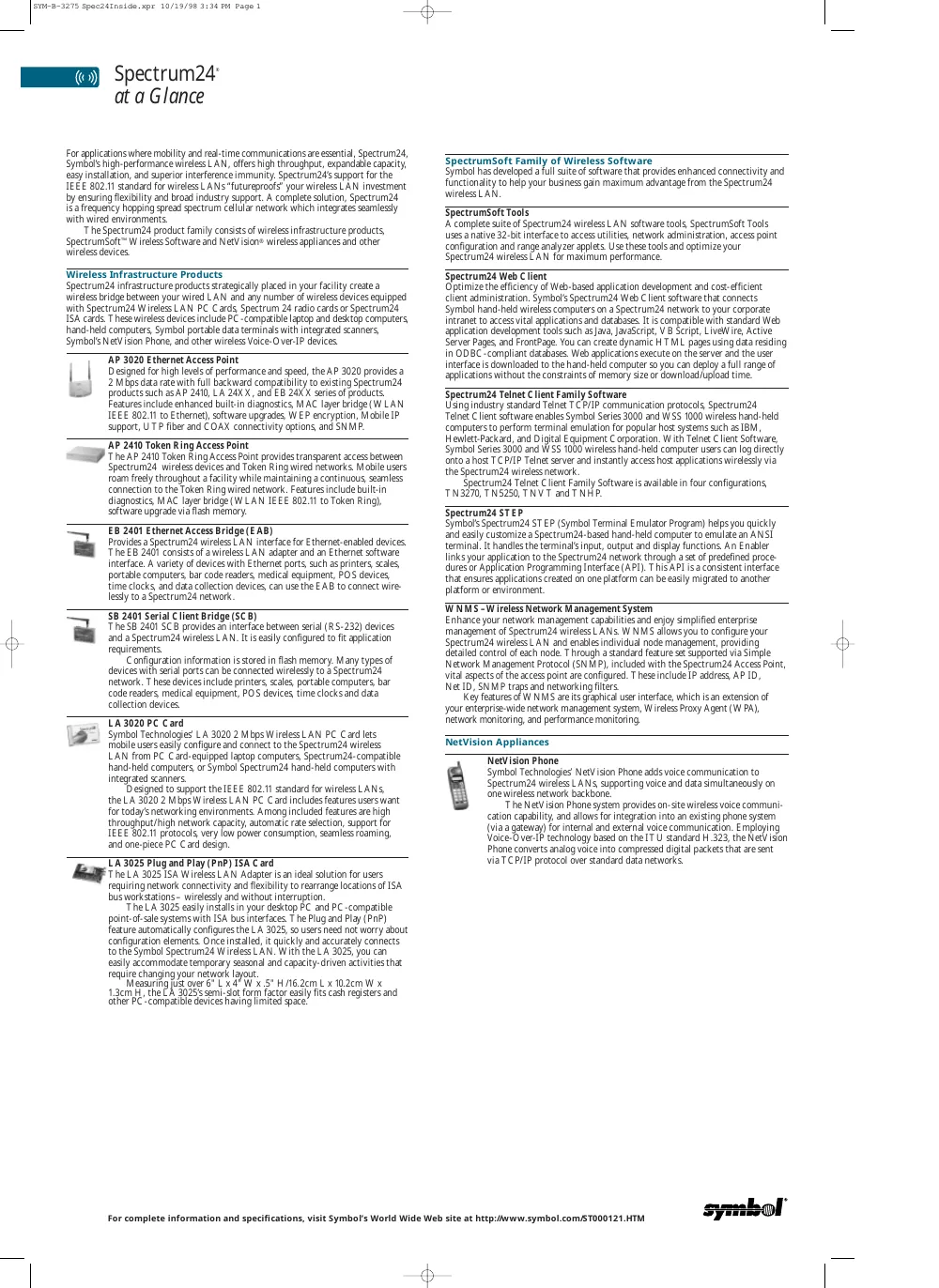
The text of page 2, from the PDF itself
SYM-B-3275 Spec24Inside.xpr 10/19/98 3:34 PM Page 1
Spectrum24 at a Glance
For applications where mobility and real-time communications are essential, Spectrum24, Symbol’s high-performance wireless LAN, offers high throughput, expandable capacity, easy installation, and superior interference immunity. Spectrum24’s support for the IEEE 802.11 standard for wireless LANs “futureproofs” your wireless LAN investment by ensuring flexibility and broad industry support. A complete solution, Spectrum24 is a frequency hopping spread spectrum cellular network which integrates seamlessly with wired environments. The Spectrum24 product family consists of wireless infrastructure products, SpectrumSoft™ Wireless Software and NetVision® wireless appliances and other wireless devices. Wireless Infrastructure Products
Spectrum24 infrastructure products strategically placed in your facility create a wireless bridge between your wired LAN and any number of wireless devices equipped with Spectrum24 Wireless LAN PC Cards, Spectrum 24 radio cards or Spectrum24 ISA cards. These wireless devices include PC-compatible laptop and desktop computers, hand-held computers, Symbol portable data terminals with integrated scanners, Symbol’s NetVision Phone, and other wireless Voice-Over-IP devices. AP 3020 Ethernet Access Point Designed for high levels of performance and speed, the AP 3020 provides a 2 Mbps data rate with full backward compatibility to existing Spectrum24 products such as AP 2410, LA 24XX, and EB 24XX series of products. Features include enhanced built-in diagnostics, MAC layer bridge (WLAN IEEE 802.11 to Ethernet), software upgrades, WEP encryption, Mobile IP support, UTP fiber and COAX connectivity options, and SNMP. AP 2410 Token Ring Access Point The AP 2410 Token Ring Access Point provides transparent access between Spectrum24 wireless devices and Token Ring wired networks. Mobile users roam freely throughout a facility while maintaining a continuous, seamless connection to the Token Ring wired network. Features include built-in diagnostics, MAC layer bridge (WLAN IEEE 802.11 to Token Ring), software upgrade via flash memory. EB 2401 Ethernet Access Bridge (EAB) Provides a Spectrum24 wireless LAN interface for Ethernet-enabled devices. The EB 2401 consists of a wireless LAN adapter and an Ethernet software interface. A variety of devices with Ethernet ports, such as printers, scales, portable computers, bar code readers, medical equipment, POS devices, time clocks, and data collection devices, can use the EAB to connect wirelessly to a Spectrum24 network. SB 2401 Serial Client Bridge (SCB) The SB 2401 SCB provides an interface between serial (RS-232) devices and a Spectrum24 wireless LAN. It is easily configured to fit application requirements. Configuration information is stored in flash memory. Many types of devices with serial ports can be connected wirelessly to a Spectrum24 network. These devices include printers, scales, portable computers, bar code readers, medical equipment, POS devices, time clocks and data collection devices. LA 3020 PC Card Symbol Technologies’ LA 3020 2 Mbps Wireless LAN PC Card lets mobile users easily configure and connect to the Spectrum24 wireless LAN from PC Card-equipped laptop computers, Spectrum24-compatible hand-held computers, or Symbol Spectrum24 hand-held computers with integrated scanners. Designed to support the IEEE 802.11 standard for wireless LANs, the LA 3020 2 Mbps Wireless LAN PC Card includes features users want for today’s networking environments. Among included features are high throughput/high network capacity, automatic rate selection, support for IEEE 802.11 protocols, very low power consumption, seamless roaming, and one-piece PC Card design. LA 3025 Plug and Play (PnP) ISA Card The LA 3025 ISA Wireless LAN Adapter is an ideal solution for users requiring network connectivity and flexibility to rearrange locations of ISA bus workstations – wirelessly and without interruption. The LA 3025 easily installs in your desktop PC and PC-compatible point-of-sale systems with ISA bus interfaces. The Plug and Play (PnP) feature automatically configures the LA 3025, so users need not worry about configuration elements. Once installed, it quickly and accurately connects to the Symbol Spectrum24 Wireless LAN. With the LA 3025, you can easily accommodate temporary seasonal and capacity-driven activities that require changing your network layout. Measuring just over 6" L x 4" W x .5" H/16.2cm L x 10.2cm W x 1.3cm H, the LA 3025’s semi-slot form factor easily fits cash registers and other PC-compatible devices having limited space.
SpectrumSoft Family of Wireless Software
Symbol has developed a full suite of software that provides enhanced connectivity and functionality to help your business gain maximum advantage from the Spectrum24 wireless LAN. SpectrumSoft Tools A complete suite of Spectrum24 wireless LAN software tools, SpectrumSoft Tools uses a native 32-bit interface to access utilities, network administration, access point configuration and range analyzer applets. Use these tools and optimize your Spectrum24 wireless LAN for maximum performance. Spectrum24 Web Client Optimize the efficiency of Web-based application development and cost-efficient client administration. Symbol’s Spectrum24 Web Client software that connects Symbol hand-held wireless computers on a Spectrum24 network to your corporate intranet to access vital applications and databases. It is compatible with standard Web application development tools such as Java, JavaScript, VB Script, LiveWire, Active Server Pages, and FrontPage. You can create dynamic HTML pages using data residing in ODBC-compliant databases. Web applications execute on the server and the user interface is downloaded to the hand-held computer so you can deploy a full range of applications without the constraints of memory size or download/upload time. Spectrum24 Telnet Client Family Software Using industry standard Telnet TCP/IP communication protocols, Spectrum24 Telnet Client software enables Symbol Series 3000 and WSS 1000 wireless hand-held computers to perform terminal emulation for popular host systems such as IBM, Hewlett-Packard, and Digital Equipment Corporation. With Telnet Client Software, Symbol Series 3000 and WSS 1000 wireless hand-held computer users can log directly onto a host TCP/IP Telnet server and instantly access host applications wirelessly via the Spectrum24 wireless network. Spectrum24 Telnet Client Family Software is available in four configurations, TN3270, TN5250, TNV T and TNHP. Spectrum24 STEP Symbol’s Spectrum24 STEP (Symbol Terminal Emulator Program) helps you quickly and easily customize a Spectrum24-based hand-held computer to emulate an ANSI terminal. It handles the terminal’s input, output and display functions. An Enabler links your application to the Spectrum24 network through a set of predefined procedures or Application Programming Interface (API). This API is a consistent interface that ensures applications created on one platform can be easily migrated to another platform or environment. W NMS –Wireless Network Management System Enhance your network management capabilities and enjoy simplified enterprise management of Spectrum24 wireless LANs. WNMS allows you to configure your Spectrum24 wireless LAN and enables individual node management, providing detailed control of each node. Through a standard feature set supported via Simple Network Management Protocol (SNMP), included with the Spectrum24 Access Point, vital aspects of the access point are configured. These include IP address, AP ID, Net ID, SNMP traps and networking filters. Key features of WNMS are its graphical user interface, which is an extension of your enterprise-wide network management system, Wireless Proxy Agent (WPA), network monitoring, and performance monitoring. NetVision Appliances
NetVision Phone Symbol Technologies’ NetVision Phone adds voice communication to Spectrum24 wireless LANs, supporting voice and data simultaneously on one wireless network backbone. The NetVision Phone system provides on-site wireless voice communication capability, and allows for integration into an existing phone system (via a gateway) for internal and external voice communication. Employing Voice-Over-IP technology based on the ITU standard H.323, the NetVision Phone converts analog voice into compressed digital packets that are sent via TCP/IP protocol over standard data networks.
For complete information and specifications, visit Symbol’s World Wide Web site at http://www.symbol.com/ST000121.HTM
Page3of 3
Open in the PDF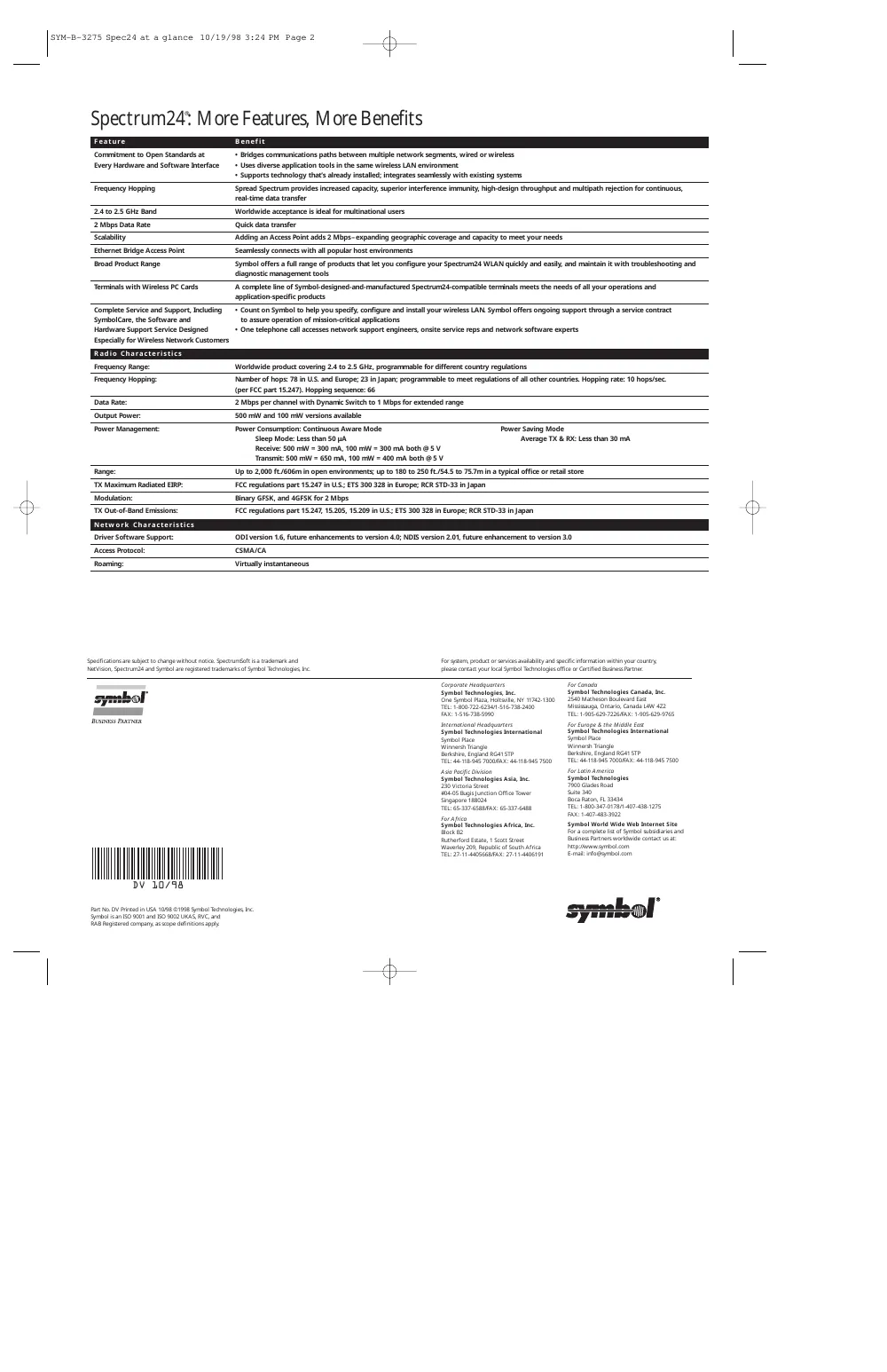
The text of page 3, from the PDF itself
SYM-B-3275 Spec24 at a glance 10/19/98 3:24 PM Page 2
Spectrum24 : More Features, More Benefits ®
Feature
Benefit
Commitment to Open Standards at Every Hardware and Software Interface
- Bridges communications paths between multiple network segments, wired or wireless
- Uses diverse application tools in the same wireless LAN environment
- Supports technology that’s already installed; integrates seamlessly with existing systems
Frequency Hopping
Spread Spectrum provides increased capacity, superior interference immunity, high-design throughput and multipath rejection for continuous, real-time data transfer
2.4 to 2.5 GHz Band
Worldwide acceptance is ideal for multinational users
2 Mbps Data RateQuick data transferScalability
Adding an Access Point adds 2 Mbps – expanding geographic coverage and capacity to meet your needs
Ethernet Bridge Access Point
Seamlessly connects with all popular host environments
Broad Product Range
Symbol offers a full range of products that let you configure your Spectrum24 WLAN quickly and easily, and maintain it with troubleshooting and diagnostic management tools
Terminals with Wireless PC Cards
A complete line of Symbol-designed-and-manufactured Spectrum24-compatible terminals meets the needs of all your operations and application-specific products
Complete Service and Support, Including
- Count on Symbol to help you specify, configure and install your wireless LAN. Symbol offers ongoing support through a service contract SymbolCare, the Software and to assure operation of mission-critical applications Hardware Support Service Designed
- One telephone call accesses network support engineers, onsite service reps and network software experts Especially for Wireless Network Customers Radio Characteristics
- Frequency Range
- Worldwide product covering 2.4 to 2.5 GHz, programmable for different country regulations
- Frequency Hopping
- Number of hops: 78 in U.S. and Europe; 23 in Japan; programmable to meet regulations of all other countries. Hopping rate: 10 hops/sec. (per FCC part 15.247). Hopping sequence: 66
- Data Rate
- 2 Mbps per channel with Dynamic Switch to 1 Mbps for extended range
- Output Power
- 500 mW and 100 mW versions available
- Power Management
- Power Consumption: Continuous Aware Mode Sleep Mode: Less than 50 µA Receive: 500 mW = 300 mA, 100 mW = 300 mA both @ 5 V Transmit: 500 mW = 650 mA, 100 mW = 400 mA both @ 5 V
Power Saving Mode Average TX & RX: Less than 30 mA
- Range
- Up to 2,000 ft./606m in open environments; up to 180 to 250 ft./54.5 to 75.7m in a typical office or retail store
- TX Maximum Radiated EIRP
- FCC regulations part 15.247 in U.S.; ETS 300 328 in Europe; RCR STD-33 in Japan
- Modulation
- Binary GFSK, and 4GFSK for 2 Mbps
- TX Out-of-Band Emissions
- FCC regulations part 15.247, 15.205, 15.209 in U.S.; ETS 300 328 in Europe; RCR STD-33 in Japan
Network Characteristics
- Driver Software Support
- ODI version 1.6, future enhancements to version 4.0; NDIS version 2.01, future enhancement to version 3.0
- Access Protocol
- CSMA/CA
- Roaming
- Virtually instantaneous
Specifications are subject to change without notice. SpectrumSoft is a trademark and NetVision, Spectrum24 and Symbol are registered trademarks of Symbol Technologies, Inc.
For system, product or services availability and specific information within your country, please contact your local Symbol Technologies office or Certified Business Partner. Corporate Headquarters Symbol Technologies, Inc. One Symbol Plaza, Holtsville, NY 11742-1300 TEL: 1-800-722-6234/1-516-738-2400 FAX: 1-516-738-5990
For Canada Symbol Technologies Canada, Inc. 2540 Matheson Boulevard East Mississauga, Ontario, Canada L4W 4Z2 TEL: 1-905-629-7226/FAX: 1-905-629-9765
International Headquarters Symbol Technologies International Symbol Place Winnersh Triangle Berkshire, England RG41 5TP TEL: 44-118-945 7000/FAX: 44-118-945 7500
For Europe & the Middle East Symbol Technologies International Symbol Place Winnersh Triangle Berkshire, England RG41 5TP TEL: 44-118-945 7000/FAX: 44-118-945 7500
Asia Pacific Division Symbol Technologies Asia, Inc. 230 Victoria Street #04-05 Bugis Junction Office Tower Singapore 188024 TEL: 65-337-6588/FAX: 65-337-6488
For Latin America Symbol Technologies 7900 Glades Road Suite 340 Boca Raton, FL 33434 TEL: 1-800-347-0178/1-407-438-1275 FAX: 1-407-483-3922
For Africa Symbol Technologies Africa, Inc. Block B2 Rutherford Estate, 1 Scott Street Waverley 209, Republic of South Africa TEL: 27-11-4405668/FAX: 27-11-4406191
DV 10/98 Part No. DV Printed in USA 10/98 ©1998 Symbol Technologies, Inc. Symbol is an ISO 9001 and ISO 9002 UKAS, RVC, and RAB Registered company, as scope definitions apply.
Symbol World Wide Web Internet Site For a complete list of Symbol subsidiaries and Business Partners worldwide contact us at: http://www.symbol.com E-mail: info@symbol.com