Spec sheet · Sick
Data Sheet: Z sensor
Spec sheet68 pagesPDF 6.8 MB
Data sheet for the SICK Z sensor miniature photoelectric sensors, including the ZT1 and ZT2 proximity and ZL1 to ZL3 reflex switches.
Covers · 1 model
The models it covers
Summary
What is in it
The SICK data sheet for the Z sensor family of miniature photoelectric sensors for short range on/off applications such as conveyors and packaging lines. It gives dimensional drawings, connection diagrams, technical data, scanning distance charts and order numbers for ZT1 and ZT2 photoelectric proximity switches (background suppression, energetic and V-optic, NPN and PNP types) and ZL1, ZL2 and ZL3 photoelectric reflex switches, followed by reflectors and accessories.
From the sheet
Key facts from this sheet
Each line names its page in the PDF.
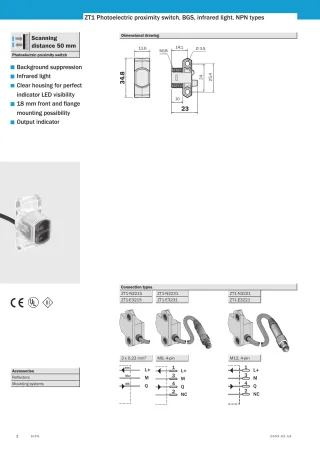
SICK data sheet from 2009 for the Z sensor family of miniature photoelectric sensors, which includes the ZT1 proximity switch and also names the ZT2, ZL1, ZL2 and ZL3. For the ZT1 it gives each version by sensing method and light type, with technical data, dimensional drawings, connection types, order numbers and accessories.
- What it is
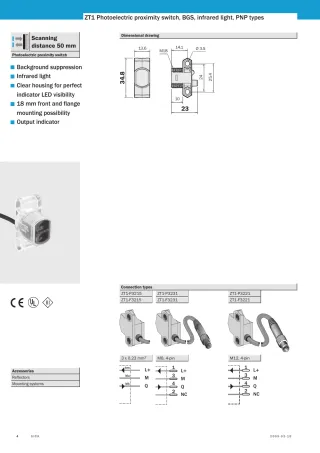
- Miniature photoelectric proximity switch from the SICK Z sensor family, in NPN and PNP types p. 1, 2, 4
- Versions and range
- Background suppression, infrared: 50 mm; energetic, infrared: 100 mm; energetic V-optic, red light: 60 mm; energetic V-optic, infrared: 155 mm p. 2, 14, 26, 38
- Light source
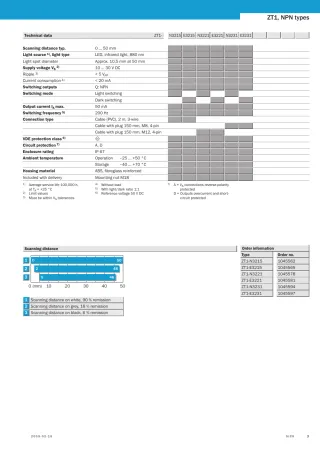
- LED, infrared light, 880 nm; red light versions: LED, red light, 660 nm p. 3, 26, 27
- Connections
- PVC cable, 2 m, 3-wire; or 150 mm cable with M8 or M12 4-pin plug p. 3
- Switching
- NPN or PNP output; light switching and dark switching versions p. 3, 5
- Enclosure rating
- IP 67 p. 3
- Temperature
- Operation –25 ... +50 °C; storage –40 ... +70 °C p. 3
- Mounting
- M18 thread; 18 mm front and flange mounting p. 2
- Housing
- ABS, fibreglass reinforced; clear, so the indicator LED shows from any direction p. 1, 2, 3
- Protection
- Supply connections reverse-polarity protected; outputs overcurrent and short-circuit protected p. 3
- Mounting brackets
- BEF-WN-M18, MB-W1000, and MB-BS18MM with rotary insert p. 67
What this sheet walks you through
- Choosing a ZT1 version by sensing method and light type p. 2, 14, 26, 38
- Scanning distance on white, grey and black targets p. 3
- Dimensions and connection pin assignments p. 2
- Order numbers for each ZT1 version p. 3, 5
- Reflectors and mounting brackets with order numbers p. 66, 67
Good to know
- The Z sensor has no adjustment possibilities or extra functions; background suppression is fixed at 50 mm. p. 1
Questions this sheet answers
What is the sensing range of the SICK ZT1?
It depends on the version: 50 mm with background suppression, 100 mm energetic infrared, 60 mm V-optic red light, and 155 mm V-optic infrared. p. 2, 14, 26, 38
Can the ZT1 sensing distance be adjusted?
No. The data sheet says the Z sensor has no adjustment possibilities. p. 1
What connection options does the ZT1 come with?
A 2 m 3-wire PVC cable, or a 150 mm cable with an M8 or M12 4-pin plug. p. 3
Is the ZT1 available with PNP output?
Yes. The data sheet lists both NPN and PNP types of the ZT1. p. 2, 4
Which mounting brackets fit the ZT1?
The BEF-WN-M18, the MB-W1000, and the MB-BS18MM bracket with rotary insert. p. 67
The whole text · 7 parts
Read the sheet here as text
Its text as extracted from the PDF, unedited, in parts; each page opens the PDF at that page.
The file