Manual · PSC
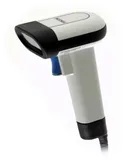
SP400 Handheld Laser Scanner
Manual6 pagesPDF 529 KB
Short user's guide for the PSC SP400 handheld laser scanner: controls, installation, scanning, troubleshooting and laser safety.
Covers · 1 model
The models it covers
Summary
What is in it
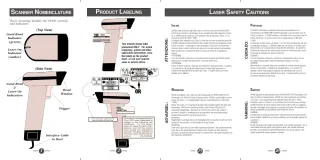
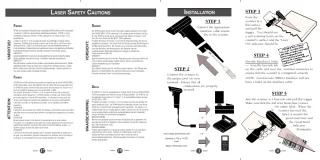
A short multilingual user's guide for the PSC SP400 handheld laser bar code scanner. It identifies the scanner's controls and indicators and its labels, gives the installation steps (attach the interface cable, connect to the terminal, test the beam and scan the configuration label on decode interfaces), explains how to scan, offers troubleshooting tips, lists input voltage limits and repeats the laser safety cautions in many languages, with CE conformance details.
From the manual · read page by page
Key facts from this manual
Each line names its page in the PDF.
Folded user's guide R44-1031 for the PSC SP400 handheld laser scanner. It shows the scanner's controls and indicators, the steps to connect and test it, how to aim it at a barcode, and basic troubleshooting. Most of the sheet repeats the laser safety cautions in many languages.
- Device
- Handheld laser barcode scanner with trigger p. 1, 2
- Input voltage
- Operating 4.75V to 14 VDC (max); ripple 100mVpeak (max) p. 3
- Power source
- From the host computer or an external power supply p. 4
- Laser
- Visible laser diode, 1.0 milliwatt maximum output p. 5
- Indicators
- Green Good Read and amber Laser On lights p. 2
- Interface cable
- Decode interface cables carry a setup barcode near the terminal end; non-decode (HHLC) cables have none p. 3
- Document number
- R44-1031 (Rev. G) p. 1
What this manual walks you through
- Identifying the trigger, read window and indicators p. 2
- Connecting the interface cable and the terminal port p. 3
- Testing the beam and setting up a decode interface from the cable label p. 3
- Aiming the scanner so the beam crosses the whole label p. 4
- Troubleshooting a scanner that does not read p. 4
- Laser safety cautions in several languages p. 1, 2, 3, 4
Good to know
- The optics system is a factory only repair item; do not open the optics cavity. p. 4
- Hold the scanner at a slight angle to the barcode, not straight on. p. 4
- Wrinkled, smudged or torn labels may not read at all. p. 4
- The manual states the SP400 is certified as a Class II laser product in the U.S. and Class 1 or 2 under IEC 825-1:1993. p. 4
Questions this manual answers
What voltage does the PSC SP400 scanner need?
It operates on 4.75V to 14 VDC, with ripple of 100mVpeak at most. p. 3
What do the lights on the SP400 mean?
The amber light shows the laser is on and the green light shows a good read. p. 2
Why is my SP400 not scanning?
Check that the host or external power supply is on and working, that the cable is secure at both ends, and that the labels are in good condition. p. 4
The whole text · 1 part
Read the manual here as text
Its text as extracted from the PDF, unedited, in parts; each page opens the PDF at that page.
The file