Manual · PSC
PSC QS-200 Manual
Manual2 pagesPDF 379 KB
Both pages are below, each with its text.
Filed with · 1 model
Also filed with these models on the old site
From the manual · read page by page
Key facts from this manual
Each line names its page in the PDF.
This is the two-page PSC user's guide for the QuickScan 200 handheld bar code scanner. It covers installing the scanner on a host terminal, scanning technique, cleaning and a troubleshooting checklist.
- Device
- Handheld bar code scanner with a trigger button p. 1, 2
- Reading distance
- 0 mm to 15 mm (0 in to 0.6 in) from the nose to the bar code p. 2
- Power
- Usually from the host terminal; some systems need an optional AC/DC power adapter plugged into the jack on the I/F cable connector p. 1
- Cable release
- The interface cable unlatches with a paper clip pushed into the cable release hole p. 2
- Cleaning
- Soft cloth or facial tissue dampened with naphtha solution p. 2
What this manual walks you through
- Unpacking the scanner and connecting it to a host terminal p. 1
- Holding the scanner correctly over a bar code p. 2
- Disconnecting and reconnecting the interface cable p. 2
- Cleaning the window and scanner body p. 2
- Troubleshooting a scanner that is not working p. 2
Good to know
- Use only power adapters and interface cables supplied or approved by PSC for this scanner. p. 1
- Power down the host system before connecting the scanner. p. 1
- The scanner has no user serviceable parts. p. 2
- Do not submerge the scanner, and do not use abrasive cleaners, pads or solvents such as alcohol or acetone. p. 2
- Oversize, wrinkled, smudged, torn or low contrast labels may be hard to read. p. 2
Questions this manual answers
How do I remove the cable from a QuickScan 200?
Push the tip of a paper clip into the cable release hole to press the connector latch, then pull the cable out. p. 2
How close does the QuickScan 200 need to be to the bar code?
It reads from 0 mm to 15 mm (0 to 0.6 in) between the nose and the bar code. p. 2
Does the QuickScan 200 need a power supply?
Power usually comes from the host terminal, but some systems need an optional AC/DC power adapter plugged into the interface cable connector. p. 1
Why is my QuickScan 200 not reading bar codes?
Check power, cables and programming: that the bar code type is enabled, the interface type is right and the communication format is set. p. 2
The file
Size and text
Every page · 2
Read it here
Each page as it is printed, and its words beside it, so a phone can search and copy them.
Page1of 2
Open in the PDF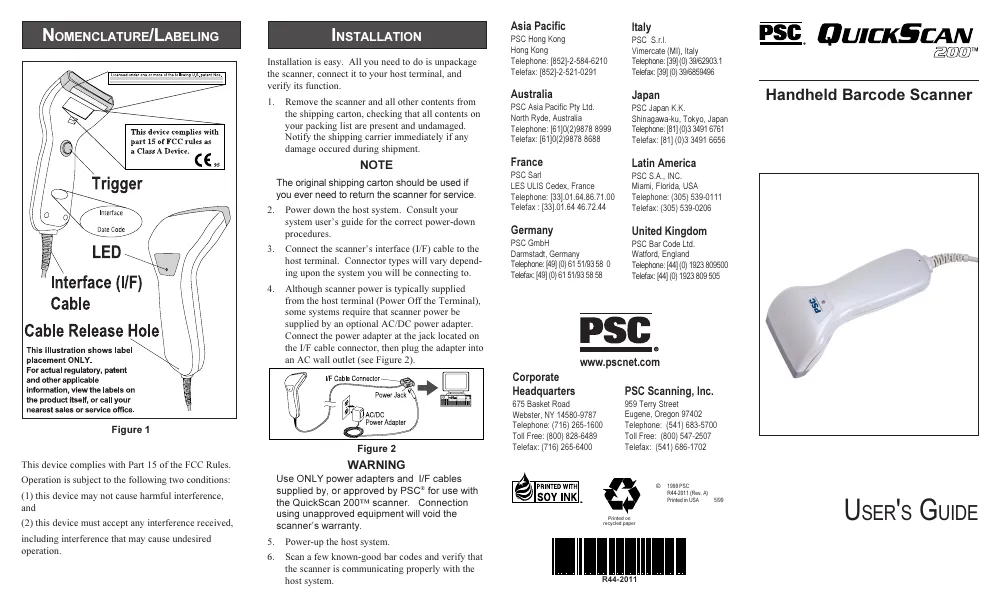
The text of page 1, from the PDF itself
NOMENCLATURE/LABELING
INSTALLATION Installation is easy. All you need to do is unpackage the scanner, connect it to your host terminal, and verify its function. 1.
Remove the scanner and all other contents from the shipping carton, checking that all contents on your packing list are present and undamaged. Notify the shipping carrier immediately if any damage occured during shipment.
NOTE The original shipping carton should be used if you ever need to return the scanner for service. 2.
Power down the host system. Consult your system user’s guide for the correct power-down procedures.
3.
Connect the scanner’s interface (I/F) cable to the host terminal. Connector types will vary depending upon the system you will be connecting to.
4.
Although scanner power is typically supplied from the host terminal (Power Off the Terminal), some systems require that scanner power be supplied by an optional AC/DC power adapter. Connect the power adapter at the jack located on the I/F cable connector, then plug the adapter into an AC wall outlet (see Figure 2).
Asia PacificItalyAustraliaJapanFranceLatin AmericaGermanyUnited Kingdom
PSC Hong Kong Hong Kong Telephone: [852]-2-584-6210 Telefax: [852]-2-521-0291
PSC Asia Pacific Pty Ltd. North Ryde, Australia Telephone: [61]0(2)9878 8999 Telefax: [61]0(2)9878 8688
PSC Sarl LES ULIS Cedex, France Telephone: [33].01.64.86.71.00 Telefax : [33].01.64 46.72.44
PSC GmbH Darmstadt, Germany Telephone: [49] (0) 61 51/93 58 0 Telefax: [49] (0) 61 51/93 58 58
Corporate Headquarters Figure 1 Figure 2
PSC Japan K.K. Shinagawa-ku, Tokyo, Japan Telephone: [81] (0)3 3491 6761 Telefax: [81] (0)3 3491 6656
Handheld Barcode Scanner
PSC S.A., INC. Miami, Florida, USA Telephone: (305) 539-0111 Telefax: (305) 539-0206
PSC Bar Code Ltd. Watford, England Telephone: [44] (0) 1923 809500 Telefax: [44] (0) 1923 809 505
www.pscnet.com
675 Basket Road Webster, NY 14580-9787 Telephone: (716) 265-1600 Toll Free: (800) 828-6489 Telefax: (716) 265-6400
PSC Scanning, Inc.
959 Terry Street Eugene, Oregon 97402 Telephone: (541) 683-5700 Toll Free: (800) 547-2507 Telefax: (541) 686-1702
WARNING
This device complies with Part 15 of the FCC Rules.
Use ONLY power adapters and I/F cables supplied by, or approved by PSC® for use with the QuickScan 200™ scanner. Connection using unapproved equipment will void the scanner’s warranty.
Operation is subject to the following two conditions: (1) this device may not cause harmful interference, and (2) this device must accept any interference received, including interference that may cause undesired operation.
PSC S.r.l. Vimercate (MI), Italy Telephone: [39] (0) 39/62903.1 Telefax: [39] (0) 39/6859496
5.
Power-up the host system.
6.
Scan a few known-good bar codes and verify that the scanner is communicating properly with the host system.
©
Printed on recycled paper
R44-2011
1999 PSC R44-2011 (Rev. A) Printed in USA 5/99
USER'S GUIDE
Page2of 2
Open in the PDF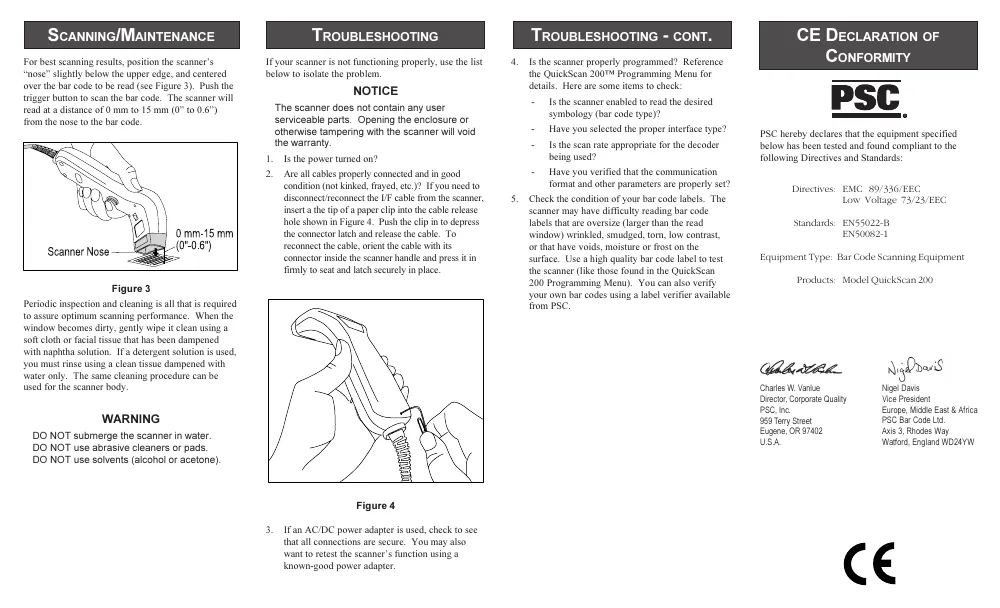
The text of page 2, from the PDF itself
SCANNING/MAINTENANCE
TROUBLESHOOTING
For best scanning results, position the scanner’s “nose” slightly below the upper edge, and centered over the bar code to be read (see Figure 3). Push the trigger button to scan the bar code. The scanner will read at a distance of 0 mm to 15 mm (0” to 0.6”) from the nose to the bar code.
If your scanner is not functioning properly, use the list below to isolate the problem.
TROUBLESHOOTING - CONT. 4.
NOTICE The scanner does not contain any user serviceable parts. Opening the enclosure or otherwise tampering with the scanner will void the warranty. 1.
Is the power turned on?
2.
Are all cables properly connected and in good condition (not kinked, frayed, etc.)? If you need to disconnect/reconnect the I/F cable from the scanner, insert a the tip of a paper clip into the cable release hole shown in Figure 4. Push the clip in to depress the connector latch and release the cable. To reconnect the cable, orient the cable with its connector inside the scanner handle and press it in firmly to seat and latch securely in place.
N G I
Figure 3 Periodic inspection and cleaning is all that is required to assure optimum scanning performance. When the window becomes dirty, gently wipe it clean using a soft cloth or facial tissue that has been dampened with naphtha solution. If a detergent solution is used, you must rinse using a clean tissue dampened with water only. The same cleaning procedure can be used for the scanner body.
5.
Is the scanner properly programmed? Reference the QuickScan 200™ Programming Menu for details. Here are some items to check: -
Is the scanner enabled to read the desired symbology (bar code type)?
-
Have you selected the proper interface type?
-
Is the scan rate appropriate for the decoder being used?
-
Have you verified that the communication format and other parameters are properly set?
Check the condition of your bar code labels. The scanner may have difficulty reading bar code labels that are oversize (larger than the read window) wrinkled, smudged, torn, low contrast, or that have voids, moisture or frost on the surface. Use a high quality bar code label to test the scanner (like those found in the QuickScan 200 Programming Menu). You can also verify your own bar codes using a label verifier available from PSC.
CE DECLARATION OF CONFORMITY
PSC hereby declares that the equipment specified below has been tested and found compliant to the following Directives and Standards: Directives: EMC 89/336/EEC Low Voltage 73/23/EEC Standards: EN55022-B EN50082-1 Equipment Type: Bar Code Scanning Equipment Products: Model QuickScan 200
Charles W. Vanlue Director, Corporate Quality PSC, Inc. 959 Terry Street Eugene, OR 97402 U.S.A.
WARNING DO NOT submerge the scanner in water. DO NOT use abrasive cleaners or pads. DO NOT use solvents (alcohol or acetone).
Figure 4 3.
If an AC/DC power adapter is used, check to see that all connections are secure. You may also want to retest the scanner’s function using a known-good power adapter.
Nigel Davis Vice President Europe, Middle East & Africa PSC Bar Code Ltd. Axis 3, Rhodes Way Watford, England WD24YW