Manual · Printek
MtP300 Series Operator's Manual
Manual65 pagesPDF 948 KB
Operator's manual for the Printek MtP300 Series mobile thermal printer: setup, daily use, configuration and interfaces.
Covers · 1 model
The models it covers
Summary
What is in it
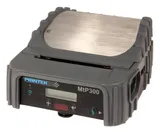
Printek's operator's manual for the MtP300 Series mobile thermal printer, which prints on media up to 3.12 inches wide and has an RS-232C port plus one optional IrDA, Bluetooth or Wi-Fi interface. It covers battery installation and charging, loading media, self test, the belt loop, the control panel and magnetic card reader, the setup menus, connecting to a host computer, power management, cleaning and troubleshooting, print and font samples, and full specifications.
Its parts
- Introduction
- Getting Started
- Daily Operation
- Printer Configuration
- Interfacing To A Host Computer
- Power Considerations
- Maintenance and Troubleshooting
- Advanced Setup Features
- Print & Font Samples
- Specifications
From the manual
Key facts from this manual
Some pages are scans or cannot be read; this says only what the readable text supports. Each line names its page in the PDF.
Operator's manual for the Printek MtP300 Series mobile thermal printers, including the MtP300 LP, written for firmware version 2.9. It covers battery charging, loading media, the setup menus, connecting by serial, IrDA, Bluetooth or Wi-Fi, power saving, cleaning, error messages and troubleshooting, and the specifications.
- Printer type
- Mobile thermal printer for media up to 3.12 inches wide, with black mark sensing p. 7
- Interfaces
- RS-232C serial on every unit, plus one optional factory installed IrDA, Bluetooth or Wi-Fi interface p. 7, 39
- Serial connector
- RJ type connector on the side of the printer; Serial RJ to DB-9F and Serial RJ to Pigtail cables listed p. 39, 61
- Serial defaults
- Printek emulation, 57,600 baud, 8 data bits, 1 stop bit, no parity, no handshake p. 12
- Battery
- 7.4 volt 2200mAH Lithium Ion p. 46
- Charging
- In the printer from an optional 100-240VAC/50-60Hz or 12/24VDC vehicle power supply, up to 2½ hours; adapter output 9 VDC p. 46, 47
- Run time
- 500 pages or more than 2000 inches of print per charge p. 57
- Printing
- Direct thermal, up to 3.3 inches per second, 203 dpi, 576 printing elements for up to 2.84″ p. 57
- Display and buttons
- 2 line x 16 character LCD; Power, Paper Feed and two configuration buttons p. 58
- Memory
- 1MB program memory; 1MB font, logo and graphic storage p. 58
- Weight
- 1.96 lbs. (0.89 kg) with battery p. 58
- Receipt paper
- 2.00 to 3.12" wide, 0.0022 to 0.0065" thick, 0.750" core, 2.625" maximum outside diameter p. 59
- Emulations
- Printek, Printek Mt3, O'Neil, ZPL-II, CPCL p. 57
- Wi-Fi
- IEEE 802.11b; the printer acts as a server, default TCP port 8023 with DHCP p. 12, 41
What this manual walks you through
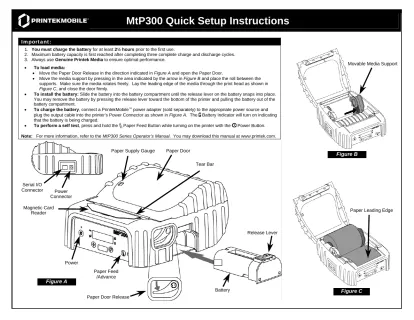
- Installing and charging the battery before first use p. 9
- Loading a roll of paper p. 10, 11
- Turning the printer on and off and printing a self test p. 11, 12
- Checking and changing the host interface settings p. 12
- Connecting by serial, IrDA, Bluetooth or Wi-Fi p. 39, 40, 41
- Standby, auto power down and running without a battery p. 43
- Cleaning the print head, sensors and platen roller p. 45
- Testing the power supply and battery p. 47
- Error messages and fixes for common problems p. 48, 49
Good to know
- Use only Printek power supplies made for the MtP300; another supply may damage the printer. p. 9
- Do not use sharp objects to clean the print head. p. 45
- Do not take apart, short circuit, heat above 80°C or burn the battery. p. 46
- IrDA uses IrCOMM, so some hosts must connect through a COM port. p. 40
- Gap sensing works only on MtP300 LP models; the minimum gap between labels is 0.125" (3.2mm). p. 60
Questions this manual answers
How long does the MtP300 battery take to charge?
Up to 2½ hours in the printer, from an optional power supply. A new battery reaches full capacity after at least three charge and discharge cycles. p. 9, 46
How do I print an MtP300 self test?
Hold the Paper Feed button while turning the printer on with the Power Button, until Printing Current Menu Values is displayed, then release Paper Feed. p. 12
What does Check Paper mean on the MtP300?
The media supply is empty or the paper/black mark sensor is dirty. Install a new roll or clean the sensor. p. 48
How can I test the MtP300 power adapter?
Measure its output with a voltmeter; it should read 9 VDC. Then check that the Battery Indicator lights when it is connected. p. 47
Can the MtP300 run without a battery?
Yes, with an optional power supply. While on external power the printer does not enter Standby. p. 43
Contents
Chapters and sections
Each line opens the PDF at its page.
- Introduction7
- Getting Started9
- Battery Installation and Charging9
- Installing Media10
- Turning the Printer On and Off11
- Performing A Printer Self Test11
- Host Interface Set Up12
- Belt Loop System13
- Daily Operation15
- Printer Configuration21
- Interfacing To A Host Computer39
- Power Considerations43
- Maintenance and Troubleshooting45
- Advanced Setup Features51
- Print & Font Samples53
- Specifications57
- Glossary of Terms63
The whole text · 7 parts
Read the manual here as text
Its text as extracted from the PDF, unedited, in parts; each page opens the PDF at that page.
The file