Manual · POS-X
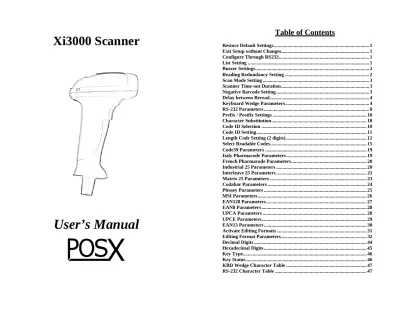
Xi3000 Scanner User's Manual
Manual25 pagesPDF 301 KB
Programming bar code manual for the POS-X Xi3000 scanner: buzzer, scan modes, keyboard wedge and RS-232 settings, symbologies and editing formats.
Covers · 1 model
The models it covers
Summary
What is in it
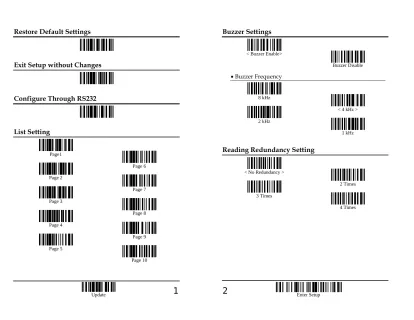
A setup manual of programming bar codes for the Xi3000 scanner. Scanning its labels restores defaults, sets the buzzer, reading redundancy, scan mode and time-outs, chooses keyboard wedge parameters (keyboard type and layout) or RS-232 parameters (baud rate, parity, data bits, flow control), adds prefixes, postfixes and code IDs, enables or disables each readable code type with its options, and defines editing formats. Decimal and hexadecimal digit labels and character tables are at the end.
From the manual · read page by page
Key facts from this manual
Each line names its page in the PDF.
Setup barcode manual for the POS-X Xi3000 scanner, made of barcodes the user scans to change its settings. It covers the buzzer, scan modes, keyboard wedge and RS-232 parameters, prefix and postfix codes, which symbologies are read, and data editing formats. Character tables for the keyboard wedge and RS-232 outputs close the manual.
- Interfaces
- Keyboard wedge and RS-232 p. 3, 5
- RS-232 settings
- 110 to 38400 baud; even, odd or no parity; 7 or 8 data bits p. 5
- Flow control
- None, Scanner Ready, Data Ready or INV. Data Ready (single port only) p. 6
- Keyboard types
- 28 types: PCAT in 10 languages, PS55 variants, IBM 3477 (Japanese), PS2-30, IBM 34XX/319X, Memorex Telex 122 Keys p. 4
- Keyboard layouts
- Default, AZERTY or QWERTZ letters; default, lower row or upper row digits p. 4
- Scan modes
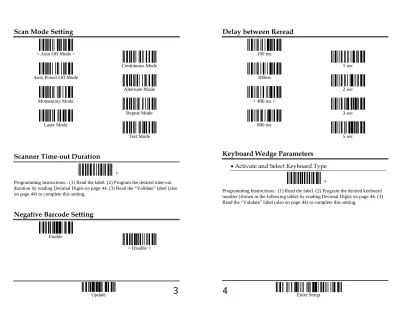
- Auto Off, Continuous, Auto Power Off, Alternate, Momentary, Repeat, Laser, Test p. 3
- Reread delay
- 100 ms, 200ms, 400 ms, 800 ms, 1 sec, 2 sec, 3 sec or 5 sec p. 3
- Buzzer
- Enable or disable; 8, 4, 2 or 1 kHz tone p. 2
- Read redundancy
- None, 2, 3 or 4 times p. 2
- Symbologies
- Code 39, Italy and French Pharmacode, Industrial, Interleave and Matrix 25, Codabar, Code 93, Code 128, EAN128, MSI, Plessey, UPCA, UPCE, EAN8, EAN13 p. 9, 10
- Add-ons
- UPCA, UPCE, EAN8 and EAN13 with Addon2 or Addon5 p. 10
- Conversions
- UPCA and EAN8 to EAN13, UPCE to UPCA, ISBN and ISSN for EAN13, UK Plessey p. 14, 15, 16
- Data editing
- Three formats; up to 6 fields plus 5 additional fields p. 17, 18, 22
- Code ID and substitution
- 5 Code ID sets; 3 character substitution sets p. 6
What this manual walks you through
- Restoring default settings or leaving setup without changes p. 2
- Setting the buzzer, read redundancy, scan mode and time-out p. 2, 3
- Choosing the keyboard type, layout and Caps Lock handling p. 3, 4
- Setting RS-232 baud rate, parity, data bits and flow control p. 5, 6
- Adding prefix and postfix codes, character substitution and code IDs p. 6, 7
- Turning each symbology and its add-ons on or off p. 9, 10
- Checksum, start/stop and code length options per symbology p. 11, 12, 13, 14, 15, 16
- Building data editing formats with fields and a transmission sequence p. 17, 18, 19, 20, 21, 22, 23
- Entering values with the decimal and hexadecimal digit barcodes p. 23, 24
- Keyboard wedge and RS-232 character tables p. 25
Good to know
- RS-232 flow control applies to a single port only. p. 6
- Each character in a prefix, postfix or substitution string is entered as two hexadecimal digits. p. 6
- In the keyboard wedge character table, Dly inserts a 100 ms delay. p. 25
Questions this manual answers
How do I reset the POS-X Xi3000 to its default settings?
Scan the Restore Default Settings barcode at the start of the manual. p. 2
How do I change the keyboard type on the Xi3000?
Scan the keyboard type label, enter the number from the keyboard table with the decimal digit barcodes, then scan Validate. p. 3, 4
Can the Xi3000 read negative (reversed) barcodes?
Yes, the Negative Barcode Setting has Enable and Disable barcodes. p. 3
The whole text · 3 parts
Read the manual here as text
Its text as extracted from the PDF, unedited, in parts; each page opens the PDF at that page.
The file