Manual · Palm
Read This First: Palm Tungsten T3 Handheld
Manual18 pagesPDF 477 KB
Getting started guide for the Palm Tungsten T3 handheld: connecting the cradle, charging, setup, Palm Desktop and HotSync.
Covers · 2 models
The models it covers
Summary
What is in it
The short getting started guide from Palm, Inc. that came in the box with the Palm Tungsten T3 handheld. It lists the box contents, then shows how to connect the USB HotSync cradle and power adapter, charge the handheld, turn it on and remove the stylus, find the buttons and controls, install Palm Desktop software on Windows or Mac OS X, enter an appointment and synchronize it with the HotSync process. It ends with troubleshooting steps, including a soft reset.
From the manual · read page by page
Key facts from this manual
Each line names its page in the PDF.
This is the Read This First quick start guide for the Palm Tungsten T3 handheld. It walks through connecting the USB HotSync cradle, charging, first setup, installing Palm Desktop software, synchronizing, and fixing common problems.
- Device type
- Palm Tungsten T3 handheld that slides open to show the input area p. 3, 10
- In the box
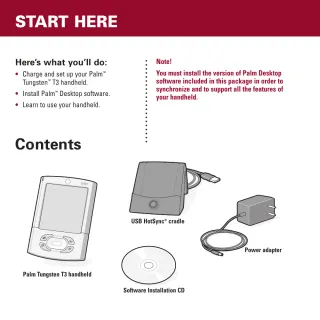
- Handheld, USB HotSync cradle, power adapter, Software Installation CD p. 3
- Connection
- USB HotSync cradle; computers without USB need a serial cradle, sold separately p. 4
- Charging
- In the cradle from the power adapter, at least two full hours; indicator light solid green while charging p. 4, 5
- Desktop software
- Palm Desktop for Windows and Mac OS X; option to synchronize with Microsoft Outlook instead p. 8
- Hardware features
- IR port, expansion card slot, headphone jack, microphone, speaker, Voice Memo button, 5-way navigator, Bluetooth controls p. 7
- Reset button
- Soft reset button inside a hole on the back panel p. 12
- Full handbook
- TungstenT3_Handbook.pdf, opened in Adobe Acrobat Reader from Palm Desktop p. 17
What this manual walks you through
- Connecting the HotSync cradle and power adapter p. 4
- Charging the handheld in the cradle p. 5
- Turning on the handheld and removing the stylus p. 6
- Installing Palm Desktop software on Windows or Mac p. 8
- Scheduling an appointment on the computer and on the handheld p. 9, 10
- Synchronizing with the HotSync process p. 11
- When the indicator light stays off or the handheld will not turn on p. 12
- When the Palm Desktop installer does not start from the CD p. 13
- When the HotSync process does not begin p. 14
- Finding photos and voice memos after synchronizing on Windows p. 16
Good to know
- The version of Palm Desktop included in the package must be installed to synchronize and support all features. p. 3
- If you synchronize with Microsoft Outlook, enter appointments in Outlook rather than Palm Desktop. p. 9
- Photos, voice memos and expense data always go to Palm Desktop, even when synchronizing with Outlook. p. 16
- Some third-party applications may not be compatible and can cause freezes, resets or slow performance after a HotSync. p. 15
- Use the stylus tip or an unfolded paper clip without a sharp tip to press the reset button. p. 12
Questions this manual answers
How long should I charge a new Palm Tungsten T3?
At least two full hours in the cradle, with the indicator light solid green. p. 5
How do I soft reset a Tungsten T3?
Slide the handheld open and gently press the reset button in the hole on the back panel with the stylus tip. p. 12
Can I sync a Tungsten T3 with a computer that has no USB port?
Yes, with a serial cradle, which is sold separately. p. 4
What do I do if HotSync does not start on the Tungsten T3?
Check the handheld is seated and the cradle is connected; on Windows, check HotSync Manager is in the system tray with Local USB or Local Serial checked. p. 14
Where is the full Tungsten T3 handbook?
On Windows, in Palm Desktop under the Help menu; on Mac, TungstenT3_Handbook.pdf in the Applications:Palm:Documentation folder. p. 17
The whole text · 2 parts
Read the manual here as text
Its text as extracted from the PDF, unedited, in parts; each page opens the PDF at that page.
The file